ADOBE AFTER EFFECTS 7.0
User Guide
101
If a file does not contain a field order label, you can match the original field order of your footage. If you are not sure
which field order was used to interlace a footage item, use the procedure below to find out.
1 Select the item in the Project panel.
2 Choose File > Interpret Footage > Main.
3 In the Interpret Footage dialog box, select Upper Field First from the Separate Fields menu, and then click OK.
4 In the Project panel, press Alt (Windows) or Option (Mac OS) as you double-click the footage to open it in a
Footage panel.
5 If the Time Controls panel is not visible, choose Window > Time Controls.
6 In the Footage panel, find a segment that contains one or more moving areas.
7 Using the Frame Advance button in Time Controls, step forward at least five frames in the Footage panel.
Moving areas should move consistently in one direction. If the moving areas move backward every other frame, the
wrong field-separation option has been applied to the footage.
Note: Analog capture cards can vary. DV or footage captures from IEEE 1394 (FireWire/i.Link) are always lower-field
first.
About 3:2 and 24Pa pulldown
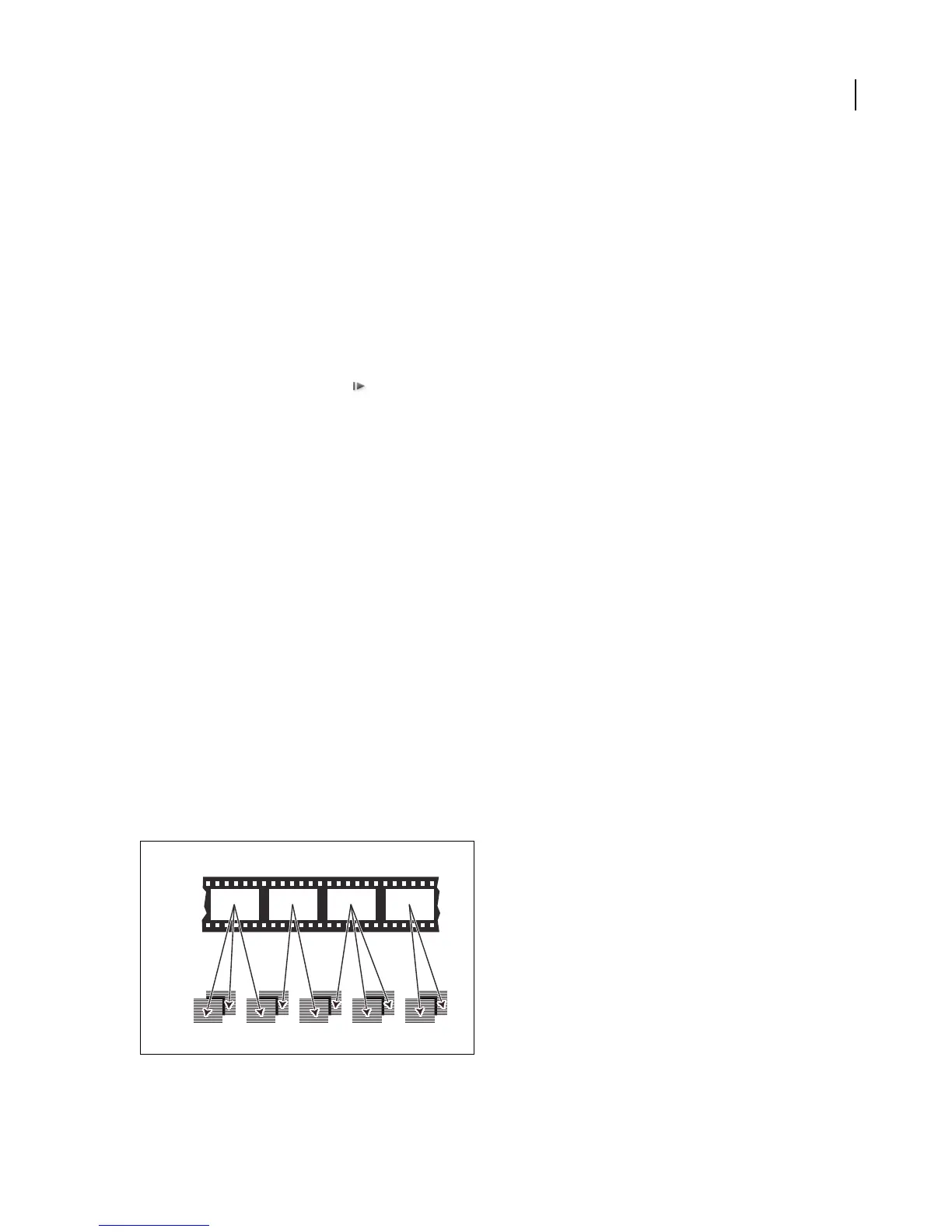
When you transfer 24-fps film to 29.97-fps video, you use a process called 3:2 pulldown,inwhichthefilmframesare
distributed across video fields in a repeating 3:2 pattern. The first frame of film is copied to fields 1 and 2 of the first
frameofvideo,andalsotofield1ofthesecondvideoframe.Thesecondframeoffilmisthenspreadacrossthenext
two fields of video—field 2 of the second video frame and field 1 of the third frame of video. This 3:2 pattern is
repeated until four frames of film are spread over five frames of video, and then the pattern is repeated.
The 3:2 pulldown process results in whole frames (represented by a W) and split-field frames (represented by an S).
The three whole video frames contain two fields from the same film frame. The remaining two split-field frames
contain a video frame from two different film frames. The two split-field frames are always adjacent to each other.
The phase of 3:2 pulldown refers to the point at which the two split-field frames fall within the first five frames of the
footage.
Phase occurs as a result of two conversions that happen during 3:2 pulldown: 24-fps film is redistributed through
30-fps video, so each of four frames of 24-fps film is spread out over five frames of 30(29.97)-fps video. First, the film
is slowed down 0.1% to match the speed difference between 29.97 fps and 30 fps. Next, each film frame is repeated
in a special pattern and mated to fields of video.
When you apply 3:2 pulldown to footage, one frame of the film (A) is separated into two or three interlaced video fields (B) which are grouped
into video frames containing two fields each.
2323
A
B
WS S WW



 To Next Page