ADOBE AFTER EFFECTS 7.0
User Guide
265
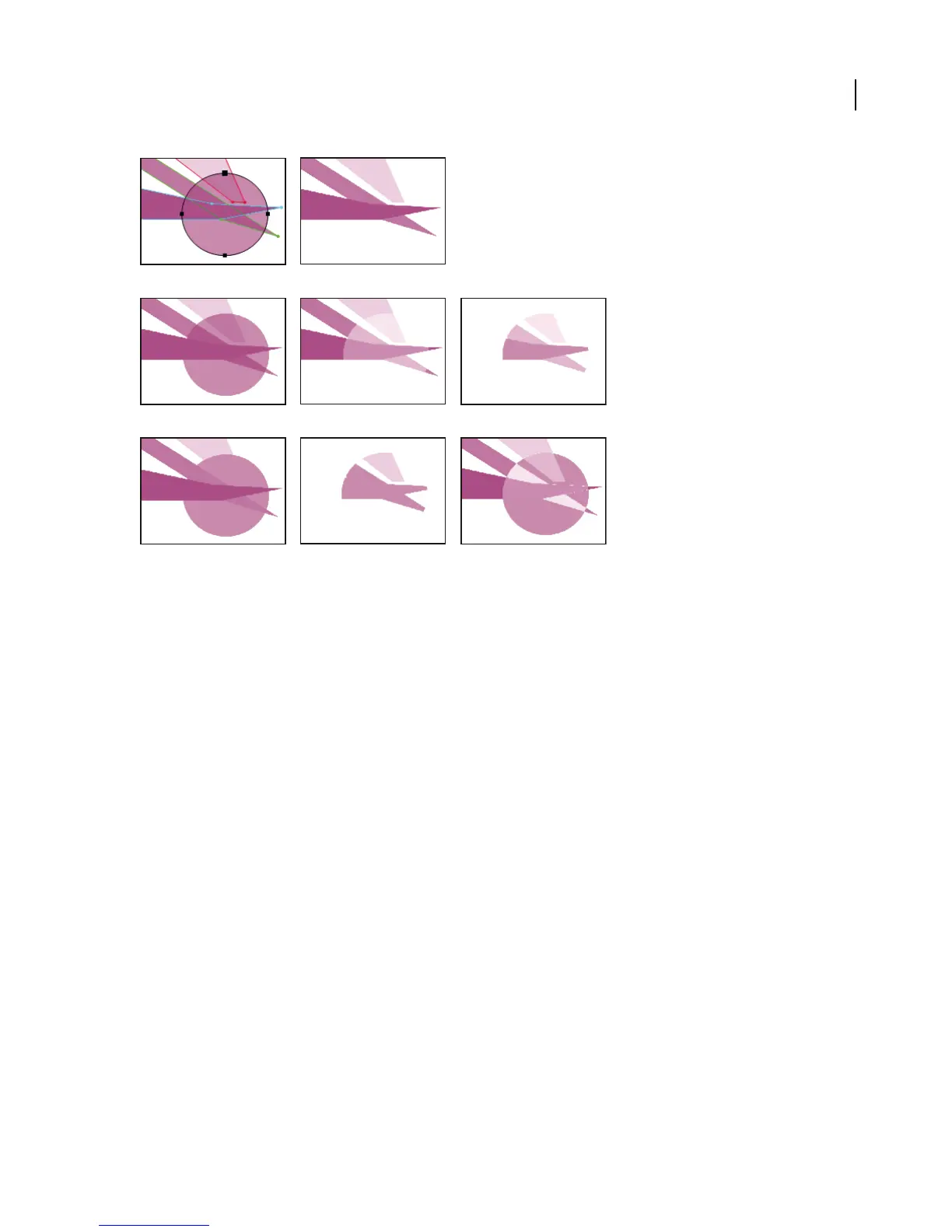
Maskshapesthatresultwhendifferentmodesareappliedtothecirclemask.TheshapesinthisillustrationhavedifferentMaskOpacityvalues.
A. Original masks B. None C. Add D. Subtract E. Intersect F. Lighten G. Darken H. Difference
To apply a mask mode
1 In the Timeline panel, select the layer containing the mask to which you want to apply a mode and press M.
2 Click the menu next to the mask name and choose a mask mode.
None AfterEffectstreatsthemaskasifitdoesnotexist.Themaskhasnoimpactonthelayerorcomposition.This
optionisusefulwhenyouwanttousethemask’spathforaneffectsuchasStrokeorFill,butdonotwantittocreate
transparent areas in the layer.
Add Adds the selected mask area to the other masks for that layer, displaying all mask contents in the Composition
panel. Where multiple masks intersect, the opacity of all intersecting masks is added together.
Subtract Subtracts the mask from all masks located above it in the Timeline panel. The contents of the subtracted
maskareaappearasaholeintheCompositionpanel.Thisoptionisusefulwhenyouwanttocreatetheappearance
of a hole in the center of another mask.
Intersect Addsthemasktoallmasksaboveit,butdisplaysintheCompositionpanelonlytheareawheretheselected
mask and any of the previous masks intersect. Where multiple masks intersect, the opacity of all intersecting masks
is added together.
Lighten Adds the mask to all the masks above it, displaying contents of all masked areas in the Composition panel.
Where multiple masks intersect, the highest opacity value is used, so opacity doesn’t build up.
Darken Adds the mask to all masks above it, but displays in the Composition panel only the area where the selected
mask and any of the others intersect. Where multiple masks intersect, the highest transparency value is used, so
transparency doesn’t build up.
Difference Adds the selected mask to the masks above it, and displays in the Composition panel the mask contents
of all masked areas except those areas where the masks intersect.
A B
C DE
FGH



 To Next Page