ADOBE AFTER EFFECTS 7.0
User Guide
184
Intensity Sets the brightness of the light. Negative values create nonlight. Nonlight subtracts color from a layer. For
example, if a layer is already lit, creating a directional light also pointing at that layer and employing negative values
creates an area of negative light, or a dark area, on the layer.
Cone Angle Sets the width of a spotlight by adjusting the angle of the cone surrounding the source. This option is
active only if Spot is selected for Light Type.
Cone Feather Adjusts the edge softness of a spotlight. This option is active only if Spot is selected for Light Type.
Color Sets the color of the light.
Casts Shadows Specifies whether the light source causes a layer to cast a shadow.
Shadow Darkness Sets the darkness level of the shadow. This option is active only if Casts Shadows is selected.
Shadow Diffusion Sets the softness of a shadow based on its apparent distance from the shadowing layer. Larger
values create softer shadows. This option is active only if Casts Shadows is selected.
To move a camera, light, or point of interest
1 In the Timeline or Composition panel, select a camera or light. To select a light, move the current-time indicator
to the point in time where the light is active.
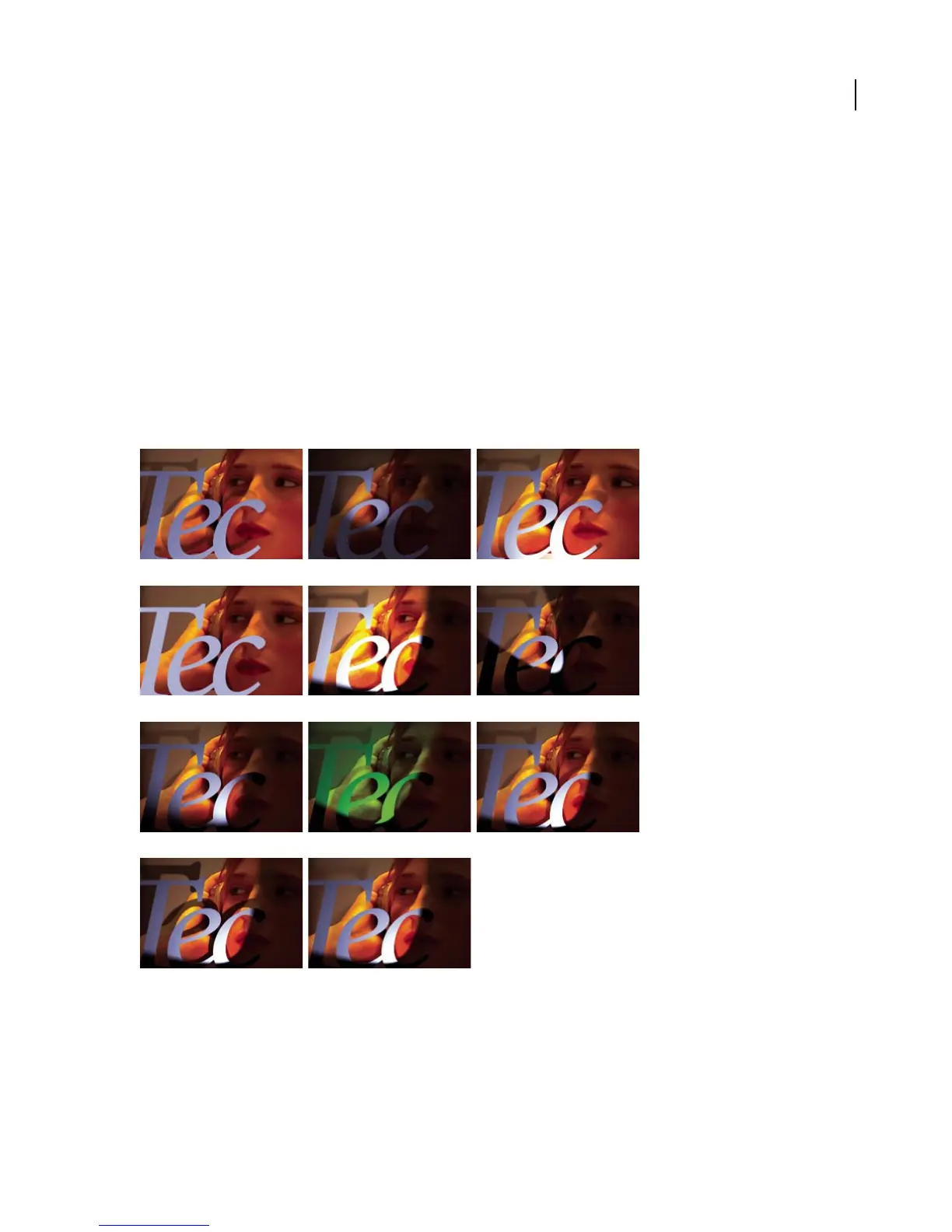
Light settings examples
Light Type: Parallel Light Type: Spot Light Type: Point
Light Type: Ambient Intensity Cone Angle
Cone Feather Color Casts Shadows
Shadow Darkness Shadow Diffusion



 To Next Page