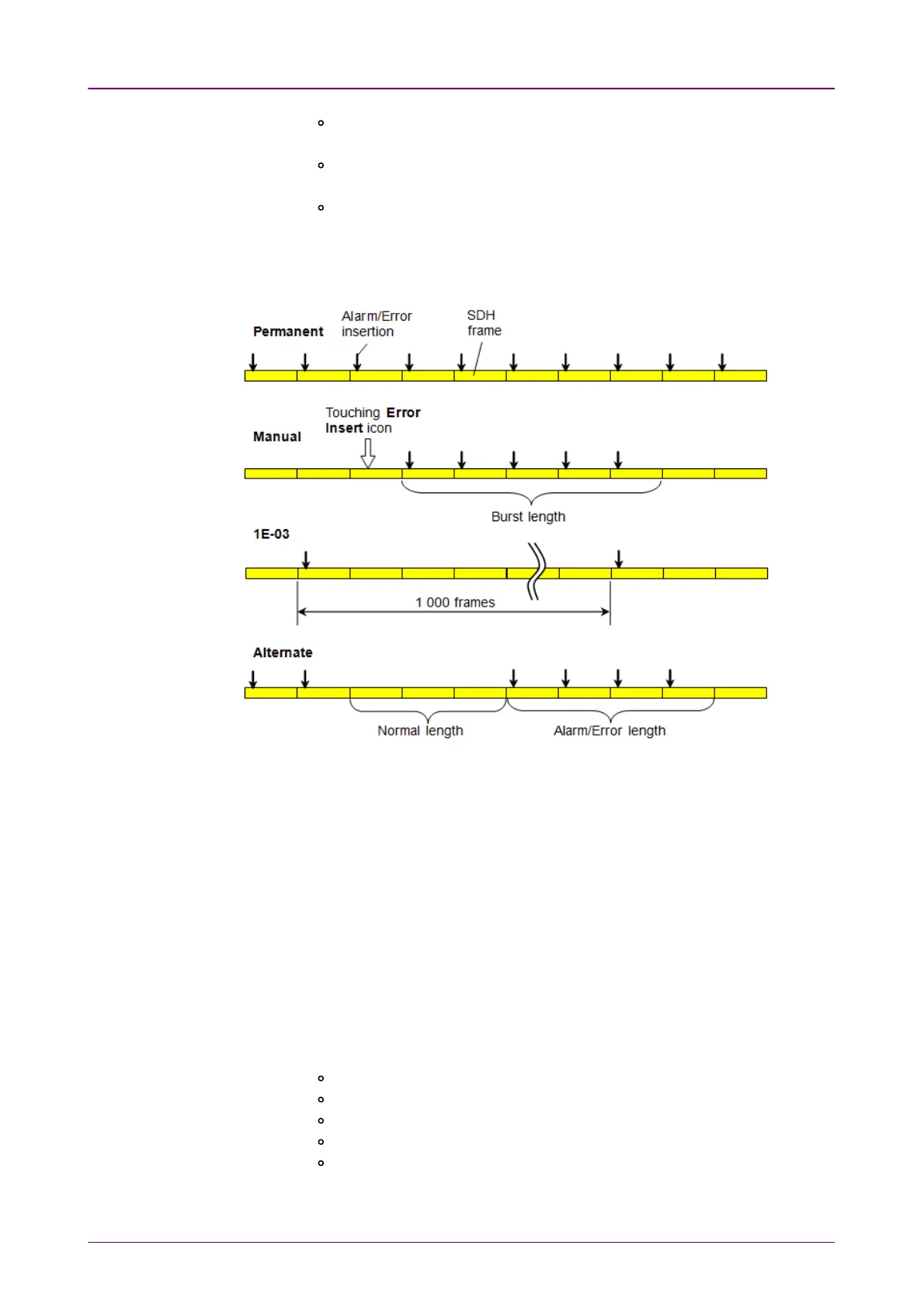
PermanentPermanent: Inserts errors or alarms in all SDH frame. The Error Insert
icon shows only status.
AlternateAlternate: Repeats error/alarm insertion per specified number of
frames. The Error Insert icon shows only status.
1E-031E-03 to 1E-101E-10: Inserts errors in the specified rate continuously.
For example, 1E-031E-03 means 10
-3
. In this case, the error will be inserted
in one frame per one thousand frames. The Error Insert icon shows
only status.
55..11..44..22 SDH frequencySDH frequency
Touch the field to set Frequency OffsetFrequency Offset. If setting a positive value, the frequency
will shift higher side.
Example:
If setting -50 ppm to the frequency offset for STM-16 output signal, the bit rate
of output signal will be
2 488 320 * (1-50*10
-6
) = 2 488 195.584 (kbit/s).
55..11..44..33 SDH pointerSDH pointer
1. Select AU*AU* or TU*TU* to insert the pointer.
2. Select the pointer type.
No test sequence: Does not insert pointers
Single alternating: Positive justification and negative justification
Regular + Double: Double positive justification
Regular + Missing: Negative justification
Double alternating: Double positive justification and double negative
justification
3. Select the MovementMovement or JumpJump.














 To Next Page