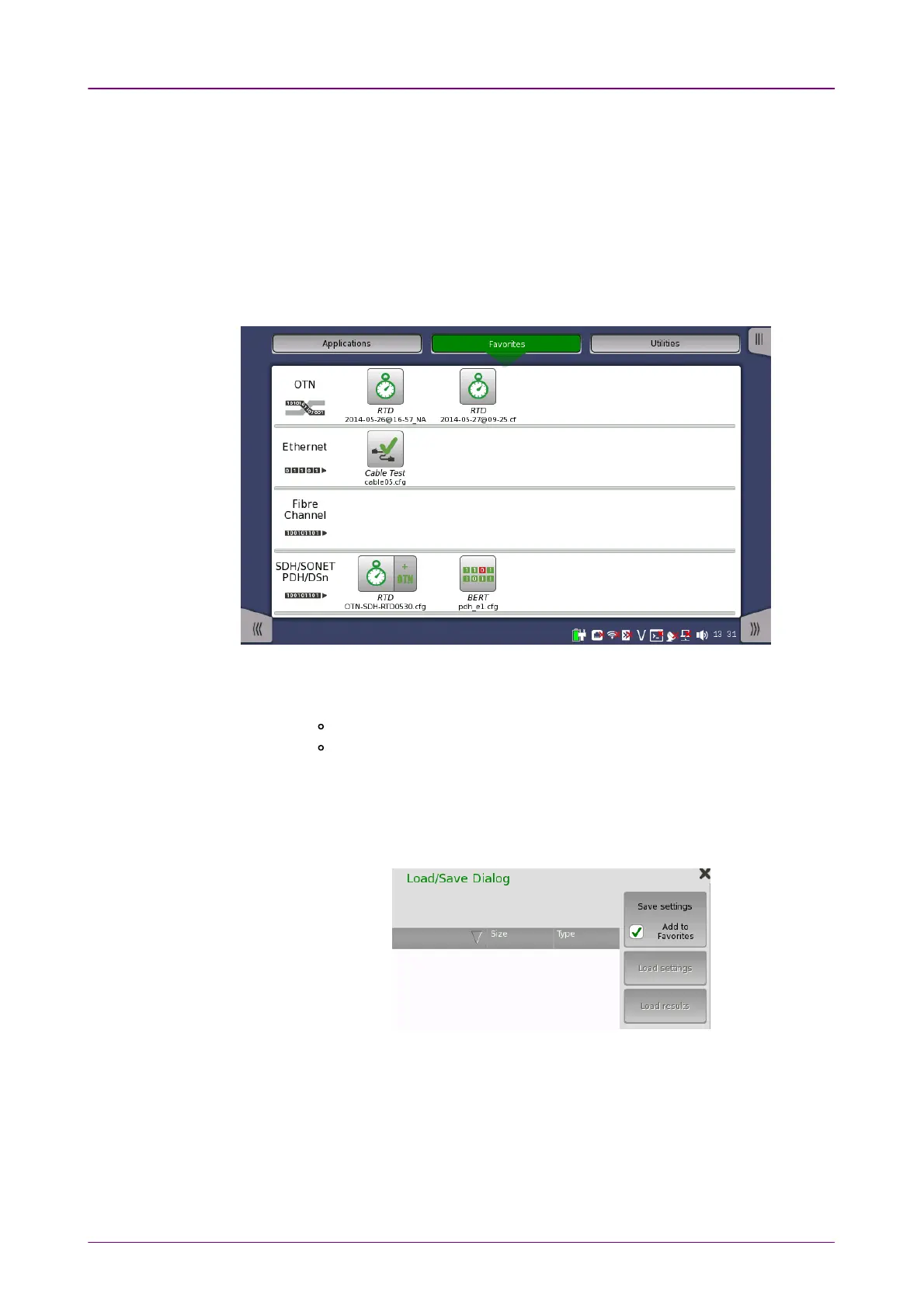
A Favorite application is basically an application with an associated set of port
resources and specific settings. When launching a Favorite application, the
associated port resources are automatically allocated and the associated
settings are subsequently loaded.
Favorites require a specific number of resources to run corresponding to the
number of resources used when the Favorite was first created. If the resources
of the Favorite are not available, user is prompted to select alternative port(s).
Touching FavoritesFavorites button displays the screen below.
Creating favoritesCreating favorites
1. Go to the workspace of the application you want to save as favorite.
Touch the ApplicationsApplications button and touch an icon to be registered.
Return to the workspace by touching the button at bottom.
2. Touch the Application toolbar tab.
3. Touch the Load SaveLoad Save icon.
4. Touch the File nameFile name field.
5. Enter the file name using the dialog box.
6. Select Add to FavoritesAdd to Favorites in the Save/Load dialog box.
7. Touch the Save settingsSave settings button.
On the Favorites screen a new favorite is now created containing the current
application resources and settings.
Deleting favoritesDeleting favorites
1. Touch and hold an icon in Favorites screen until a pop-up menu appears.
2. Touch Delete FavoriteDelete Favorite.
3. Touch DeleteDelete if the confirmation dialog box appears.














 To Next Page