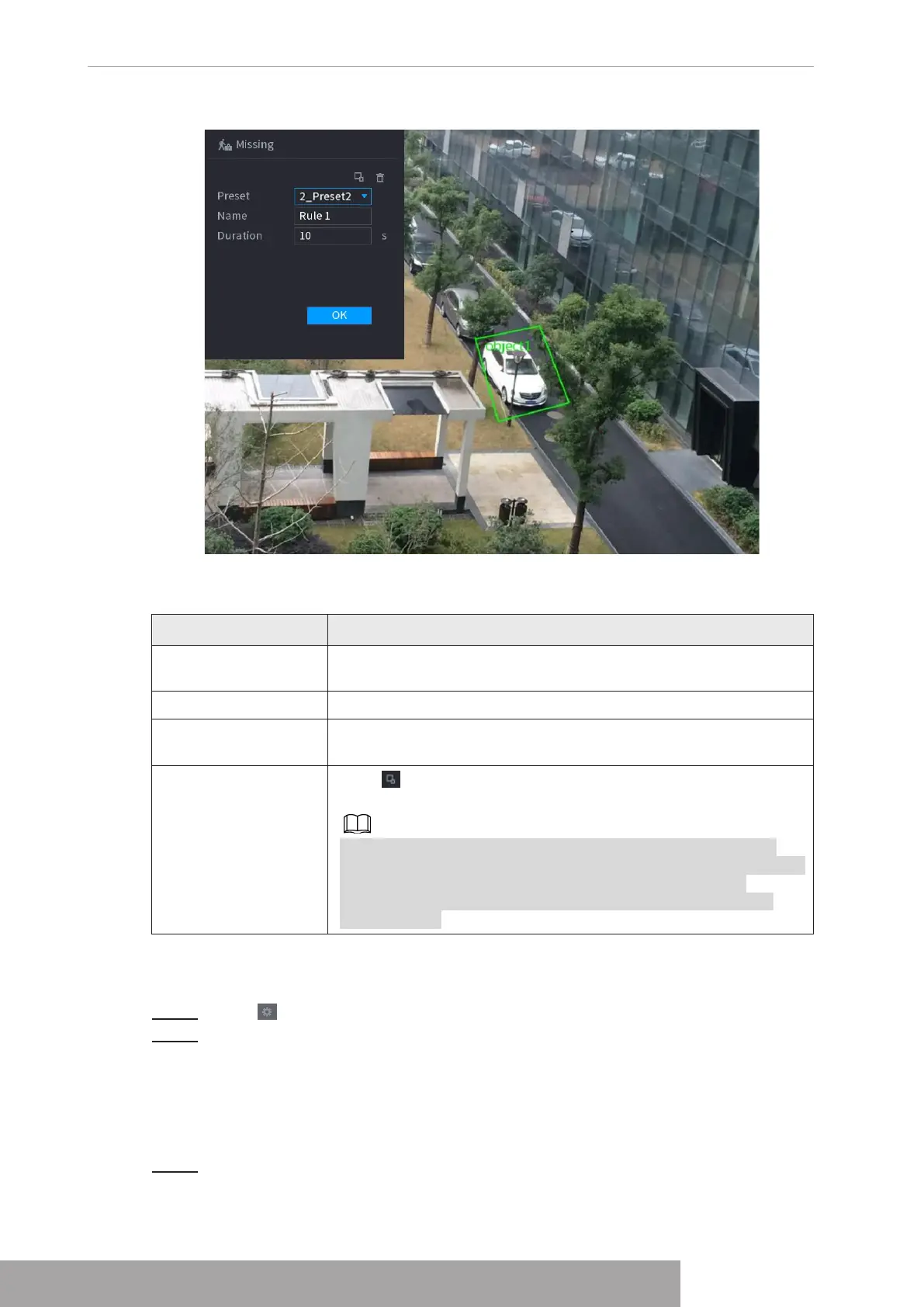
Figure 4-156
2) Set parameters. See Table 4-43.
Table 4-43
Parameter Description
Preset
Set the preset point for IVS detection according to the actual
needs.
Name Customize the rule name.
Duration
Set the minimum time that the object stays until the alarm is
triggered.
Filter target
Click to filter the target. Check the blue wireframe and adjust
the size of the area with the mouse.
Each rule can set 2 target filters (maximum size and minimum
size), that is, when the passing target is smaller than the minimum
target or larger than the maximum target, no alarm will be
generated. The maximum size should not be smaller than the
minimum size.
3) Draw a rule. Left click mouse to draw a zone, until you draw a rectangle, you can
right click mouse.
4) Click
OK
to complete the rule setting.
Step 3 Click , you can refer to "1.7.2.4.1 Tripwire" to set other parameters.
Step 4 Click
Apply
to complete the setup.
1.7.2.4.8 Loitering Detection
System can generate an alarm once the object is staying in the specified zone longer than the
threshold.
Step 1 In the
Type
drop-down list, select
Loitering Detection
.
The interface is shown as below. See Figure 4-157.
Copyright © NSS Sp. z o.o.
User‘s Manual 144



 To Next Page