1.11.14 Register
You can register the Device into the specified proxy server which acts as the transit to make it
easier for the client software to access the Device.
Step 1 Select
Main Menu
>
NETWORK
>
Register
.
The
Register
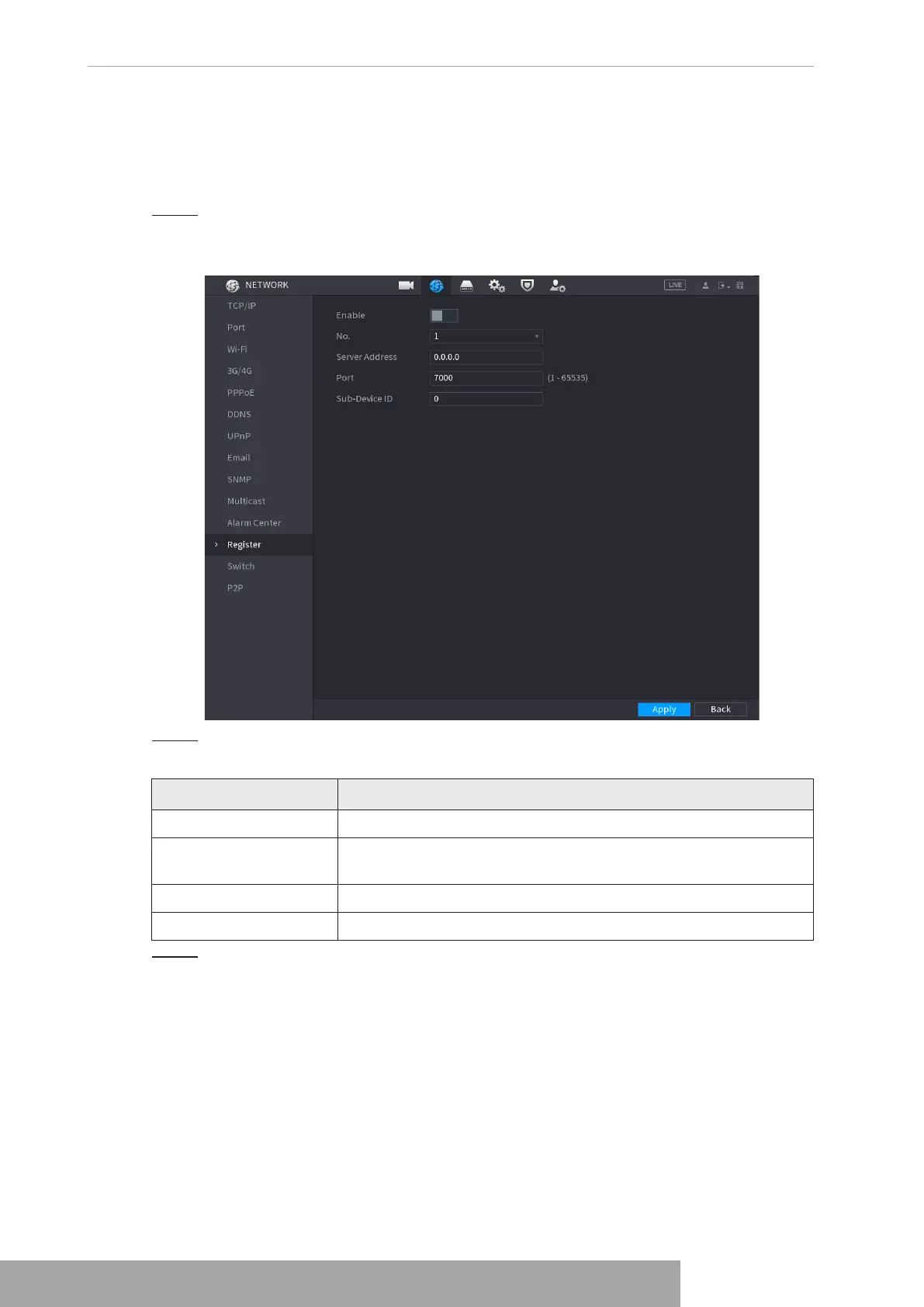
interface is displayed. See Figure 4-239.
Figure 4-239
Step 2 Configure the settings for the register parameters. See Table 4-77.
Table 4-77
Function Description
Enable Enable the register function.
Server IP Address
Enter the server IP address or the server domain that you want to
register to.
Port Enter the port of the server.
Sub Service ID This ID is allocated by the server and used for the Device.
Step 3 Click
Apply
to complete the settings.
1.11.15 Setting Switch
After setting
Switch
, when an IPC is connected to the PoE port, the system automatically
assigns the IP address to the IPC according to the set IP segment, and the NVR will
automatically connect to the IPC.
Copyright © NSS Sp. z o.o.
User‘s Manual 234



 To Next Page