You can use the multicast IP address to login the web.
On the web login dialog box, in the
Type
list, select
MULTICAST
. The web will
automatically obtain the multicast IP address and join. Then you can view the video
through multicast function.
1.11.13 Alarm Center
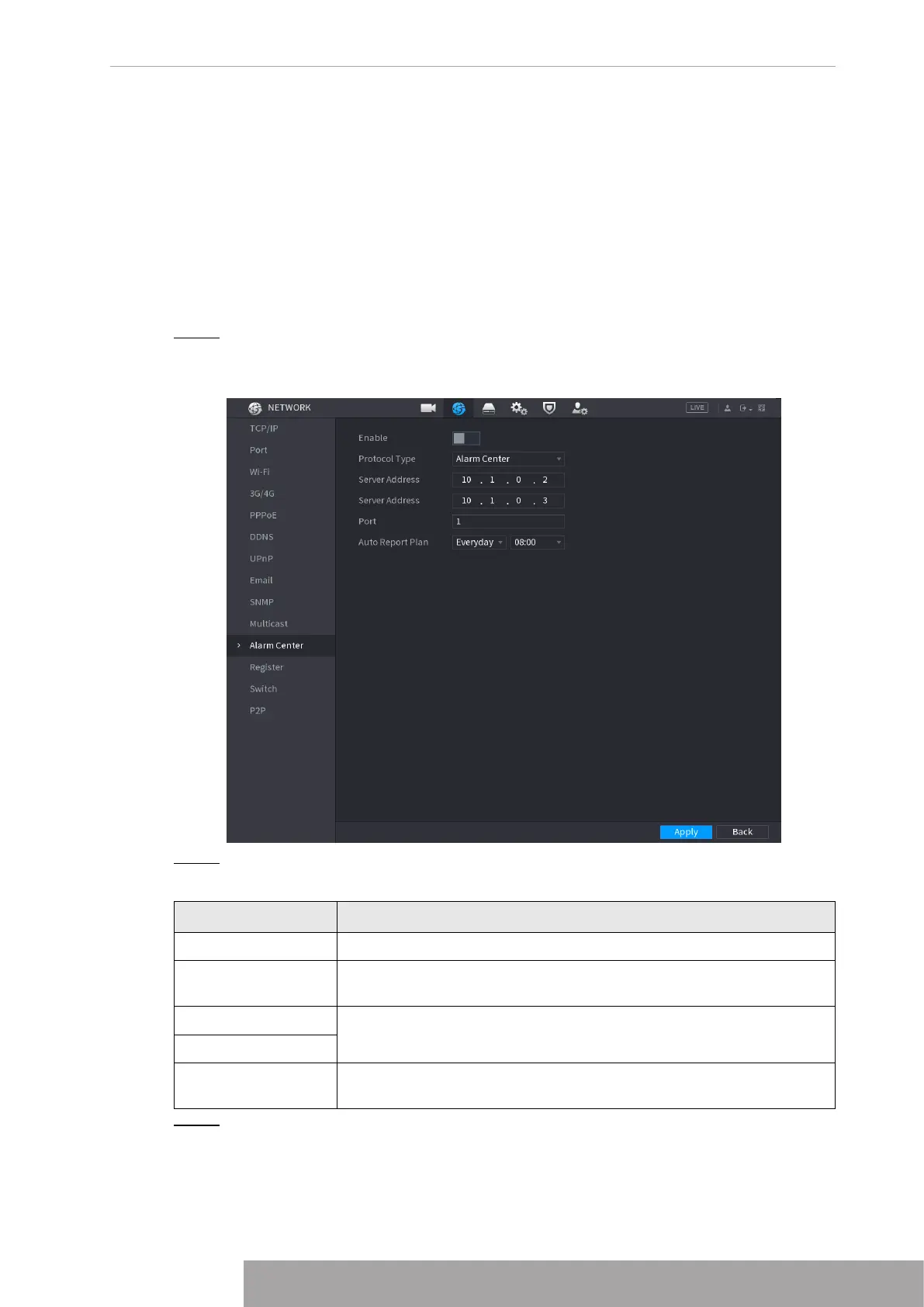
You can configure the alarm center server to receive the uploaded alarm information. To use
this function, the
Alarm Upload
check box must be selected.
Step 1 Select
Main Menu
>
NETWORK
>
Alarm Center
.
The
Alarm Center
interface is displayed. See Figure 4-238.
Figure 4-238
Step 2 Configure the settings for the alarm center parameters. See Table 4-76.
Table 4-76
Parameter Description
Enable Enable the alarm center function.
Protocol Type
In the
Protocol Type
list, select protocol type. The default is
Alarm
Center
.
Host IP
The IP address and communication port of the PC installed with
alarm client.
Port
Auto Report Plan
In the
Auto Report Plan
list, select time cycle and specific time for
uploading alarm.
Step 3 Click
Apply
to complete the settings.
Copyright © NSS Sp. z o.o.
233 User‘s Manual



 To Next Page