Icon Function
Open the
Disk Manager
interface. For details, see "4.12.3
Disk Manager".
Open the
USB Management
interface. For details about USB
operations, see "4.3.2.2 USB Management".
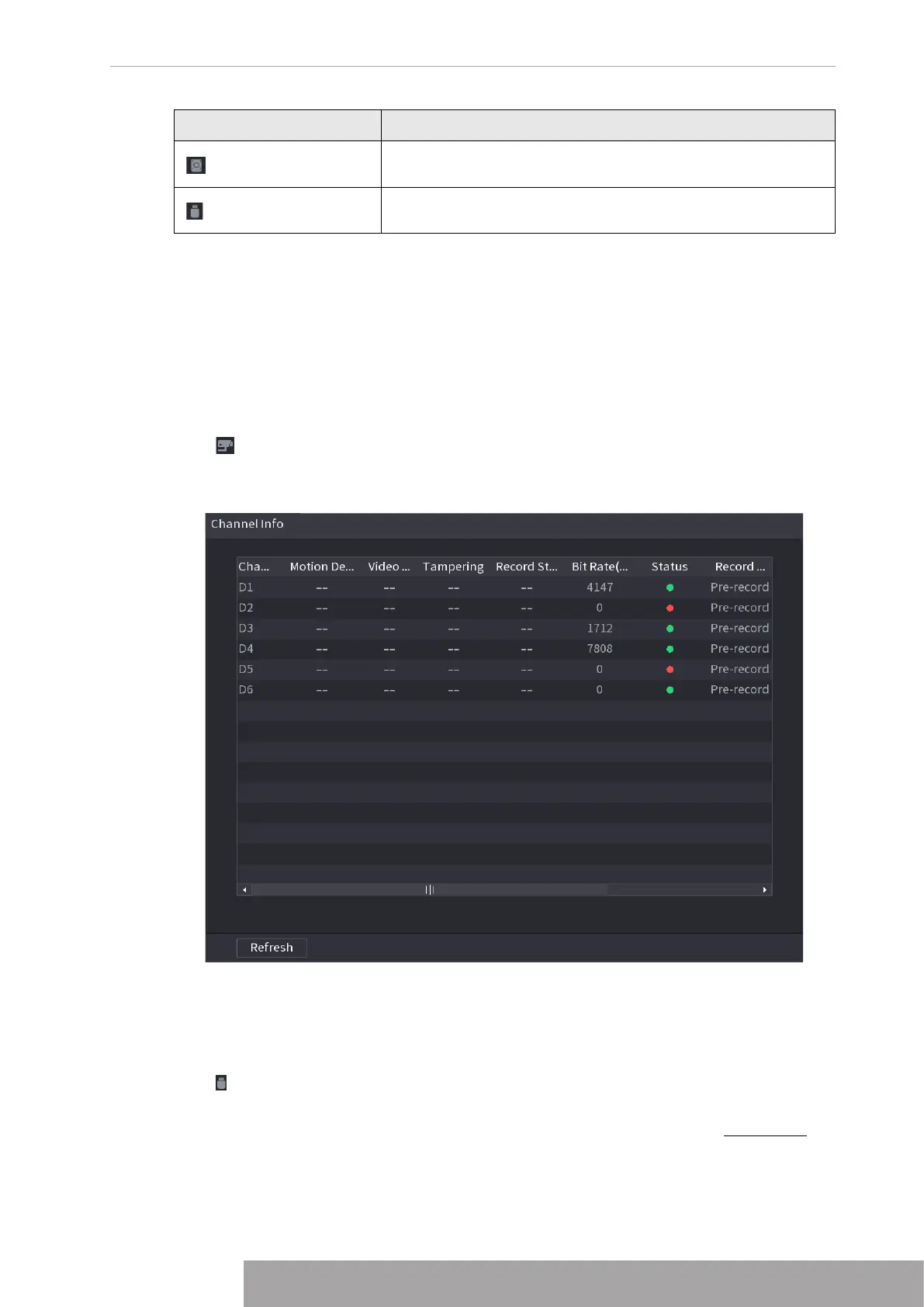
1.3.2.1 Channel Info
After the remote device registered to the corresponding channel, you can view its status such
as alarm status, record status, connection status, record mode, etc.
● Alarm status: It includes motion detection alarm, video loss alarm, tampering alarm.
● Record status: System is recording or not.
● Bit Rate: System displays bit rate information.
● Status: current channel connection status.
Click , system goes to the channel information setup interface. You can view information of
the corresponding channel. See Figure 4-66.
Figure 4-66
1.3.2.2 USB Management
After connecting the USB device, you can copy log, config file to USB device or update NVR
system.
Click , system goes to
USB Management
interface. You can view and manage USB
information. See Figure 4-67.
Here you can view USB information, back up file, and update system. Refer to File Backup,
"1.10.1 Log", "1.10.4.4 System Update" for detailed information.
Copyright © NSS Sp. z o.o.
63 User‘s Manual



 To Next Page