1.8 Event Manager
1.8.1 Alarm Info
You can search, view and back up the alarm information.
Step 1 Select
Main Menu
>
ALARM
>
Alarm Info
.
The
Alarm Info
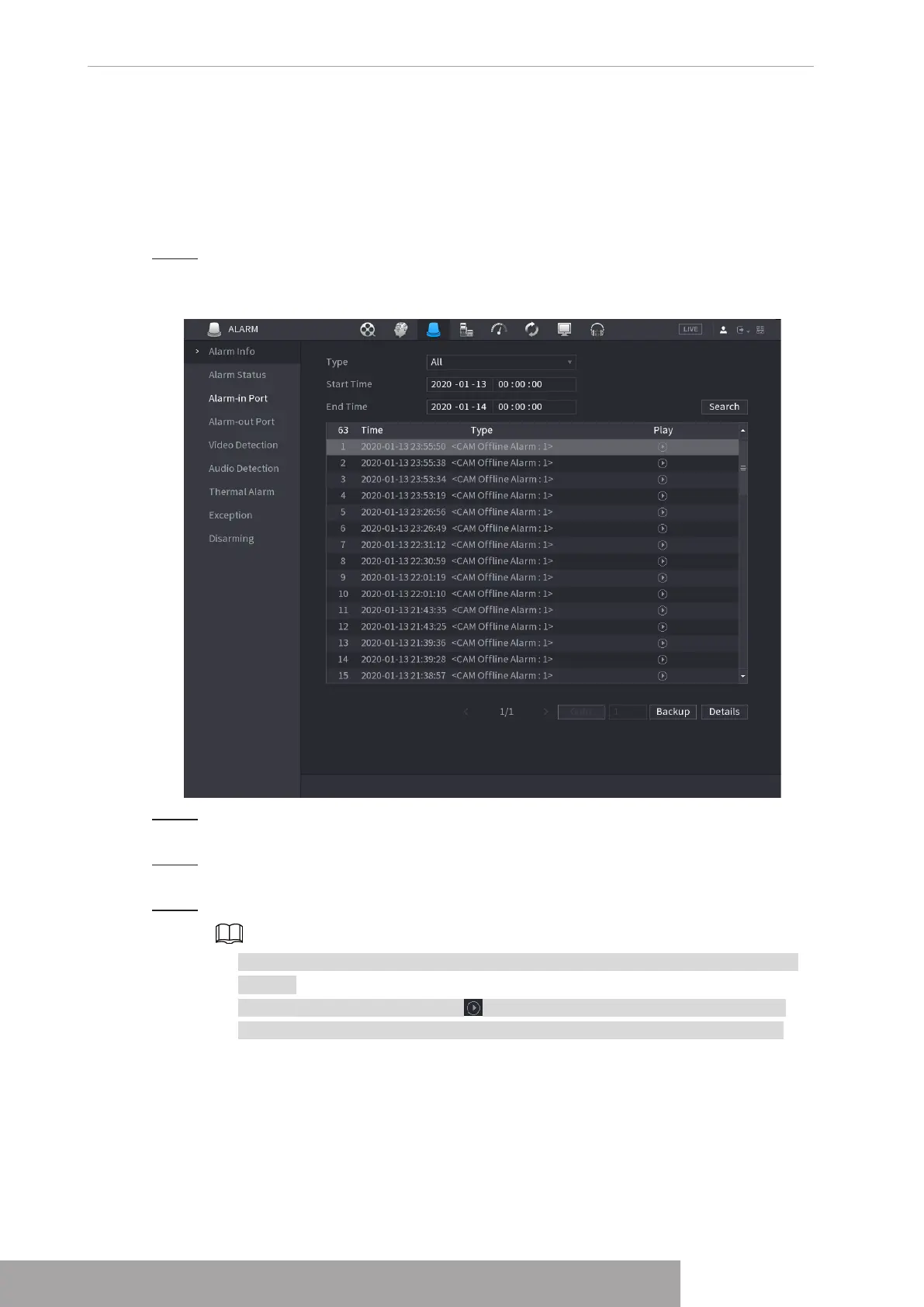
interface is displayed. See Figure 4-186.
Figure 4-186
Step 2 In the
Type
list, select the event type; In the
Start Time
box and
End Time
box, enter
the specific time.
Step 3 Click
Search
.
The search results are displayed.
Step 4 Click
Backup
to back up the search results into the external storage device.
● Select an alarm event log and then click Backup to back up it to peripheral USB
device.
● Select an alarm event log, click to play the recorded video of alarm event.
Double-click a log or click Details to view the detailed information of the event.
1.8.2 Alarm Status
You can view NVR alarm event, and remote channel alarm event.
Select
Main Menu
>
ALARM
>
Alarm Status
, the
Alarm Status
interface is displayed. See
Figure 4-187.
Copyright © NSS Sp. z o.o.
User‘s Manual 174



 To Next Page