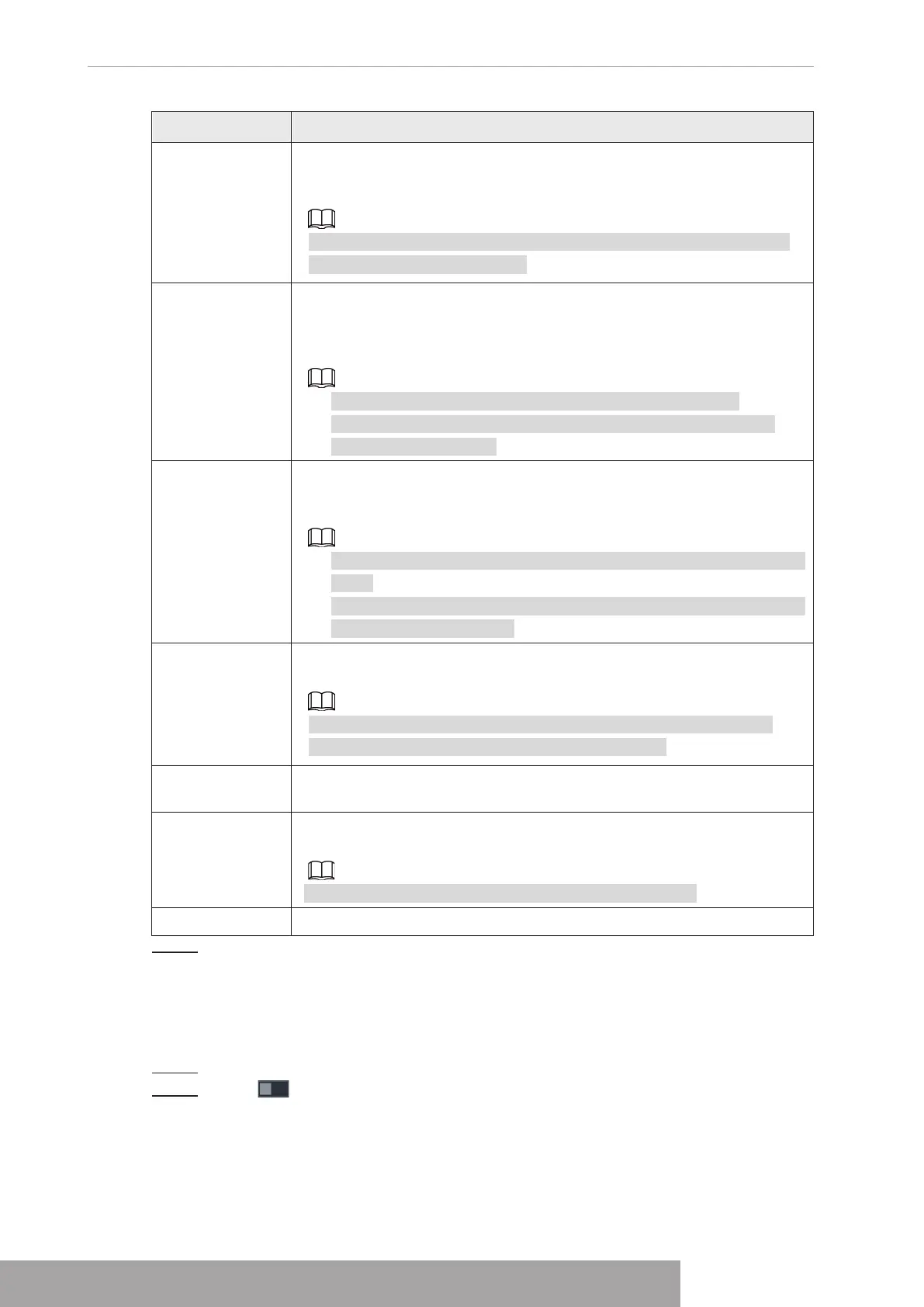
Parameter Description
Record Channel
Select the check box and select the needed recording channel (support
multiple choices). When an alarm occurs, the NVR device activates the
channel for recording.
You need to enable intelligent recording and auto recording first. For
details, see "1.1.4.6 Schedule".
PTZ Linkage
Select the check box and click Setting to select the channel and PTZ
action. When an alarm occurs, the NVR device associates the channel
to perform the corresponding PTZ action. For example, activate the PTZ
in channel one to turn to the preset point X.
● Tripwire alarm supports to activate PTZ preset point only.
● You need to set the corresponding PTZ actions first, see "1.4.4
Calling PTZ Functions".
Tour
Select the check box and select the channel for tour. When an alarm
occurs, the local interface of the NVR device displays the selected
channel screen.
● You need to set the time interval and mode for tour first, see "1.16.2
Tour".
● After the tour is over, the preview interface is restored to the screen
split mode before the tour.
Snapshot
Select the Snapshot check box to take a snapshot of the selected
channel.
To use this function, select
Main Menu
>
CAMERA
>
ENCODE
>
Snapshot
, in the Mode list, select
Event (Trigger)
.
Log
Select the check box, the NVR device records the alarm information in
the log when an alarm occurs.
Alarm Tone
Check the box and then select the corresponding audio file from the
drop-down list. System plays the audio file when the alarm occurs.
Refer to "1.17.1 File Management" to add audio file first.
Buzzer Select the check box to activate the buzzer when an alarm occurs.
Step 3 Click
Apply
.
1.8.9 Disarming
You can disarm all alarm linkage actions as needed.
Step 1 Select
Main Menu
>
Alarm
>
Disarming
.
Step 2 Click to enable disarming.
Copyright © NSS Sp. z o.o.
User‘s Manual 194



 To Next Page