Error reports C 3
ekrPro Com
60
web guide controller EDV-No.: MD.191.01.05/1.6.x Chapter: C 3
with analog sensors Date: 23.11.2007 Page: 2/4
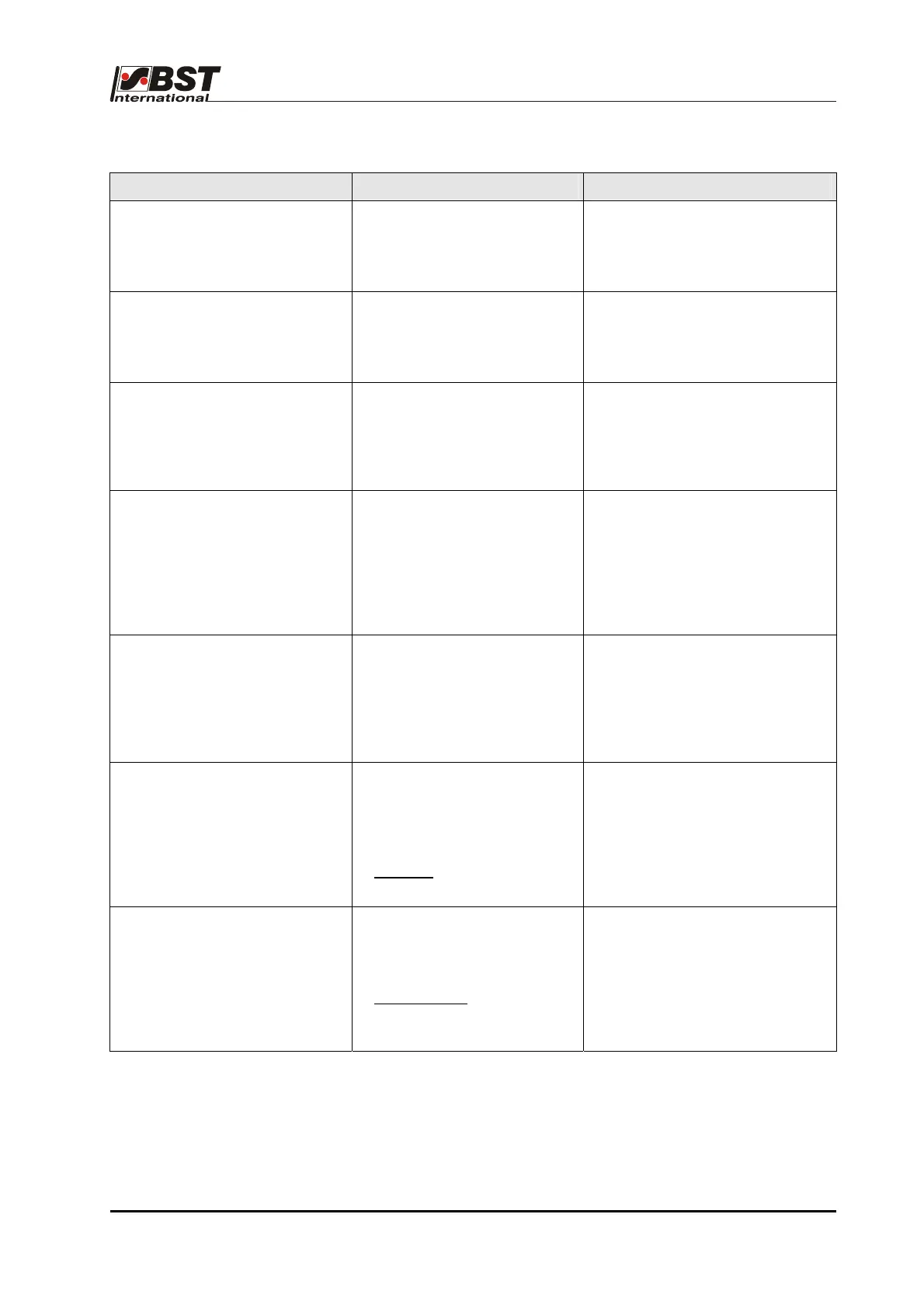
Report Possible cause Solution
MOTOR OVERCURRENT
- Guiding device has moved
into a stop position or is
blocking the motorised guide.
- Activate into the opposite
direction.
Error report will be deleted
automatically.
MOTOR SHORT CIRCUIT
- Actuator short circuit
The actuator controller was
switched off.
- Find the cause of the short
circuit
- Exchange the actuator if
necessary.
MOTOR TEMPERATURE
- The maximum output stage
motor operating temperature
has been exceeded.
The actuator controller was
switched off.
- Leave the output stage to cool.
- Determine the cause of the
error.
CONTRAST DIRT
- Insufficient contrast has been
determined after a material
set-up using the analog
sensors.
The setting will be imported,
but correct controlling cannot
be guaranteed.
- Clean the sensor and repeat the
material set-up.
LIMIT SWITCH SET
- The actuator has reached a
software limit switch
(“Pos. Limit”).
Driving the actuator in the
corresponding traversing
direction is prevented.
- Activate into the opposite
direction.
EDGE DETECT. TIMEOUT
- No edge was found during
edge detection (Search
process timeout).
No guidance is possible.
Condition:
Norming
mode = „No
norming“
- Check operation of the sensor
positioning unit (especially the
slide).
NORMING TIMEOUT
- No contrast transition was
found (Search process
timeout).
No guidance is possible.
Requirement:
Norming mode = "Bright“ or
"Dark/Bright“
- Check operation of the sensor
positioning unit (especially the
slide).



 To Next Page