Commissioning B 3
ekrPro Com
60
web guide controller EDV No.: MD.191.01.05/1.6.x Chapter: B 3
with analog sensors Date: 23.11.2007 Page: 5/73
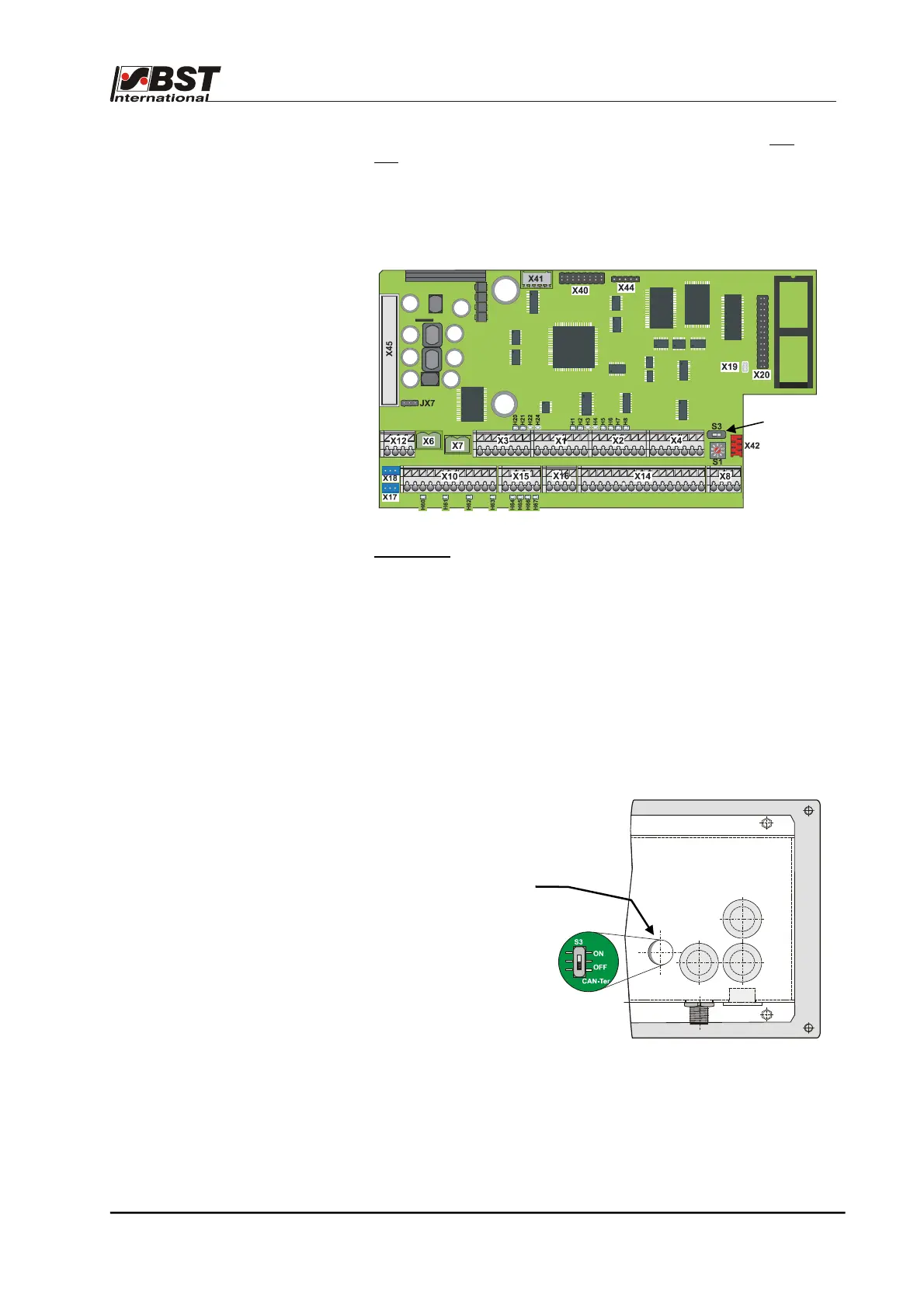
B 3.3.2 Terminator activation
The terminator must be activated on each of the physical first
and
last CAN bus participants. The possible settings are described
below.
B 3.3.2.1 ekrPro Com
60
In the ekrPro Com
60
, the activation is carried out using switch S3 on
the processor circuit board. Set the switch to "ON“.
Procedure:
1. Switch-off the power to the controller.
2. Open controller’s front cover.
3. Activate terminator S3 (switch position ON)
4. Close the controller’s front cover.
5. Restore the power.
B 3.3.2.2 ekrPro Key
60
(if fitted)
In the ekrPro Key
60
activation
is carried out via switch S3.
Remove plug on the
back side.
Set the switch to "ON“.
Switch S3
Terminator S3



 To Next Page