Commissioning B 3
ekrPro Com
60
web guide controller EDV No.: MD.191.01.05/1.6.x Chapter: B 3
with analog sensors Date: 23.11.2007 Page: 22/73
Parameter settings
Setting of the parameters for the function tear-off detection is made
separately for each guiding mode. If necessary, a different sensor
can be allocated as the tear-off detection sensor for each guiding
mode. It is also possible to allocate two different guiding modes with
different parameters to a single sensor.
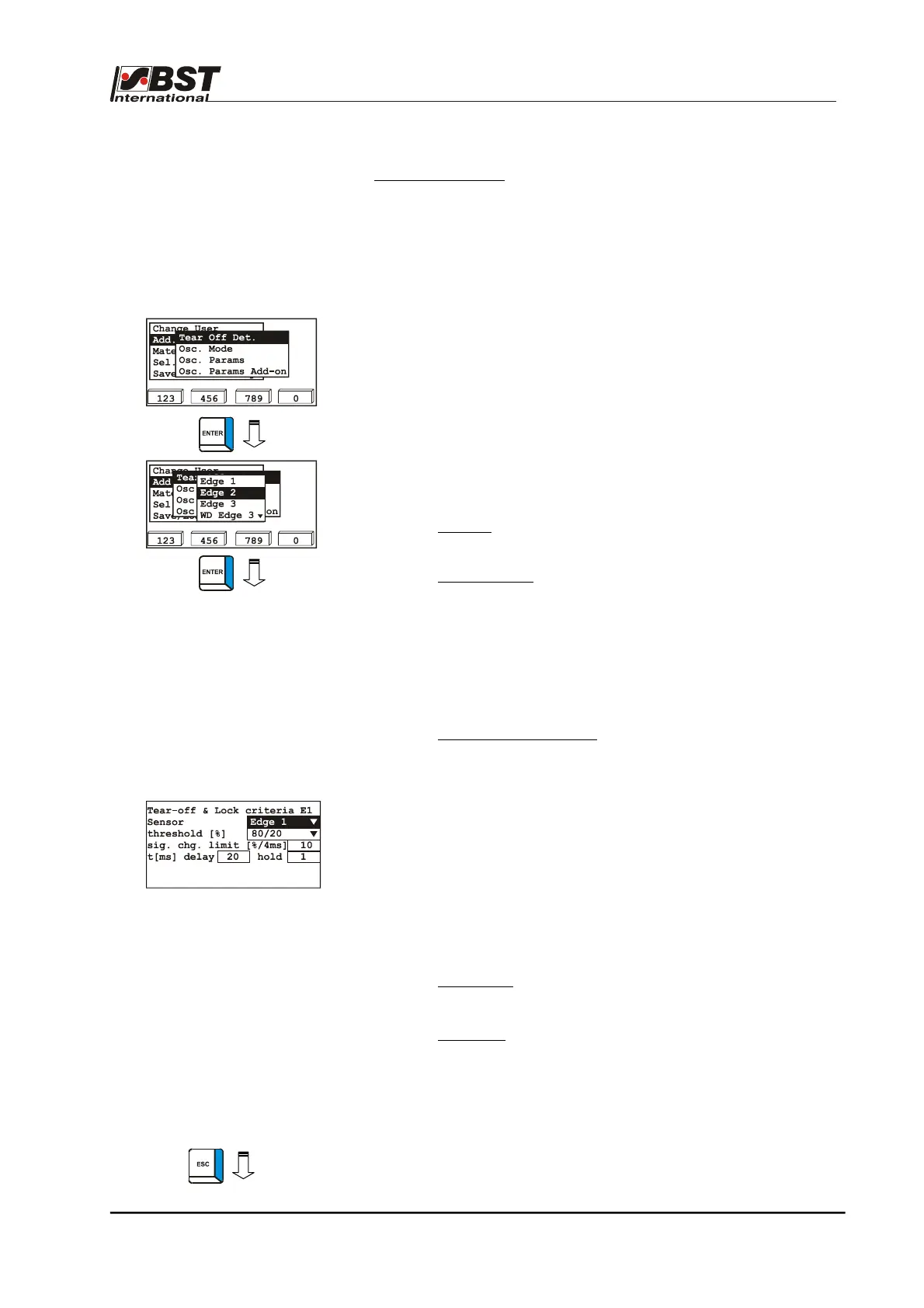
1. Select Add. Functions in General Setup and then select the
Tear Off Det. sub-directory afterwards.
Confirm the respective selection by pressing ENTER.
2. Select the desired guiding mode (Edge 1, Edge 2, Edge 3,
Center 1&2) from the option list.
Confirm the selection by pressing ENTER.
3. This will open up the inputting window for the selected guiding
mode. The following separate parameters can be set:
► Sensor:
Selection of the sensor with which tear-
off detection is to be implemented.
► threshold [%]: Percentage covering of the sensor
measuring band, above which a change
is detected as a tear.
For the example value entered here
(80/20), this means that the function
detects a tear, if more than 80% or less
than 20% of the sensor measuring band
is covered.
► sig. chg. limit. [%/4ms]: Maximum permissible rate of
change of the sensor signal in %
per 4 ms
(Scanning cycle = 4 ms, i.e. the
sensor measurements are read
every 4 ms).
A tear is detected, if the rate of
change of the sensor signal
exceeds the percentage per 4 ms
set here.
The values to be set are
calculated according to the
formula on the following page.
► delay [ms]: Delay time in ms from detection of a tear
until blocking of the guiding system.
► hold [ms]:
Blocking hold time in ms after the
detected end of the tear until the blocking
is lifted, i.e. until the guiding system is
activated.
4. If necessary, set parameters for further guiding modes
(see points 2 and 3).
5. Press the ESC button to exit the window.



 To Next Page