Commissioning B 3
ekrPro Com
60
web guide controller EDV No.: MD.191.01.05/1.6.x Chapter: B 3
with analog sensors Date: 23.11.2007 Page: 34/73
B 3.7.5.2.5 Man Pos Control – Activation of the Position Controller
The position controller for ”manual” mode can be activated for
actuators with position feedback (e.g. EMS 17).
With the position controller activated, the actuator keeps the actual
position when in manual mode, independently of any external forces
acting on the drive (self-locking).
When using an OMG 4, OMG 8 or CK 37 servo-center
component, the position controller must be deactivated!
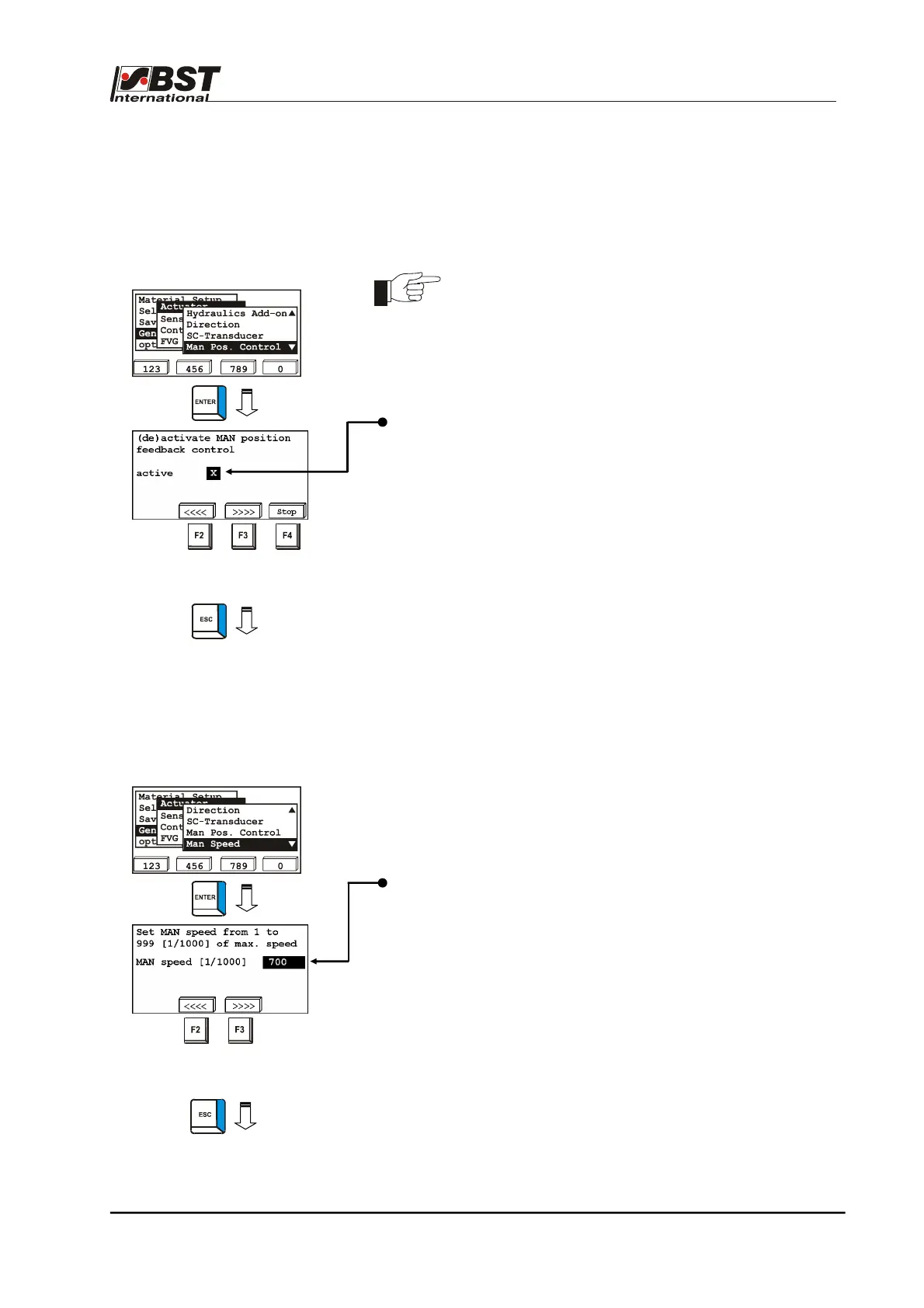
1. Select Actuator in General Setup and then select the
Man Pos. Control sub-directory afterwards.
2. Press the ENTER button to enter the inputting menu.
3. To switch on the position controller activate checkbox active
using the vertical arrow keys.
To test the position controller the actuator can be moved in
manual mode to a desired position using the F2 and F3 keys.
If the position controller is activated, the function can be
interrupted by pressing the F4 key (e.g. to prevent damage to
the material web).
4. Press the ESC button to exit the window.
B 3.7.5.2.6 Man Speed – adjustment speed for
manual mode
This sub-menu is used to set the positioning speed of the actuator in
manual operating mode.
1. Select Actuator in General Setup and then select the
Man Speed sub-directory afterwards.
2. Press the ENTER button to enter the inputting menu.
3. Enter the desired positioning speed in the editing box
MAN speed [1/1000].
Input of the positioning speed is as a percentage of the
maximum positioning speed.
The example value of 700 entered here means a positioning
speed of 700 per thousand = 70 percent of the maximum
speed.
To test the set positioning speed move the actuator using the
F2 and F3 keys.
4. Press the ESC button to exit the window.



 To Next Page