Commissioning B 3
ekrPro Com
60
web guide controller EDV No.: MD.191.01.05/1.6.x Chapter: B 3
with analog sensors Date: 23.11.2007 Page: 53/73
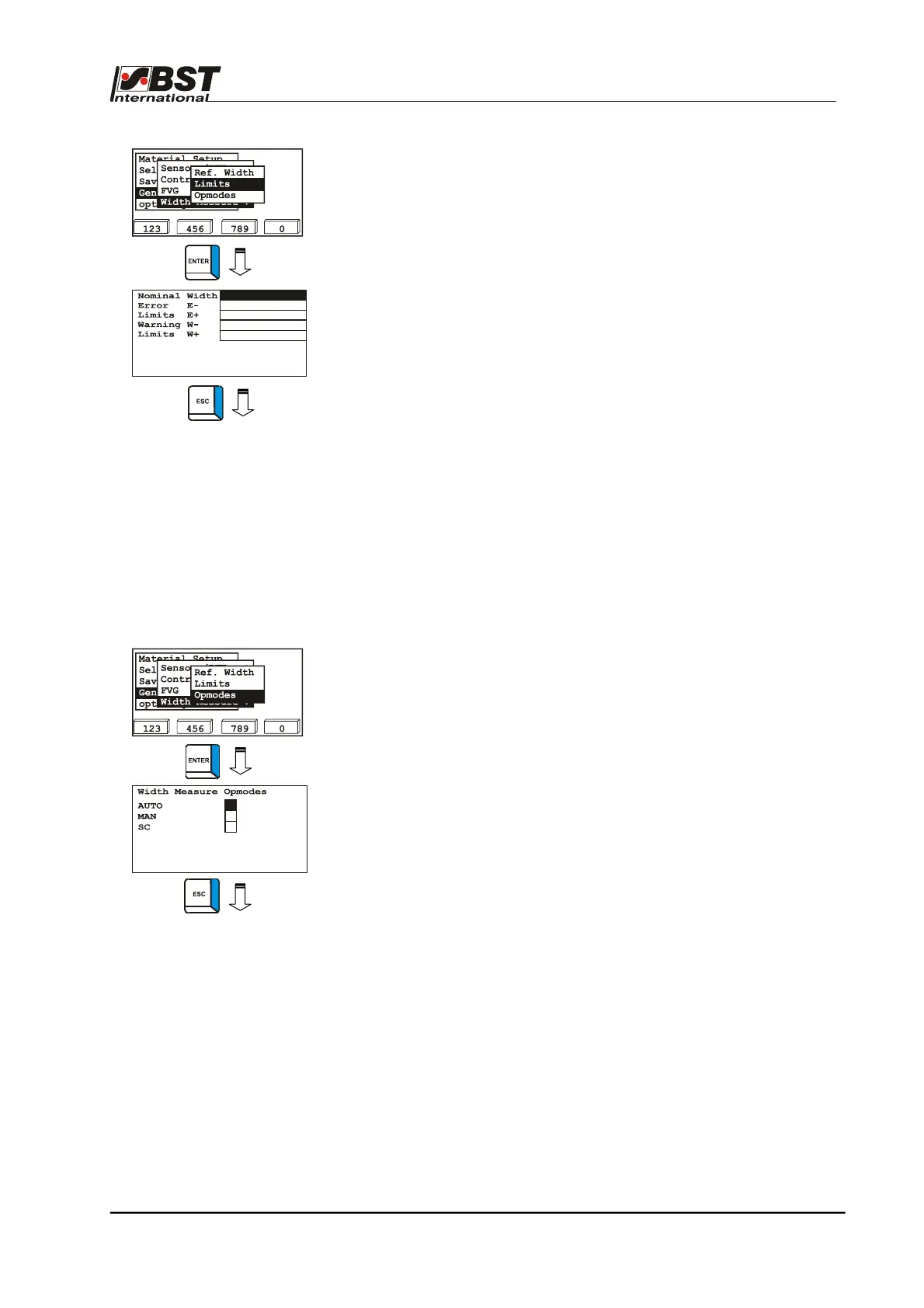
1. Select Limits in the selection window and press the ENTER
key. This will open up the input window.
2. Enter the nominal value for the material width in the edit field
Nominal Width.
3. Enter selected values for the error and warning limits in the
corresponding edit fields.
4. Press the ESC button to exit the window after you have
entered the settings.
B 3.7.5.6.3 Opmodes – Operating modes in which the
width measurement should be active
You can use this window to determine in which operating modes the
width measurement is able to be implemented.
This makes it also possible to carry out a web width measurement
without an FVG if the checkbox has been activated for the
corresponding operating mode.
If an FVG is connected, the condition is that retraction has been
deactivated for the selected operating mode(s).
1. Mark Opmodes in the selection window and then press the
ENTER button. This will open up the input window.
2. Select the desired mode(s).
3. Press the ESC button to exit the window after you have
entered the settings.
80.0
-5.0
5.0
2.0
-2.0



 To Next Page