Commissioning B 3
ekrPro Com
60
web guide controller EDV No.: MD.191.01.05/1.6.x Chapter: B 3
with analog sensors Date: 23.11.2007 Page: 72/73
B 3.7.8 Remote Device – Unit remote control
via CAN bus
Devices in the controller family (ekrPro Com
60
, ekrPro Key
60
) can be
interconnected via a CAN-Bus to form a networked system.
The function Unit remote control allows to operate the controllers
available in the system from different sources (e.g. from another
controller ekrPro Com
60
or from an external control keyboard
ekrPro Key
60
).
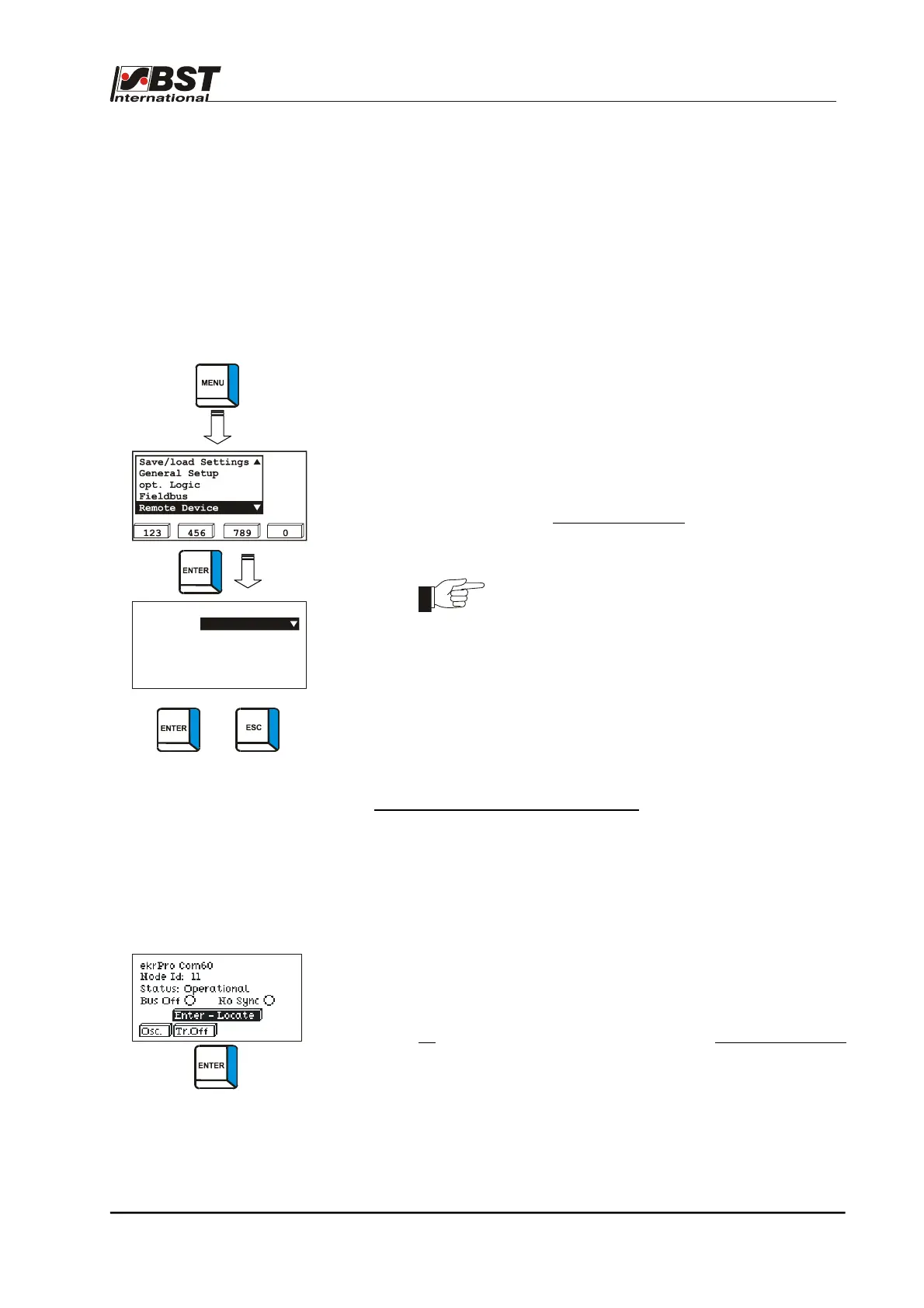
Selection of the unit to be controlled is made via the menu Remote
Device.
1. Select menu Remote Device and press ENTER.
2. The selection window for unit remote control appears.
After opening the option list device, all field bus devices found
on the CAN bus are displayed.
3. Select the device that is to be remotely controlled from the
option list and press ENTER.
The displays of the remotely controlled
unit now appear in the
display. All key operations now act directly on the remotely
controlled unit.
No remote control chaining is possible. If an
attempt is made to remotely control a further unit
via an already remotely controlled unit, this is
prevented.
4. To end unit remote control, simultaneously press the ENTER
and ESC keys.
Control function for unit remote control
The control function allows a user, to check the selection of a unit to
be remotely controlled without causing any change to the unit
settings.
Mistakes in selecting the unit to be remotely controlled, through
which an incorrect unit is remotely controlled via the CAN bus, are
avoided in this way.
1. Call up the adjoining CAN bus operating condition display
(see chapter C 2.1.1).
2. Press and hold the ENTER button.
All
LEDs on the operating keyboard on the remotely controlled
control unit flash, as long as the ENTER key is pressed down.
The remotely controlled control unit can thus be
unambiguously identified.
If no other unit has been previously selected, then the LEDs
flash on the operating keyboard of the unit on which the
ENTER key is being pressed.
Select remote device
device this device
To terminate remote
session press ENTER-ESC
+



 To Next Page