Commissioning B 3
ekrPro Com
60
web guide controller EDV No.: MD.191.01.05/1.6.x Chapter: B 3
with analog sensors Date: 23.11.2007 Page: 40/73
Once the selection has been made, specific settings must be carried
out for the FVG eco, FVG 1MK Op. and FVG 2MK Op. modes.
B 3.7.5.5.2 FVG eco
The FVG eco mode allows the sensors/FVG slides belonging to the
FVG connected to be moved using the controller arrow keys. It
effectively represents manual operation of the FVG.
For this reason, automatic edge search functions and web width
adjustment are inactive
in this mode.
The specific settings are analogue to those in the Internal FVG. The
procedure is described under point 3.7.5.5.3.
B 3.7.5.5.3 Internal FVG
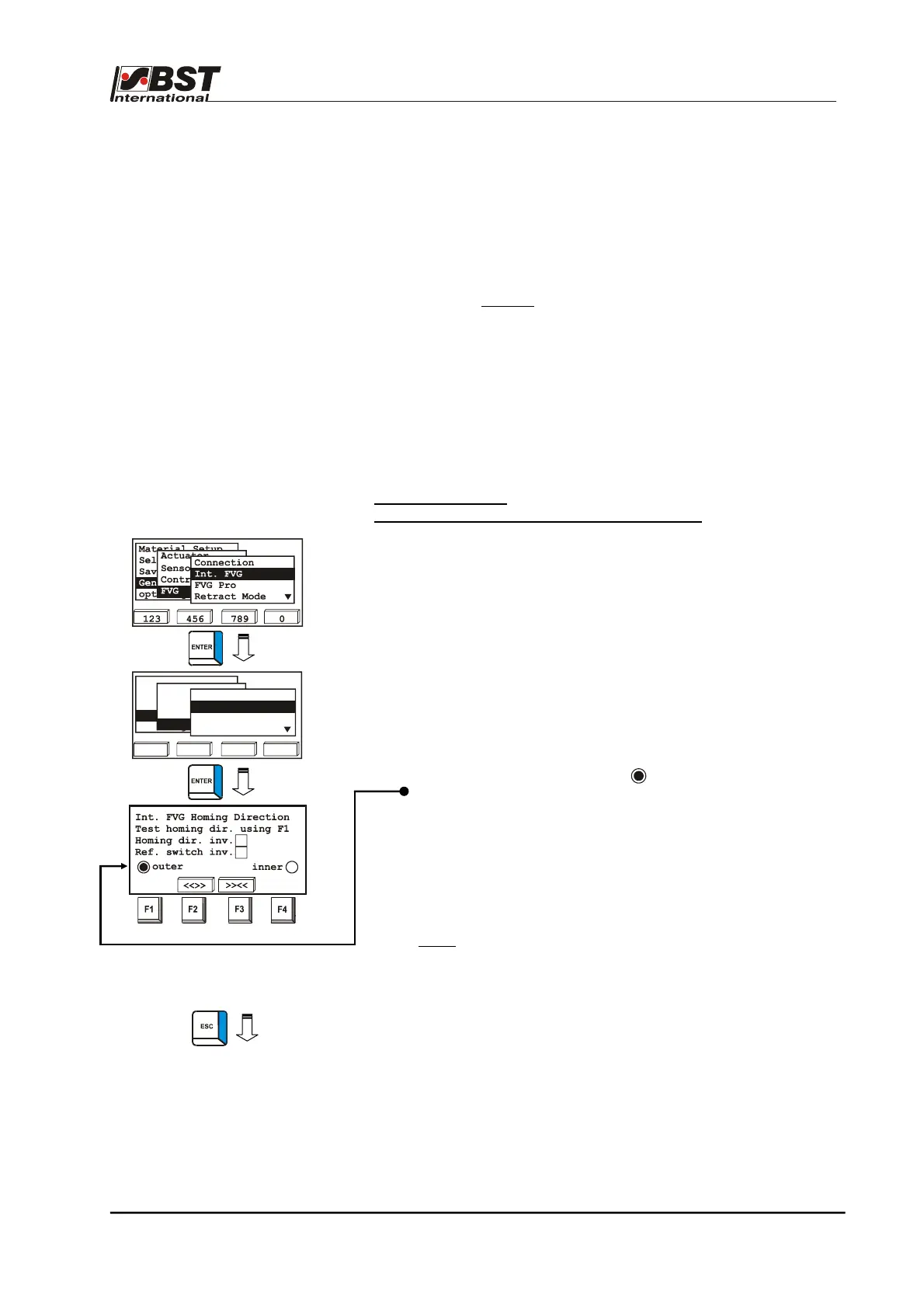
The Int. FVG submenu is used when the FVG 1MK Op. mode has
been selected (normally when using a FVG 1K or FVG 1MK).
Homing Direction –
Retraction direction and limit switch assignment
The sensor’s retraction direction and the assignment of the limit
switches are set up in the next steps.
1. Mark Int. FVG in the FVG selection window and then confirm
by pressing ENTER. Select Homing Dir. from the sub-
directory and then press ENTER to open the inputting menu.
2. Press the F1 key to check the selected retraction direction.
By pressing the F1 key, the FVG slide must move outwards
(into the homing position).
After the homing position is reached, the limit switch with the
outer label must be activated ( ).
Exit the window without making any changes if the homing
direction and limit switch assignment are correct.
If the FVG slide moves inwards when the F1 key is pressed,
then the checkbox Homing dir. inv. should be activated.
If the limit switch with label inner is activated in the homing
position, then the checkbox Ref. switch inv. should be
activated.
Note:
If the limit switch is activated but no checkbox
(outer or inner) is activated, then the limit switch
requires testing.
3. Press the ESC button to exit the inputting menu after you
have entered the setting.
123 456 789 0
Change User
Material Setup
Sel. Std. System
opt. Logic
General Setup
Actuator
Sensors/EFE
Control Loop
FVG
Connected
Retract Mode
Err. Behaviour
Homing Dir.



 To Next Page