Commissioning B 3
ekrPro Com
60
web guide controller EDV No.: MD.191.01.05/1.6.x Chapter: B 3
with analog sensors Date: 23.11.2007 Page: 41/73
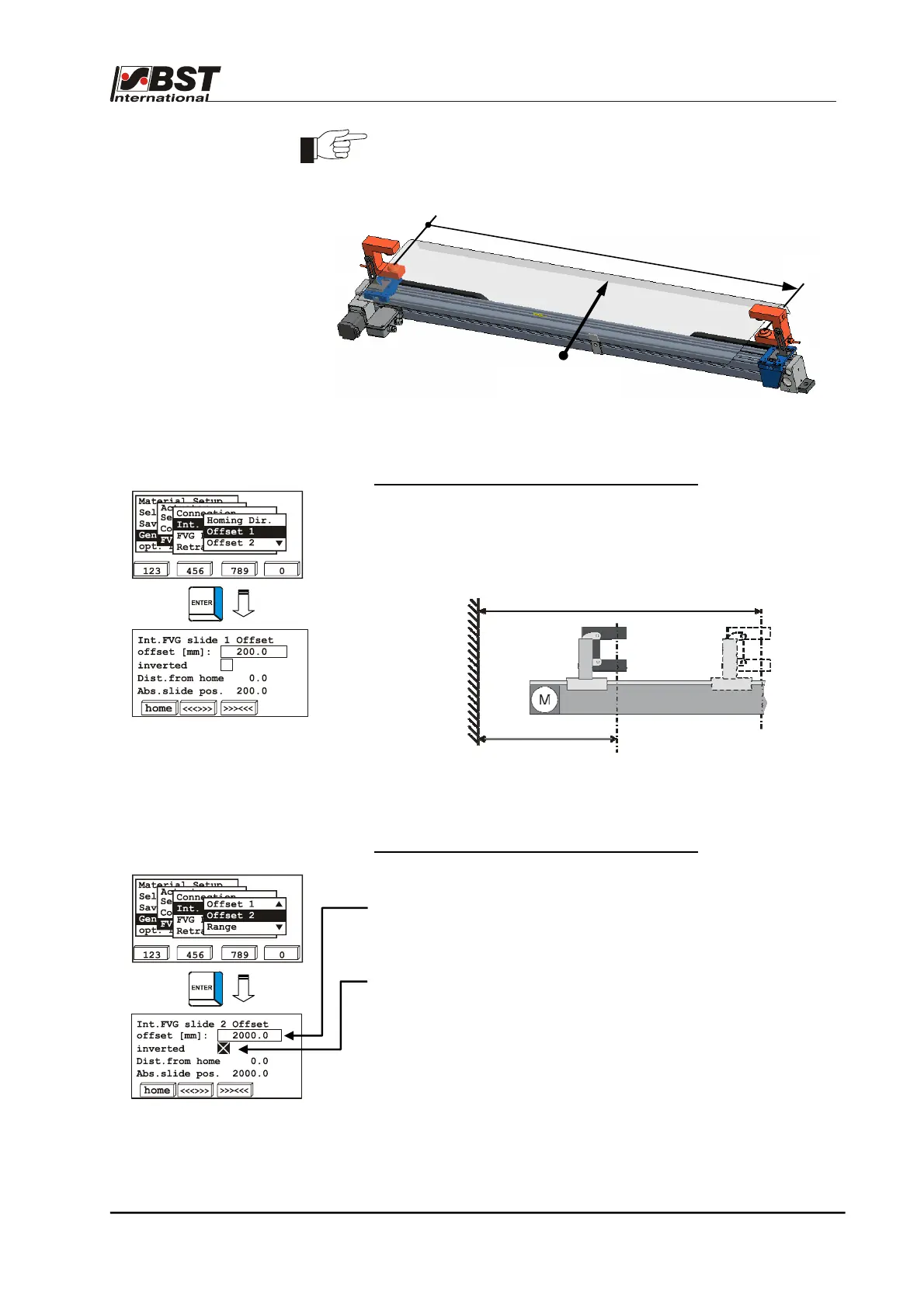
The outside FVG1 limit switch has been determined as the reference
point for the FVG slide (offset = 0.0 mm)
Offset 1 – position offset to FVG1 slide position
You can use the position offset to, for example, set the home
position (= 0.0 mm) to a fixed point, e.g. machine wall or a specific
point within the machine. The offset value is added to the current
FVG position, which results in the "Abs. slide pos.“
Offset 2 – position offset to FVG2 slide position
The meaning of the entry and display fields is equivalent to those of
Offset 1.
2000 mm has been set as the default value for the FVG2 offset.
When carrying out initial start-up, this value must be adapted to the
actual FVG length.
If Sensor 2 moves in the opposite direction to Sensor 1, and if the
distance information is based on the same fixed point, you should
activate the Inverted checkbox.
absolute position
offset
Fixed point in the machine
e.
. machine wall
Home position
[Dist. from home = 0.0 mm]
actual FVG position
Web running
direction
FVG 1
FVG 2
Offset
Offset 2 (FVG)



 To Next Page