Commissioning B 3
ekrPro Com
60
web guide controller EDV No.: MD.191.01.05/1.6.x Chapter: B 3
with analog sensors Date: 23.11.2007 Page: 4/73
ekrPro Key
60
(if fitted) :ekrPro Key60:
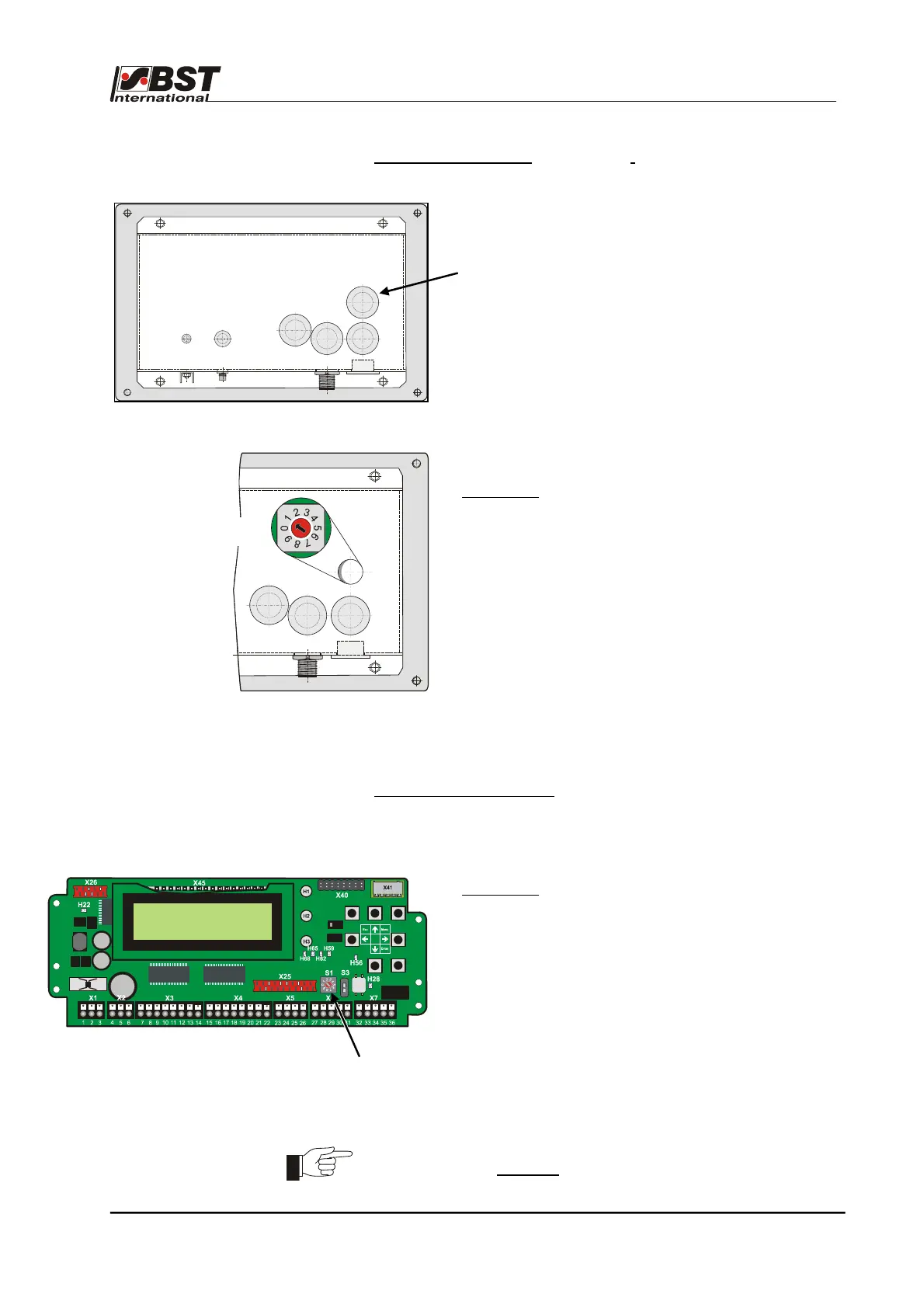
There are several plugs on the rear side of the
ekrPro Key
60
.
The BCD switch S1 for setting the address (node
number) is behind these plugs.
Procedure:
1. Switch-off the power to the controller.
2. Remove the plug.
3. Check setting of BCD switch S1. If necessary, set
device address to S1 = 1.
4. Refit the plug.
5. Restore the power.
FVGPro Module (if fitted
) :FVGPro Module”
The device address setting up is also crried out via the
S1 BCD switch mounted on the board:
Procedure:
1. Switch off the power to the FVG Pro module.
2. Open housing’s front cover.
3. Check the setting of the BCD switch S1. If
necessary, set device address to S1 = 1.
4. Close the controller’s front cover.
5. Restore the power.
The device address modification will be effective after the
power has been restored
.
S1 BCD switch
S1 BCD switch



 To Next Page