Important
• After the flange is pressed strongly, confirm that the paper core does not move. If you can hold and move the
paper core leftward and rightward and there is clearance between the flange and paper core, repeat proce-
dures 2 to 4. If there is clearance, a rewinding problem may result.
6
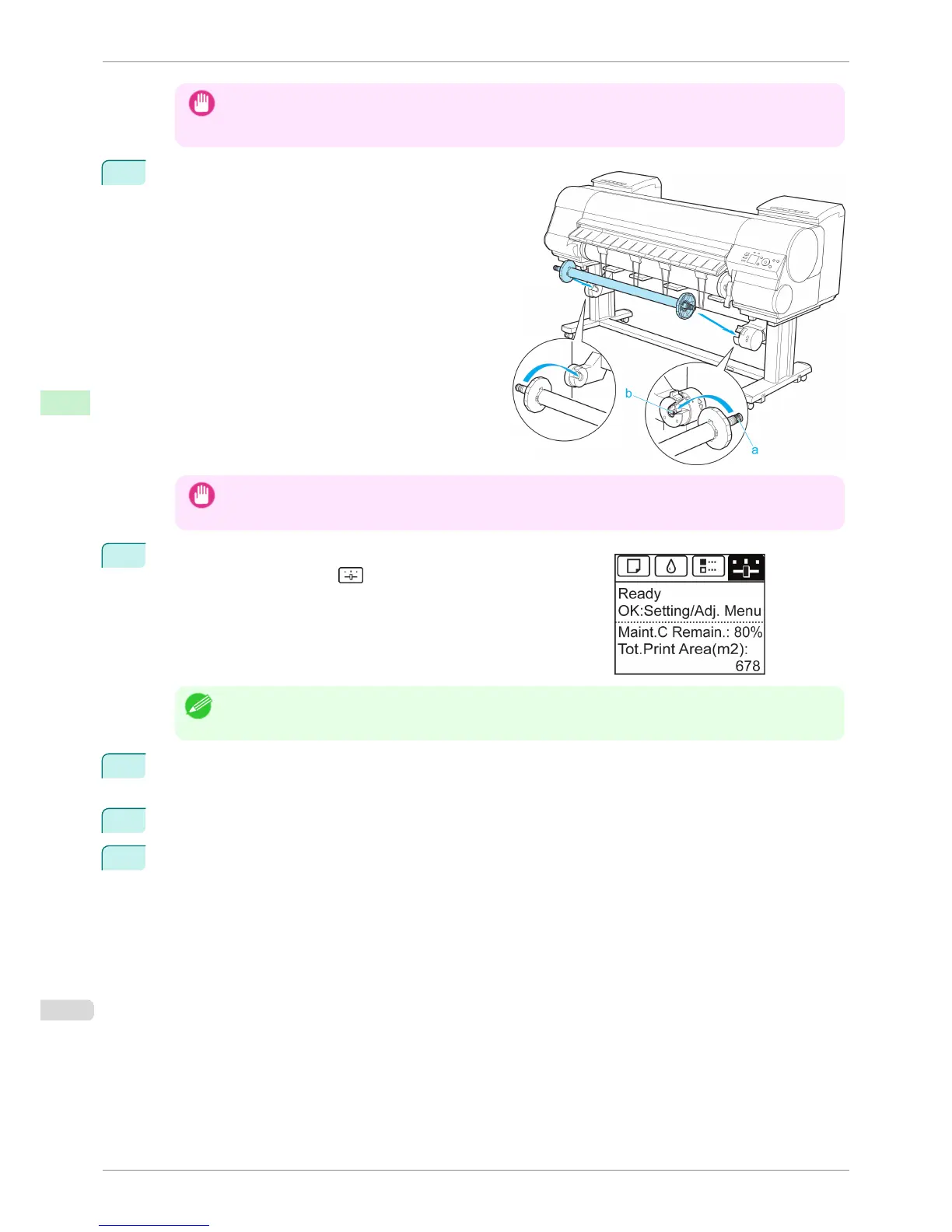
Load the Rewind Spool on the Media Take-up Unit
so that the gear of the Rewind Spool (a) meshes with
the gear of the Right Media Take-up Unit (b).
Important
• If the gear of the Rewind Spool (a) does not mesh with the gear of the Right Media Take-up Unit (b), the Media
Take-up Unit cannot be turned on.
7
On the Tab Selection screen of the Control Panel, press ◀ or ▶ to
select the Settings/Adj. tab ( ).
Note
• If the Tab Selection screen is not displayed, press the Menu button.
8
Press the OK button.
The Set./Adj. Menu is displayed.
9
Press ▲ or ▼ to select Take-up Reel, and then press the OK button.
10
Press ▲ or ▼ to select Auto Feed, and then press the OK button.
The roll is now advanced to the Media Take-up Unit.
Loading the Rewind Spool on the Media Take-up Unit
iPF8400S
User's Guide
Handling and Use of Paper Media take-up unit
510














 To Next Page