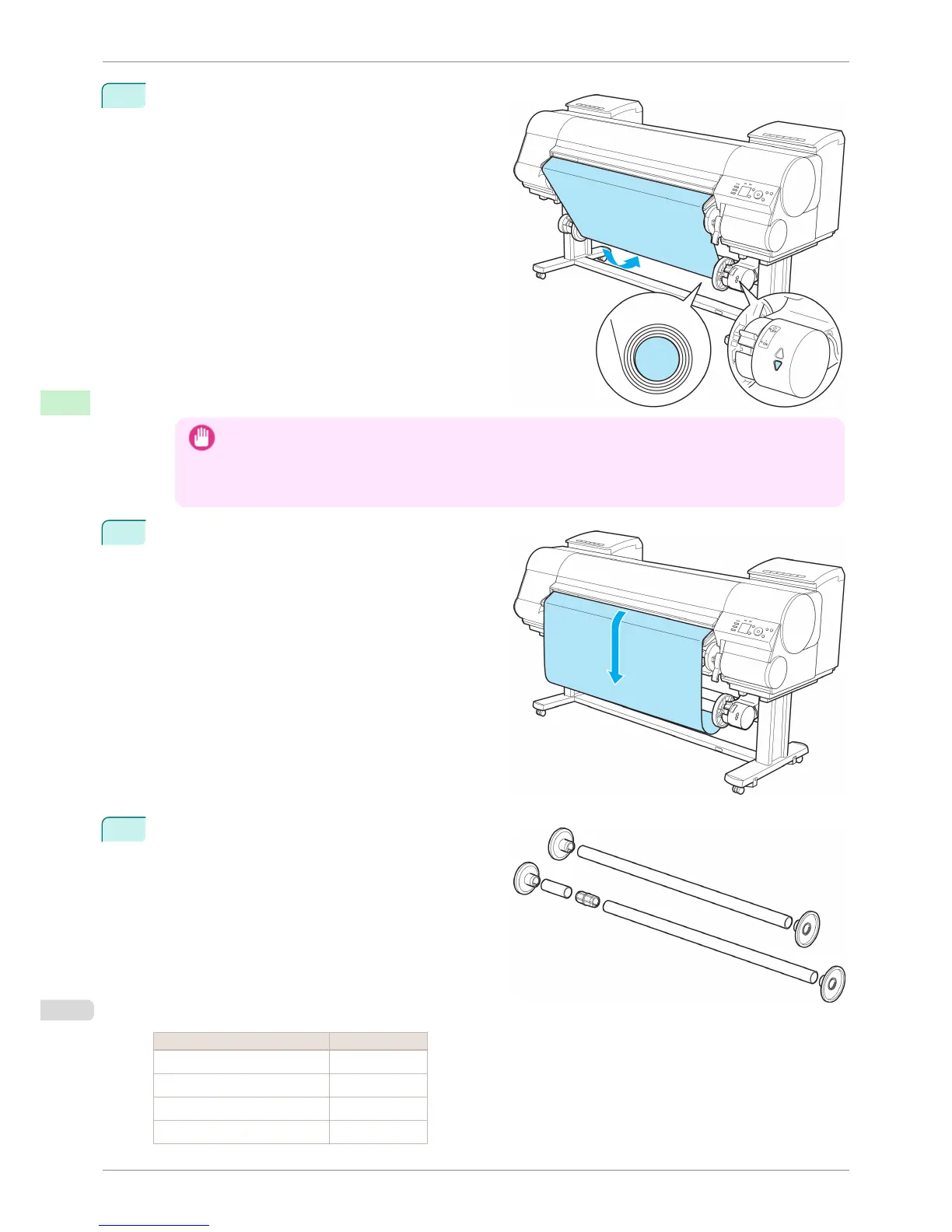
14
On the Right Media Take-up Unit, pull the Rewind
Mode Switch forward to turn it on. Press the ▼ button
to rewind the roll so that it is nearly taut.
Important
• Rewind the paper so that the paper core makes at least two revolutions. If the paper is not rewound two full
revolutions, repeat steps 13 and 14.
• Do not manually force the Rewind Spool or paper core to rotate them. This may damage them. To rewind or
unwind rolls, press ▲ or ▼ on the Media Take-up Unit.
15
You can unwind rolls by holding down ▼ on the Con-
trol Panel.
16
Refer to the following table and securely insert the
Weight Flange and Weight Joint suitable for the type
and width of roll into the Weight Roll.
The following list identifies Weight Roll and Weight
Flange you can use. A Color Label is applied to each
Weight Roll.
Weight Roll
Roll Width Weight Roll to Use
B2 Width: 515.0 mm (20.3 in) D
B1 Width: 728.0 mm (28.7 in) A+E
B0 Width: 1,030.0 mm (40.6 in) A+G
A1 Width: 594.0 mm (23.4 in) E
Loading the Rewind Spool on the Media Take-up Unit
iPF8400S
User's Guide
Handling and Use of Paper Media take-up unit
512














 To Next Page