Advanced Guide
>
Scanning
>
Scanning with the Bundled Application Software
>
Useful MP Navigator EX
Functions
> Correcting/Enhancing Images Manually
S402
Correcting/Enhancing Images Manually
You can correct/enhance scanned images manually.
1.
Scan documents into MP Navigator EX and save them, then open the View & Use
enhance.
Note
See "
Let's Try Scanning
" to scan images into MP Navigator EX.
You can also select images saved on a computer.
Opening Images Saved on a Computer
2.
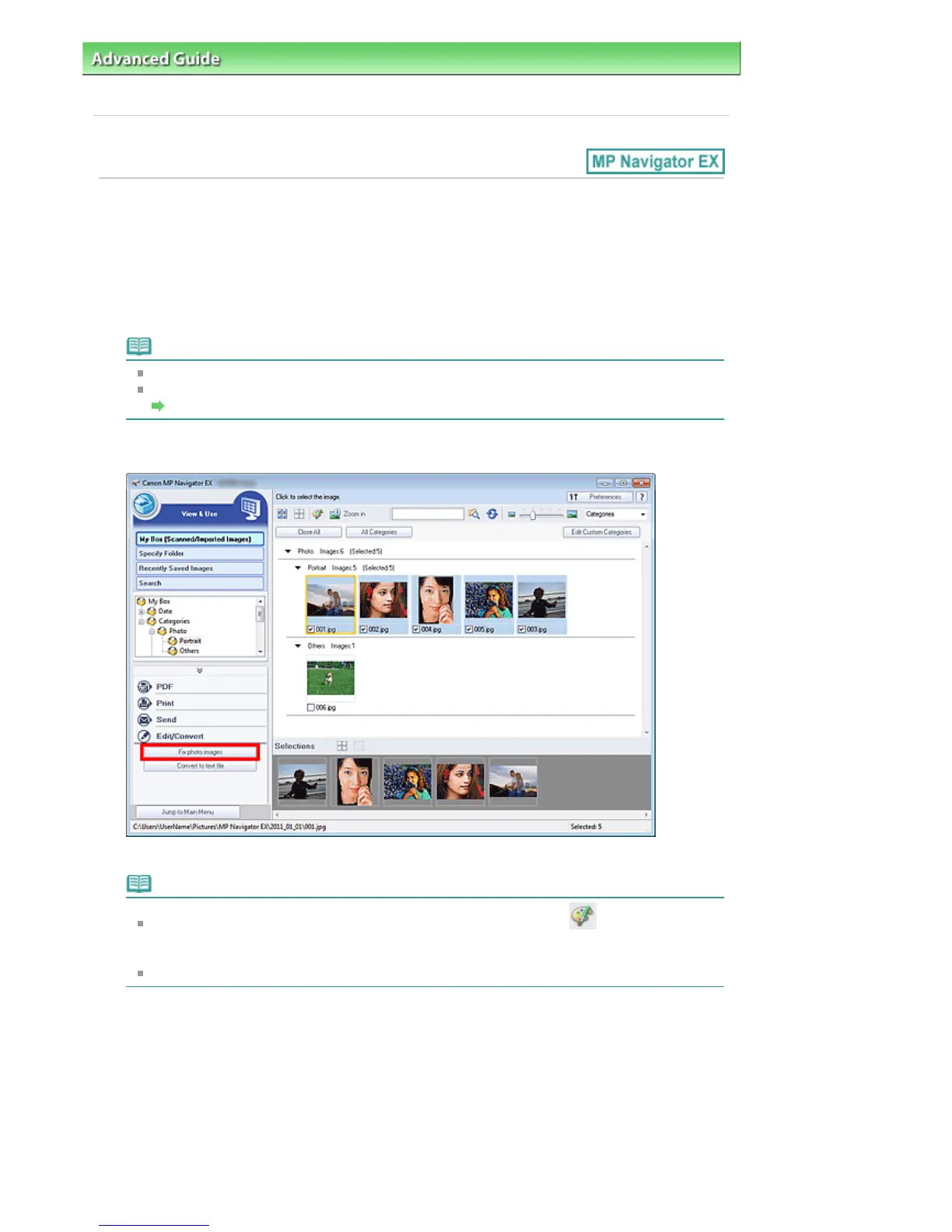
Click Edit/Convert, then click Fix photo images on the list.
The Correct/Enhance Images window opens.
Note
The Correct/Enhance Images window can also be opened by clicking (Image Correction/
Enhancement) on the Toolbar or in the Zoom in dialog box. In that case, only the target image
(outlined in orange) can be corrected/enhanced.
See "
Correct/Enhance Images Window " for details on the Correct/Enhance Images window.
3.
Select the image you want to correct/enhance from the thumbnail list.
The selected image appears in Preview.
Seite 413 von 922 SeitenCorrecting/Enhancing Images Manually















 To Next Page