Instructions for use Primus Infinity Empowered SW 4.5n 23
Overview
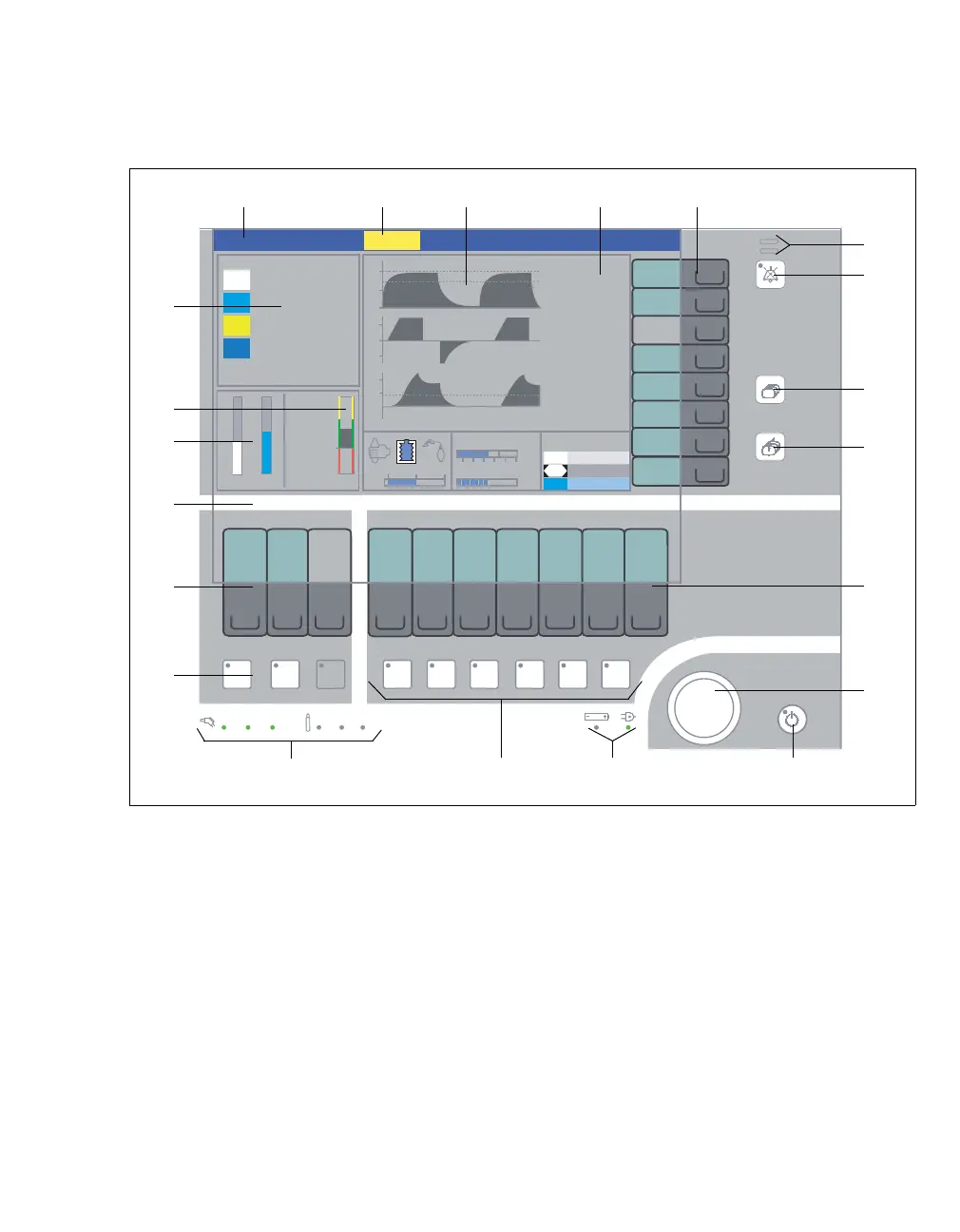
Screen with user interface
A Status field for the current ventilation mode
B Alarm field for alarms and their class
C Curve field for curves and other displayed mod-
ules
D Numerical field for measured values
E Soft keys for monitoring functions
F LEDs indicating the alarm status
G Key for silencing acoustic alarms for 2 minutes
H Key for changing the screen pages
I Key for calling up the standard screen
J Soft keys for ventilation settings
K Rotary knob: "select, set, confirm"
L Key for switching over to Standby
M LEDs for power supply/battery power
N Keys for selecting the ventilation mode
O LED indicators for the central gas supply and
reserve gas cylinders
P Keys for selecting the carrier gas (N
2O or Air)
Q Soft keys for fresh-gas delivery settings
R Prompt field for user guidance
S Bar graph for gas delivery (virtual flow tubes)
T Bar graph for fresh-gas utilization (econometer)
(optional)
U Parameter field for gas monitoring
300
AB DCE
U
T
S
R
Q
P
MNO
F
G
H
I
J
K
L
Volume












 To Next Page