Instructions for use Primus Infinity Empowered SW 4.5n 39
Operating concept
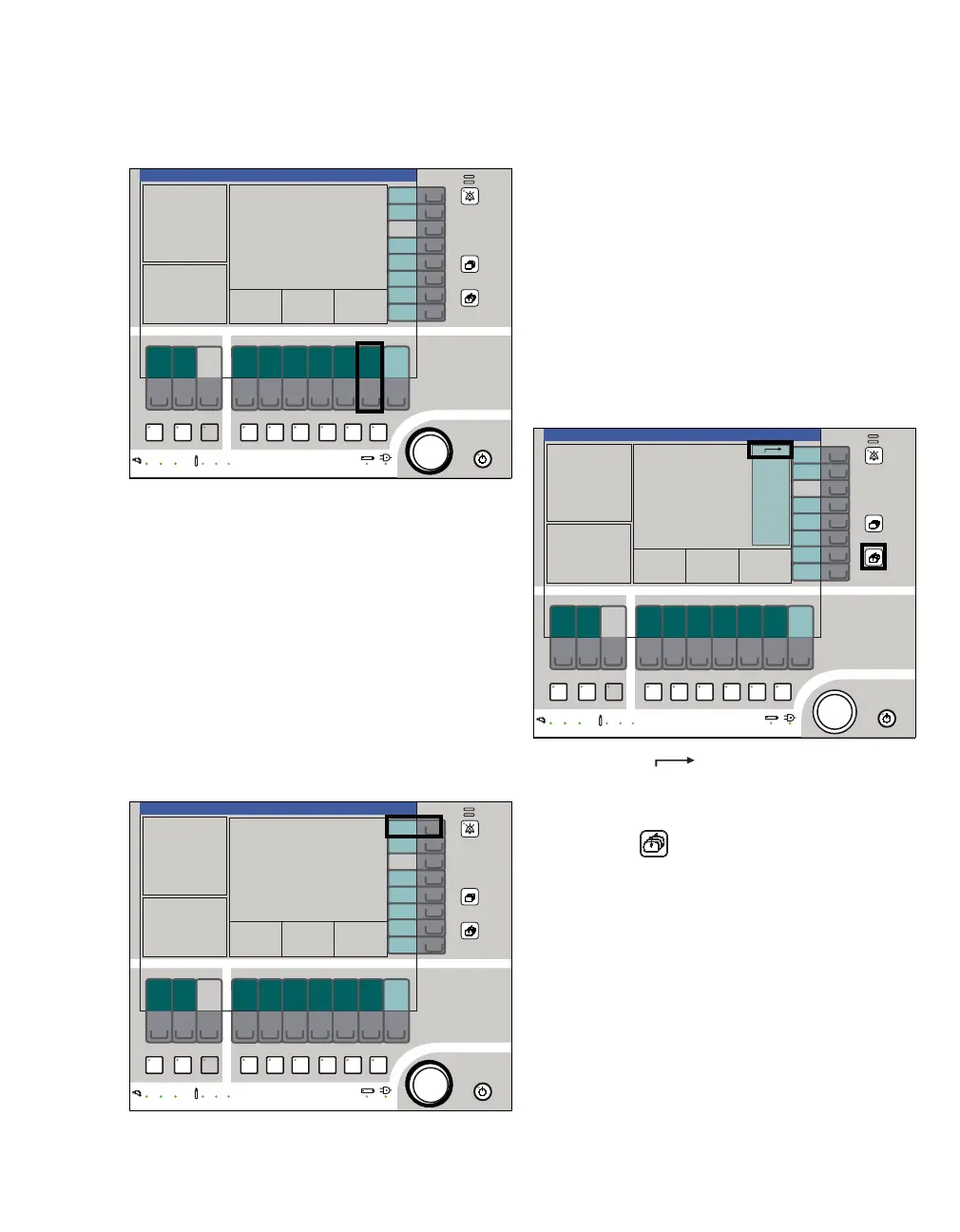
Selecting/setting ventilation parameters
Example: PEEP ventilation parameter
1 Push the soft key PEEP (A). The color changes
from dark green to yellow.
In addition, a flashing help text is displayed in
the prompt field.
2 Set the PEEP value = turn the rotary knob (B).
Confirm the PEEP value = push the rotary knob
(B). The color changes from yellow to dark
green.
Selecting/setting monitoring functions
Example: Change the lower alarm limit of the end-
expiratory CO2 concentration.
1 Press the soft key alarm limits (A). The alarm
limits menu is displayed on the screen.
2 Select the alarm limit = turn the rotary knob (B).
Confirm the selection = push the rotary knob
(B).
Set the alarm limit = turn the rotary knob (B).
Confirm the new alarm limit = push the rotary
knob (B).
3 To exit the alarm limits menu:
z Confirm the symbol (C) to exit the menu
= push the rotary knob (B)
or
z Press the key (D).
301301
A
B
B
A
373
D
C












 To Next Page