Order sorter section
1/1
2. Replacement and adjustment of parts
27410-5
27410-5
Adjusting the stop position of the print receiving tray [Print sorter unit (10-
inch type)]
!
!!
! Procedure
1. Remove the sorter cover.
☞20020-5
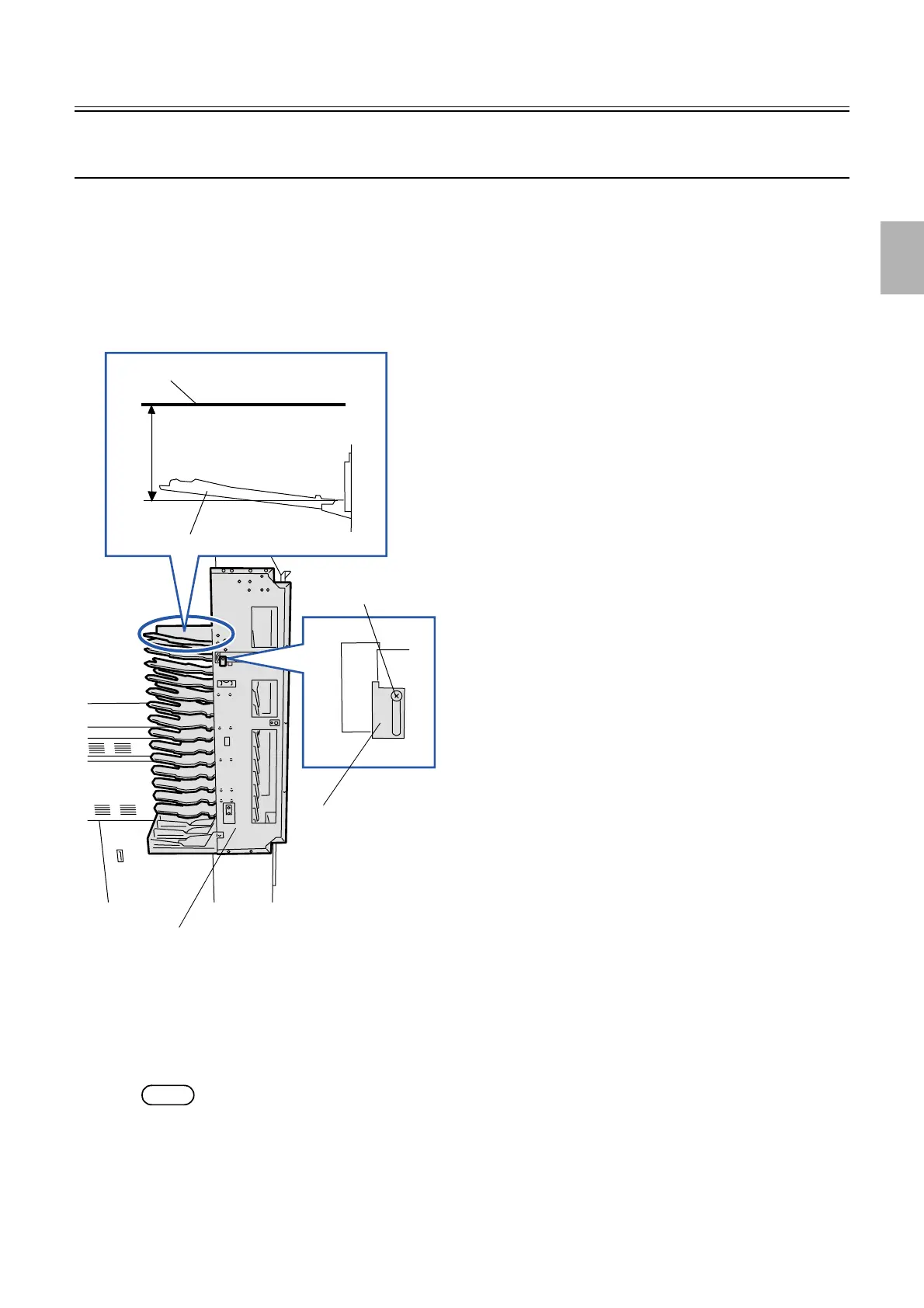
2. Move the sorter home sensor holder up and down to adjust the stop position of the print receiving tray.
(Loosen one screw.)
" Point
Adjust the position of the sorter home sensor holder so that the distance between the hinge section of the print receiving tray
which is located at the paper receiving position and the upper side of conveyor belt on print conveyor unit is 153±1 mm.
3. Press the manual sorter switch continuously to check the stop position of the print receiving tray.
If the stop position is not stable, check and adjust the tension of the sorter motor timing belt and chain.
NOTE
• Adjusting the tension of the sorter motor timing belt
☞20120-5
• Adjusting the tension of the chain
☞20120-5
Sorter home sensor holder
153±1 mm
Print receiving tray
Upper side of conveyor belt
Print sorter unit
Screw
G074236
Distributed by: minilablaser.com



 To Next Page