Replenishment package unit
1/2
2. Replacement and adjustment of parts
27820
27820
Replacing the probe [SM]
!
!!
! Procedure
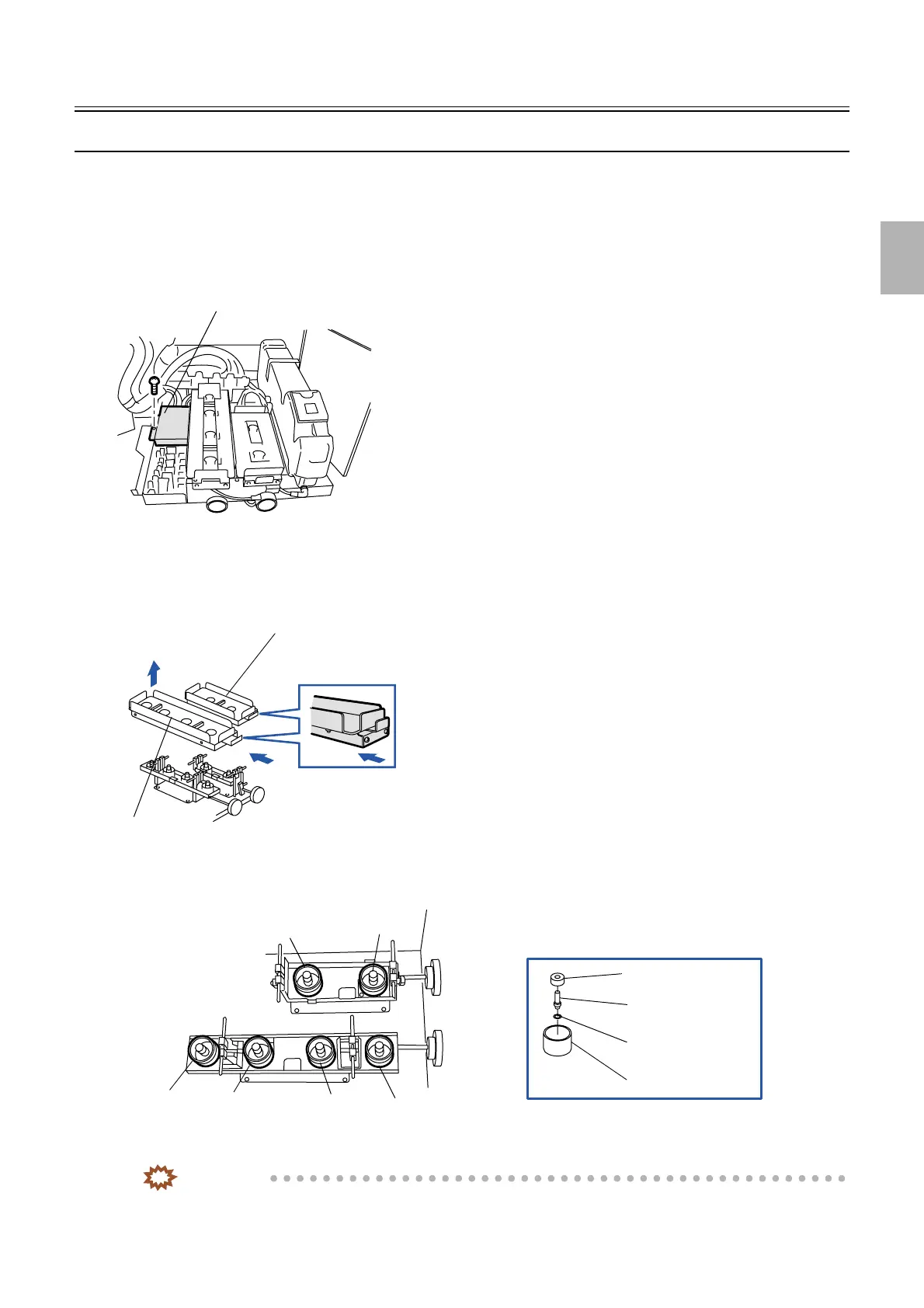
1. Pull out the replenishment package unit.
2. Remove the replenishment package.
3. Remove the protection cover of the SM I/O PCB. (one screw)
4. Disconnect the tray unit connectors.
J/P601: Tray unit A
J/P600: Tray unit B
5. Remove the tray units.
6. Remove the probe nut and the probe.
7. Assemble the new probe, then tighten the probe nut securely using the probe replacing jig.
IMPORTANT
• The O-ring is attached to the new probe.
• The probe (including the O-ring) should be used properly for each solution.
Protection cover
G050891
1. Press the lever.
Tray unit B
Tray unit A
2. Lift it up.
G050892
CD-C
CD-B
CD-A
STB
BF-A
BF-B
Probe holder
O-ring
Probe
Probe nut
G050893
Distributed by: minilablaser.com



 To Next Page