Tablet replenishment section
1/2
2. Replacement and adjustment of parts
27670
27670
Adjusting the position of the elevator middle sensor [J]
!
!!
! Procedure
1. Remove all the tablet cartridges.
2. Remove the tablet replenishment unit section cover.
☞20020
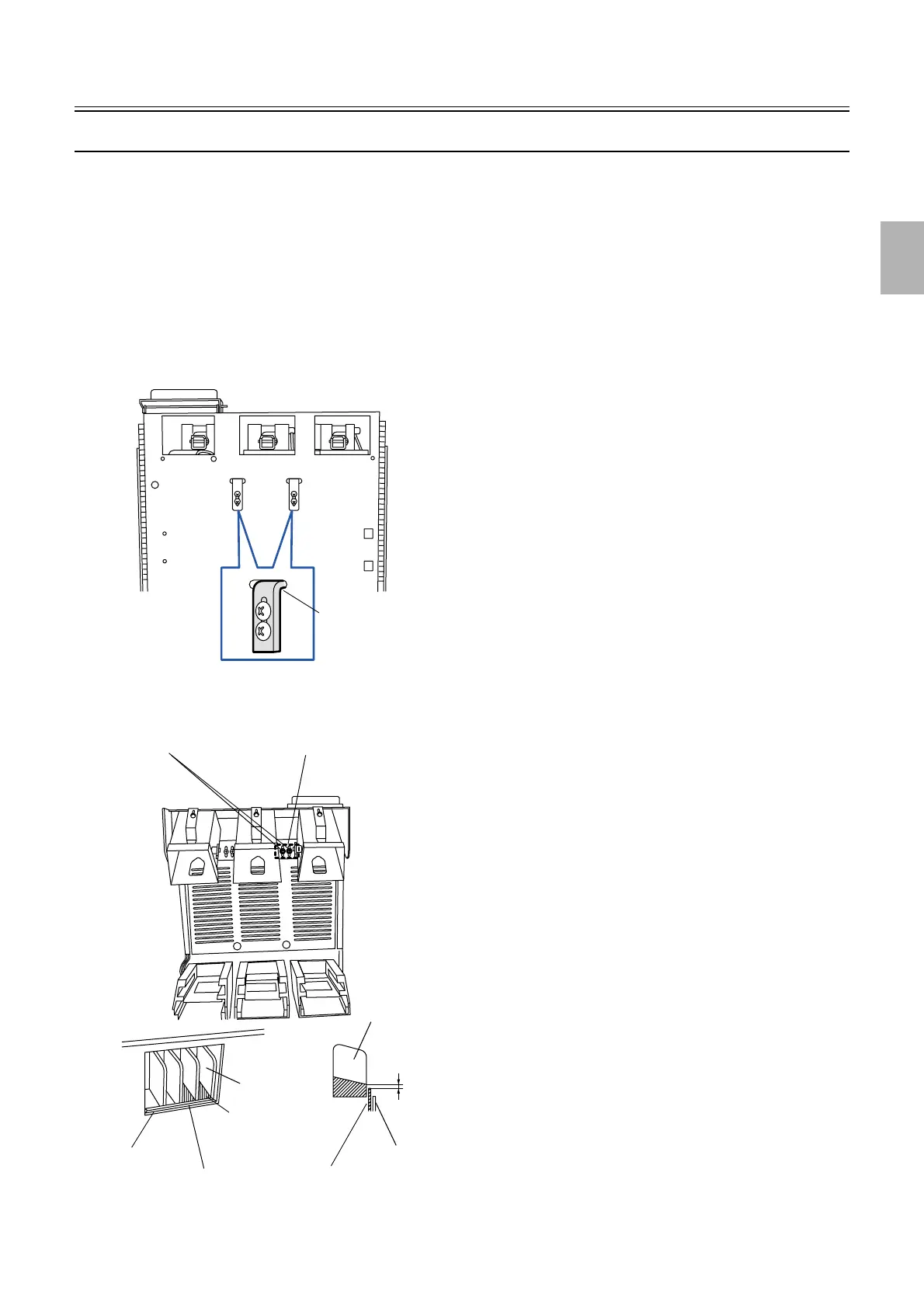
3. Check that the stopper contacts with the upper of the slot.
" Point
If the stopper does not contact with the upper of the slot, open the tablet replenishment unit and then adjust the position of the
stopper. (two screws for each)
4. Adjust the position of the elevator middle sensor so that space between the higher bottom of the bucket
platform and tablet gate is 1.5 mm±0.5 mm when the elevator is stopped at the position where the
elevator middle sensor detects dark in the Output Check. (two screws)
Oval hole
G050741
Higher bottom of
the bucket
platform
Bucket platform
Tablet gate
Bucket
platform
1.5±0.5 mm
Tablet gate
Chute inlet
Chute inlet
Screws
Elevator middle sensor
G050743
Distributed by: minilablaser.com



 To Next Page