Self-diagnostic
1/3
3. Mode
35955
35955
Network Self-Diagnostic
Bringing up the display
Maintenance: 2260 → Extension → Maintenance → Self-diagnostic → Network Self-Diagnostic
NOTE
• Network Self-Diagnostic is supported by FRONTIER-Printer Ver. 3.0 or later, and QSS-Printer Ver. 5.0 or later.
!
!!
! Explanation (Network Self-Diagnostic)
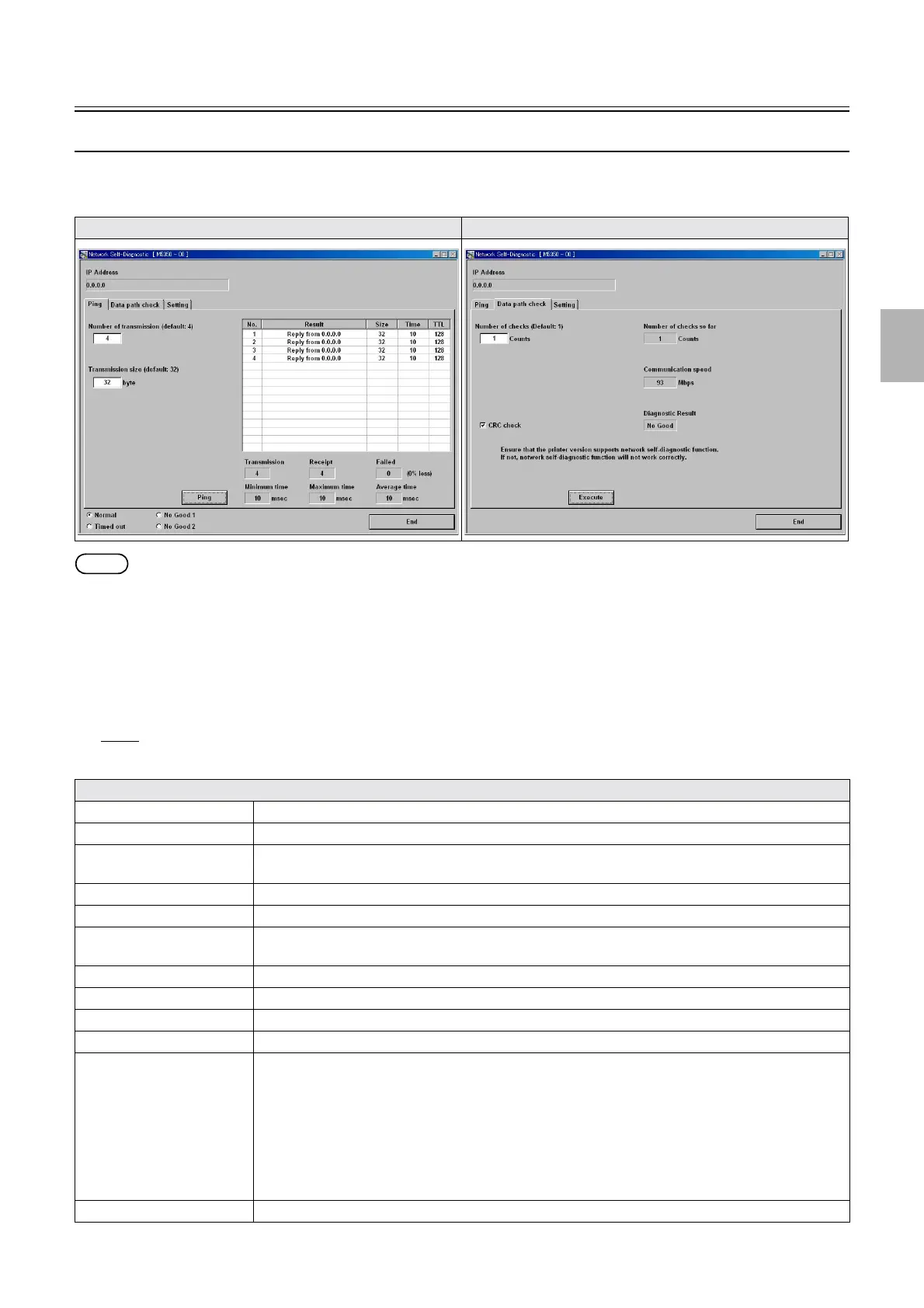
• Network Self-Diagnostic has the functions below.
1. Checks the connection of the LAN cable connecting the PC and printer I/F main PCB using Ping.
2. Tests the image data transmission between the HDD and printer I/F main PCB using data path check.
!
!!
! Ping
The connection of the LAN cable connecting the PC and printer I/F main PCB can be checked.
Ping Data path check
Explanation
Number of transmission Specify the number of Ping transmission. (default: 4) (input range: 1 to 300)
Transmission size Specify the data size to transmit using Ping. (default: 32 bytes) (input range: 1 to 65500 bytes)
Ping Click Ping, then the specified size of data is send to and received from the selected output device for the
specified times using Ping.
Transmission Shows the number of Ping transmission.
Receipt Shows the number of Ping reception.
Failed Shows the number that Ping transmission and reception failed.
(0% loss): The failure rate is shown on the right side of Failed.
Minimum time Shows the shortest response time of Ping.
Maximum time Shows the longest response time of Ping.
Average time Shows the average response time of Ping.
No. Shows the number of the diagnosis result.
Result The diagnosis result of Ping is shown.
1. If the data transmission and reception was normally performed, Reply from 192.168.1.11 is
shown.
*2
2. If no replay was received for one second, Request timed out is shown.
3. If data transmission failed, No Good(Transmission) is shown.
4. If data reception failed, No Good(Receipt) is shown.
5. If data transmission and reception failed due to a cause other than those above, No Good is shown.
Size
*1
Shows the transmitted data size by the byte.
Distributed by: minilablaser.com



 To Next Page