Positions of PCBs and electrical parts (dryer section, conveyor and order classification section)
1/2
6. Electrical parts
63275
63275
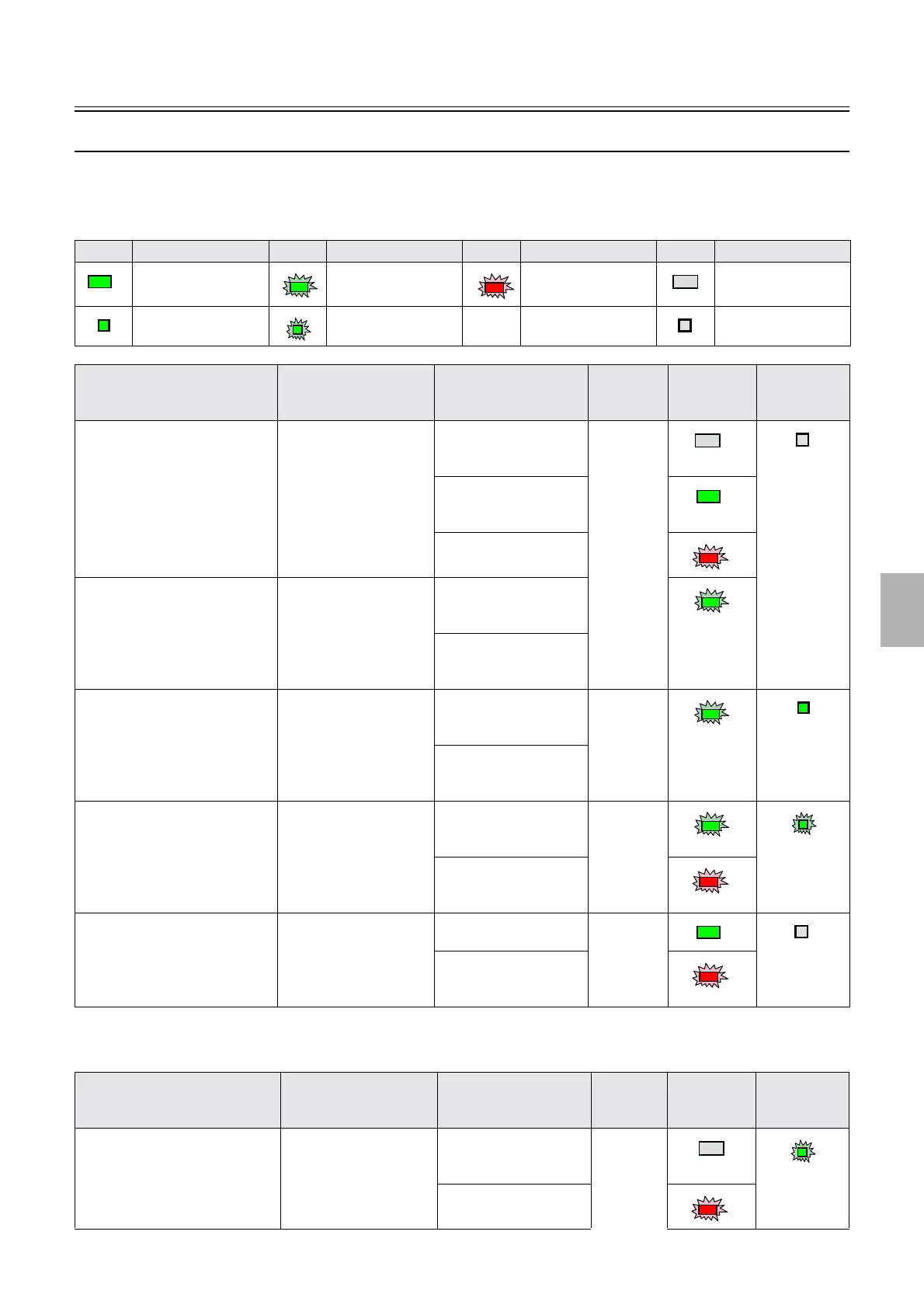
Condition check of the processor condition light and Manual Sorter Switch
This section explains operations of the processor condition light and Manual Sorter Switch in various conditions.
!
!!
! Conditions of the processor condition light and Manual Sorter Switch
" If the Manual Sorter Switch was pressed to start up the printer and processor forcibly while the program
timer activates
Light Condition Light Condition Light Condition Light Condition
Lights in green Blinks in green Blinks in red Off
Lights in green Blinks in green - - Off
Condition Condition of the printer
I/F Main PCB
Condition of the
processor
Condition
of the
X10
*1
Processor
condition
light
Manual
Sorter Switch
Both printer and processor started
up normally.
ON It is raising the
processing solution
temperatures.
ON
It is standing ready to
adjust the processing
solution temperatures.
An error that cannot be
resolved occurs.
After the Close Down Checks
were performed, and until the
program timer activates.
ON→OFF It has stopped adjusting
the processing solution
temperatures.
The error, Cannot
control temperature
occurs.
The 200 V power supply is not
supplied.
OFF It has stopped adjusting
the processing solution
temperatures.
OFF
The error, Cannot
control temperature
occurs.
The printer I/F PCB starts up
while the program timer activates.
OFF→ON It is raising the
processing solution
temperatures.
ON
The error, Cannot
control temperature
occurs.
The printer I/F PCB finishes the
startup operation while the
program timer activates.
ON The solution temperature
adjustment is complete.
ON
The error, Cannot
control temperature
occurs.
Condition Condition of the printer
I/F Main PCB
Condition of the
processor
Condition
of the
X10
*1
Processor
condition
light
Manual
Sorter Switch
The printer I/F main PCB starts up. OFF→ON It is raising the
processing solution
temperatures.
ON
An error that cannot be
resolved occurs.
Distributed by: minilablaser.com



 To Next Page