Self-diagnostic
1/2
3. Mode
35952
35952
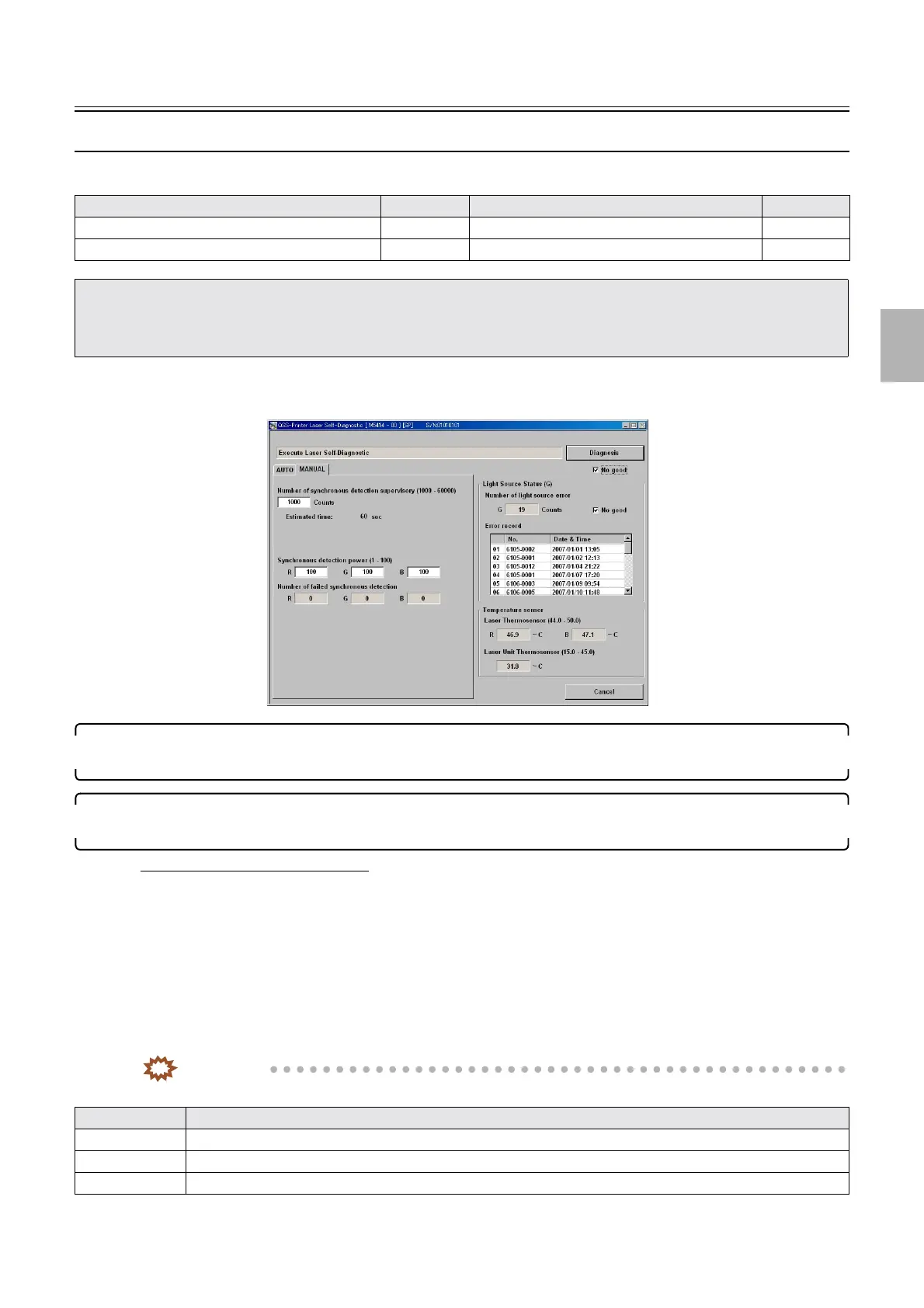
Laser Self-Diagnostic (diagnosis MANUAL)
Also see the following references to utilize for diagnosis.
!
!!
! Diagnosis (MANUAL)
1. Enter 1000 in the Number of synchronous detection supervisory field on Laser Self-Diagnostic
(MANUAL).
2. Configure the Synchronous detection power settings on Laser Self-Diagnostic (MANUAL) then
perform diagnosis.
Narrowing down the asynchronous point
To find the asynchronous point in a short time, narrow down the point by narrowing the range of value as shown below.
1. If failed synchronous detection is not detected with value 100, reduce the value by
1
/
2
, and check the synchronous
detection again.(100%→50%)
2. If failed synchronous detection is not detected with value 50, increase the value by
1
/
4
, and check the synchronous
detection again.(50%→75%)
3. If failed synchronous detection is not detected with value 50, increase the value by
1
/
4
, and check the synchronous
detection again.(50%→75%)
4. If failed synchronous detection is not detected with value 50, reduce the value by
1
/
4
, and check the synchronous
detection again.(50%→25%)
IMPORTANT
• As the standards of judgment with regard to the laser unit or the G-AOM driver, use the following values.
Model Reference Model Reference
Laser Self-Diagnostic (details of modes)
☞35950 Laser Self-Diagnostic (diagnosis: AUTO) ☞35951
Laser Self-Diagnostic (starting/exiting) ☞35953
• For the symptoms for which Laser Self-Diagnostic is and is not effective, see ☞Explanation (Laser Self-Diagnostic) 35950.
• Use Laser Self-Diagnostic (diagnosis MANUAL) only for diagnosing G laser.
To diagnose R laser and B laser, Right Source Status (R)and Right Source Status (B) of Laser Self-Diagnostic (AUTO) can give
more precise judgment.
G Judgment
30% or less Light intensity has not deteriorate (adequate light intensity).
From 31 to 60% Light intensity tends to deteriorate (even though the urgency is not high, enough attention should be paid).
From 61 to 100% Light intensity has deteriorated (the closer to 100%, the greater urgency).
M5414-05
Distributed by: minilablaser.com



 To Next Page