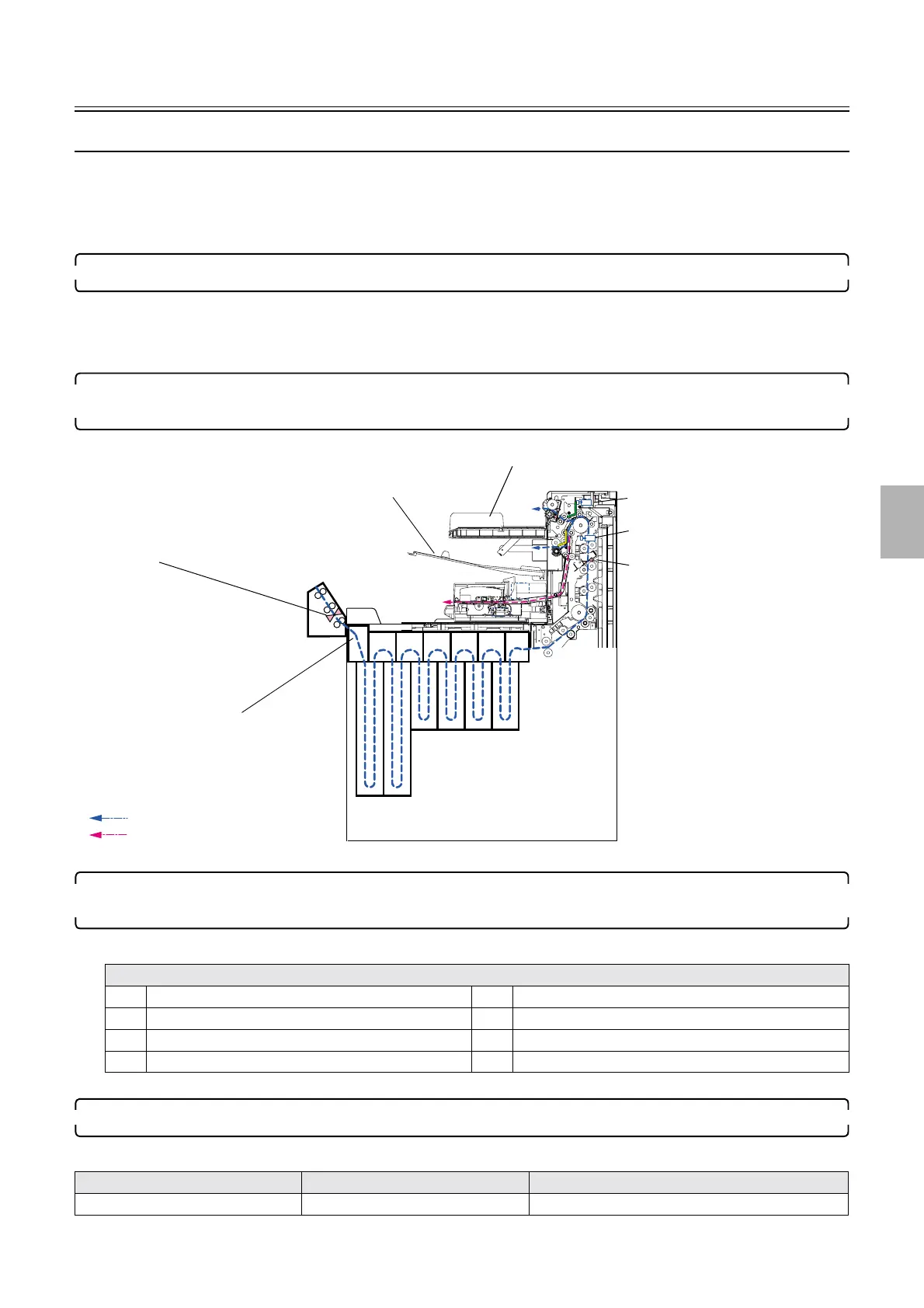
Processor paper advance operation
1/4
5. Operation sequence
56100
56100
Proc essor paper adv ance operation
Paper advance operation of the processor (normal prints)
This section explains the process that begins with the normal print paper entering the processor and ends with it being output to either the
print conveyor unit or the print receiving tray (large). It is a precondition that the temperature adjustment of the processing solution is
completed.
Paper advance operation of setup print varies normal print operation.
1. The processor enters the following states when the paper is loaded. ☞ 55100
• Processor drive motor: ON
• Dryer fan: ON
• Dryer heater: ON
2. The back edge of the paper passes through paper sensor 2 (left, center, right), which is located in the
processor loading unit.
3. When the paper leading edge passes position A in the above figure, the process signal is transmitted to
the processor by the printer.
• The following data are transmitted to the processor by the printer.
4. Paper arrives at the dryer rack.
• The paper advance procedures listed below vary depending on print paper width and advance length.
Transmission data list
1 Information of paper advance length 5 Information of print counts
2 Information of paper width 6 Information of paper advance position
3 Information of paper surface 7 Information of paper lane
4 Order information 8 Information of splice
Paper width Advance length Paper advance procedure references
• Between 82.5 and 152 mm • Between 82.5 and 305 mm ☞Paper output to the print conveyor unit
Paper sensors 2 (left, center and right)
Position A
Print conveyor unit
Print receiving tray (large)
Normal Print
Setup print
Dryer selection solenoid 1
Dryer selection solenoid 2
Dryer Lane Select Sensor
G085226
Distributed by: minilablaser.com



 To Next Page