Tablet replenishment section
1/2
2. Replacement and adjustment of parts
27650
27650
Adjusting the tension of the elevator chain [J]
!
!!
! Procedure
1. Remove all the tablet cartridges.
2. Remove the tablet replenishment unit section cover. ☞ 20020
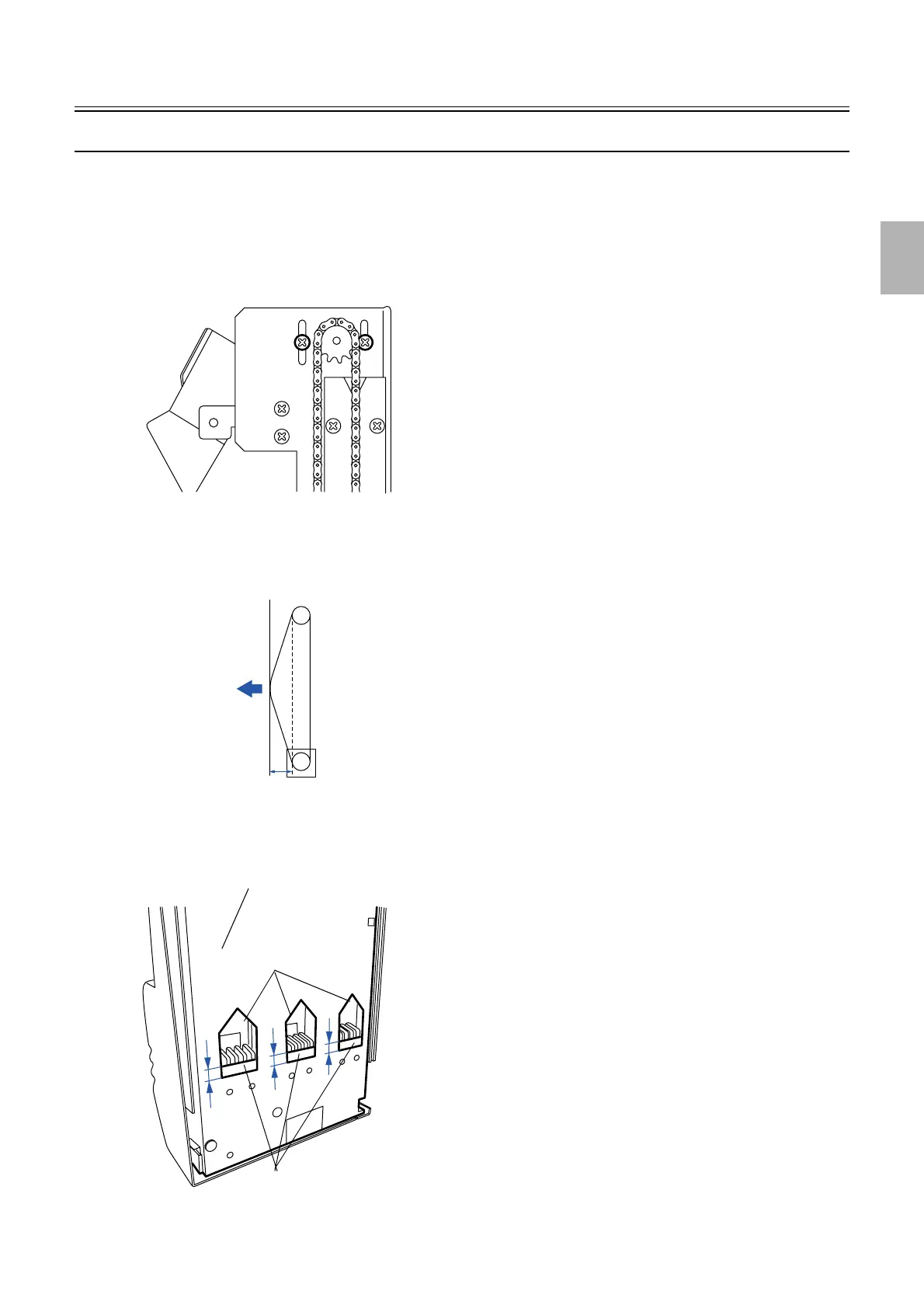
3. Loosen the two screws of the tension plate.
4. Adjust the tension of the elevator chain.
" Point
Adjust the position of the tension plates so that the elevator chain deflects by 9 mm when the part shown by the arrow is pulled
with the force of 200 g. (Adjust both right and left of elevator chain tensions.)
5. Raise the elevator until the upper sensor turns DARK.
6. Measure A, B and C as shown in the illustration to confirm that the bucket platform is parallel to the
tablet replenishment unit.
G050738
200 g
9 mm
G050739
Square holes
Bucket platforms
Tablet replenishment unit
A
B
C
G050740
Distributed by: minilablaser.com



 To Next Page