Cables
1/7
6. Electrical parts
68100
68100
Cables
Precautions in handling the cables
!
!!
! PCBs which connect to the LVPECL cable
!
!!
! PCBs which connect to the optical fiber cable
Precautions when handling the optical fiber cable
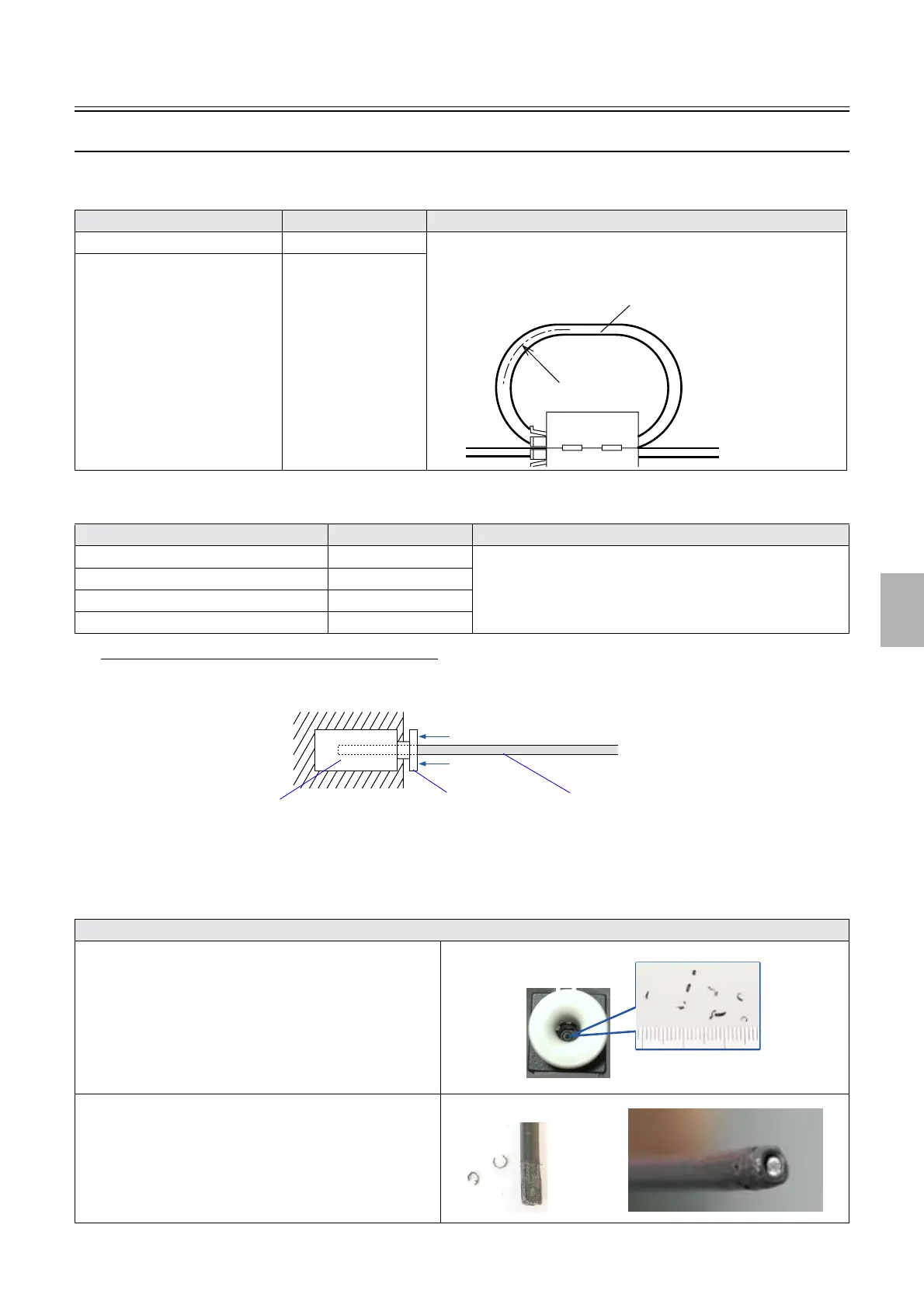
• To remove the optical fiber cable from the PCB, pull the cable straight out while pressing part A in the direction of the arrow. To
connect the cable, push it straight in as far as it will go.
!
!!
! The Factor List of the ARCNET Communication Errors
As examples, the following table shows the factors causing the ARCNET communication errors in the market.
PCB Name Manual No. Precautions when handling the LVPECL cable
Printer I/F main PCB ☞66005 Do not bend the LVPECL cable by R25.4 mm or less.
Lay the cable with a bending radius of at least R50 mm.
Laser control PCB
☞66010
PCB Name Manual No. Precautions in handling the cable
Printer I/F main PCB ☞ 66005 • See ☞The Factor List of the ARCNET Communication
Errors.
Printer control PCB ☞66000
Laser control PCB
☞66010
Processor control PCB ☞66200
The Factor List of the ARCNET Communication Errors
The shavings of the ARCNET cable are piled up in the
connector.
• Suck chips of shaved ARCNET cable sheath with the
aspirator.
• See
☞Removing chips of shaved cable sheath in the
ARCNET connector.
• See
☞How to use the aspirator.
The ARCNET cable crumbles or the ARCNET cable's surface
gets sticky.
• Cut the end of ARCNET cable using a fiber cutter.
See ☞How to use the fiber cutter.
R25.4mm
LVPECL cable
Optical fiber cablePart A
Connector on the PCB
G051007
Distributed by: minilablaser.com



 To Next Page