6. Electrical parts
68100
5/7
68100
Cables
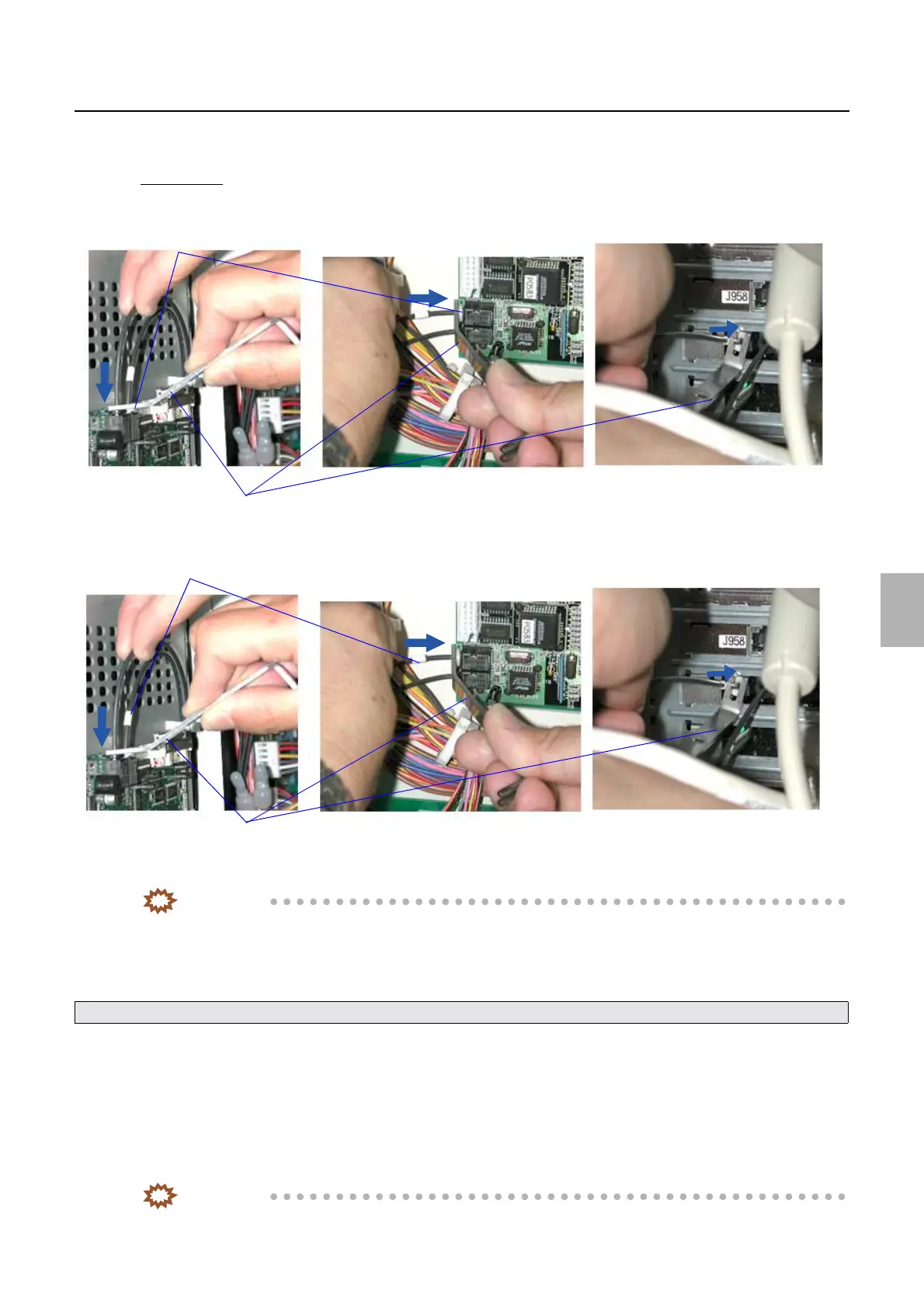
1. Remove the ARCNET cable.
Check point
(1) Press the retainer in the ARCNET Connecter with the optical fiber cable pushing bar.
(2) slightly push in the ARCNET cable in the arrow direction.
(3) Pull slightly the ARCNET cable to confirm it can be removed, then Remove the ARCNET cable.
IMPORTANT
• If the retainer in the connecter is pressed evenly but still the cable cannot be removed smoothly, keep shifting
the optical fiber cable pushing angle to find the best angle to push cable by the bar so that the cable can be
removed smoothly.
2. Clean inside of the ARCNET connector if necessary.
3. Connect the ARCNET cable.
!
!!
! How to use the fiber cutter
1. Remove the ARCNET cable.
2. Cut the ARCNET cable.
IMPORTANT
• Cut the ARCNET cable at 15 mm from the end.
See ☞ How to use the aspirator.
Retainers
Optical fiber cable pushing bars
G083085
ARCNET cables
Optical fiber cable pushing bars
G082811
Distributed by: minilablaser.com



 To Next Page