Paper supply unit
1/3
2. Replacement and adjustment of parts
25630
25630
Adjusting the timing of the paper supply pressure change sensor
!
!!
! Procedure
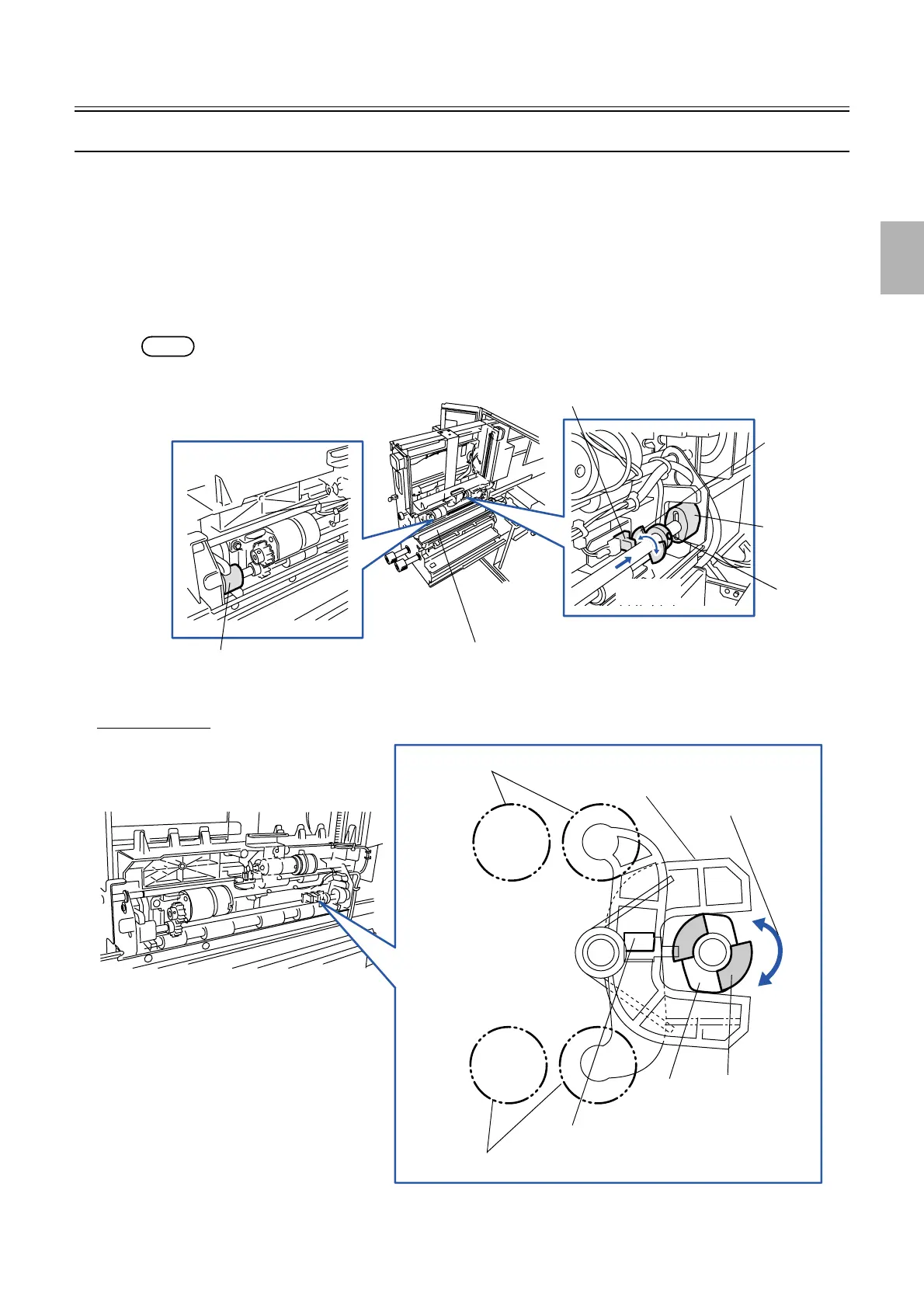
1. Activate the paper supply pressure change motor in the Output check to turn the paper supply
pressure change sensor to DARK.
2. Pull out the paper supply unit and check the condition of the cam.
3. Adjust the position of the detection plate of the paper supply pressure change sensor in order to set the
cam of the paper supply unit to be in the vertical position to the pressure release arm. (one set-screw)
NOTE
• The arm opens fully and the paper advance rollers release pressure.
Paper supply unit
Set-screw
Direction A
Paper supply pressure change sensor
Detection
plate
Cam (vertical
position)
Cam (vertical position)
G068545
Paper advance rollers
Paper advance rollers
Cam
(vertical
position)
Detection
plate
Pressure release arm
Paper supply pressure change sensor
View from direction A
Rotation direction
G068544
Distributed by: minilablaser.com



 To Next Page