Attention message: Bravo II
1/1
4. Troubleshooting
44350
44350
Attention messag e: Brav o II
No. 4350−4358
See the Bravo II Service Manual for Corrective action of Attention message.
Condition
IMPORTANT
• Attention messages not explained in this Service Manual are listed in the table.
See the Bravo II Service Manual for Corrective action of Attention message.
Attention message (Bravo II)
IMPORTANT
• Attention messages not explained in this Service Manual are listed in the table.
For corrective action of the attention message, see the d-Storage/ CD-R external writing system Service Manual.
CD-R external writing system
Attention message table
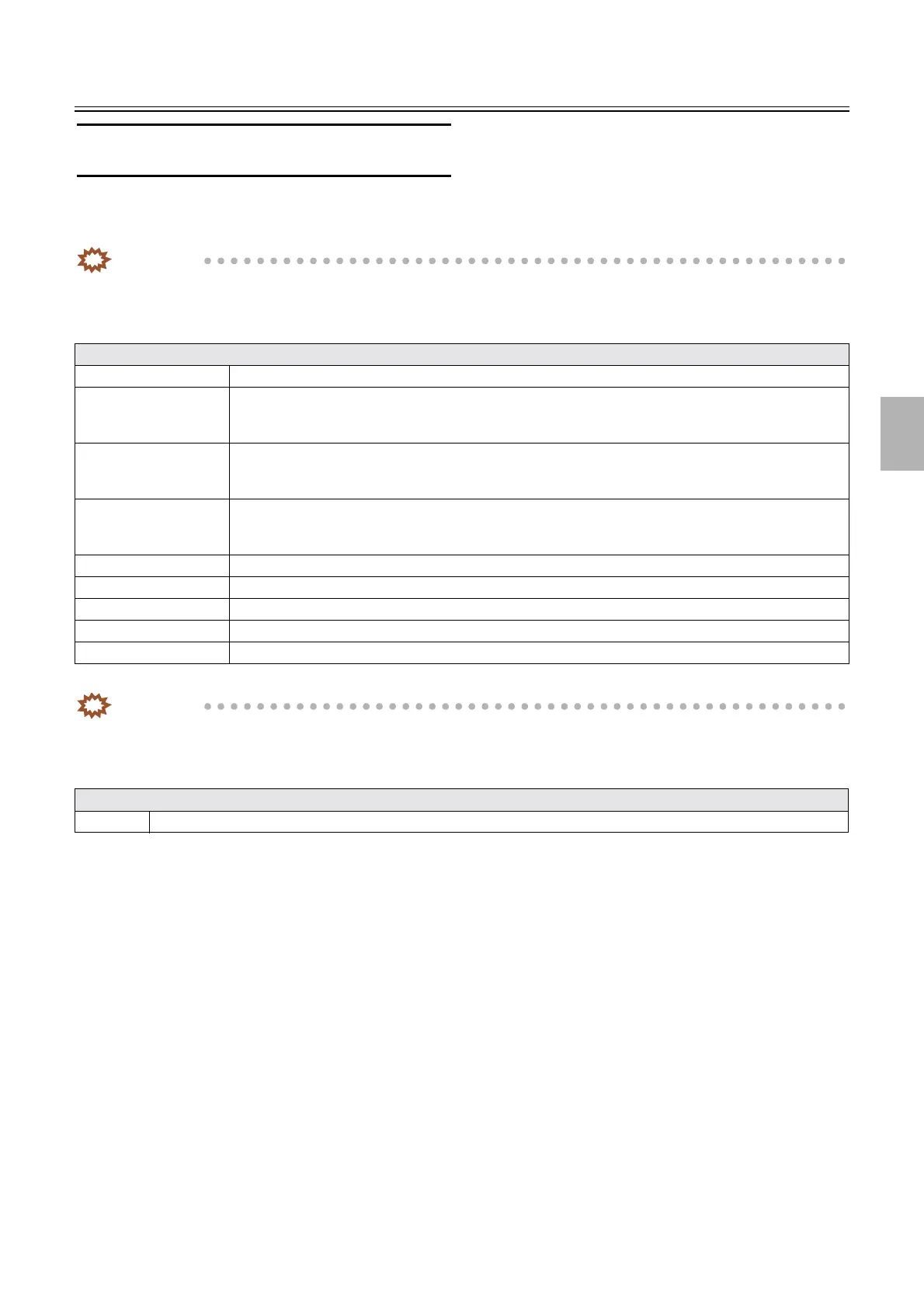
No.4350 The input bin is empty. Set the media and press the Ink Cartridge button on the Bravo.
No.4351 The quantity of ink in the color ink cartridge ran short. Open the cover of the Bravo and press the Ink
Cartridge button, then install the new cartridge. When continuing processing without replacing the cartridge,
press the Ink Cartridge button.
No.4352 The quantity of ink in the black ink cartridge ran short. Open the cover of the Bravo and press the Ink
Cartridge button, then install the new cartridge. When continuing processing without replacing the cartridge,
press the Ink Cartridge button.
No.4353 The quantity of ink in both ink cartridges ran short. Open the cover of the Bravo and press the Ink Cartridge
button, then install the new cartridges. When continuing processing without replacing the cartridges, press
the Ink Cartridge button.
No.4354 The Bravo Top Cover is open. Close the cover.
No.4355 The shared folder of PTBurn is full. Wait until the writing of CD is completed.
No.4356 The power supply of Bravo is not ON. Turn ON the Bravo.
No.4357 The data has already been written to this media. Set a new media.
No.4358 Write the data. Set the media.
Attention message table
No. 4360 The shared folder of Rimage CD/DVD Publishing Systems is full. Wait until the writing of CD is completed.
Distributed by: minilablaser.com



 To Next Page