Garmin G2000 Pilot’s Guide for the Cessna T240
190-01263-01 Rev. A94
Flight instruments
sYstem
OVerVieW
Flight
instruments
eis
AuDiO PAnel
& Cns
Flight
mAnAgement
hAZArD
AVOiDAnCe
AFCs
ADDitiOnAl
FeAtures
APPenDiCesinDeX
RUNWAYS
WARNING:
Do not use SVT runway depiction as the sole means for determining the proximity of the aircraft
to the runway or for maintaining the proper approach path angle during landing.
note: Not all airports have runways with endpoint data in the database, therefore, these runways are not
displayed.
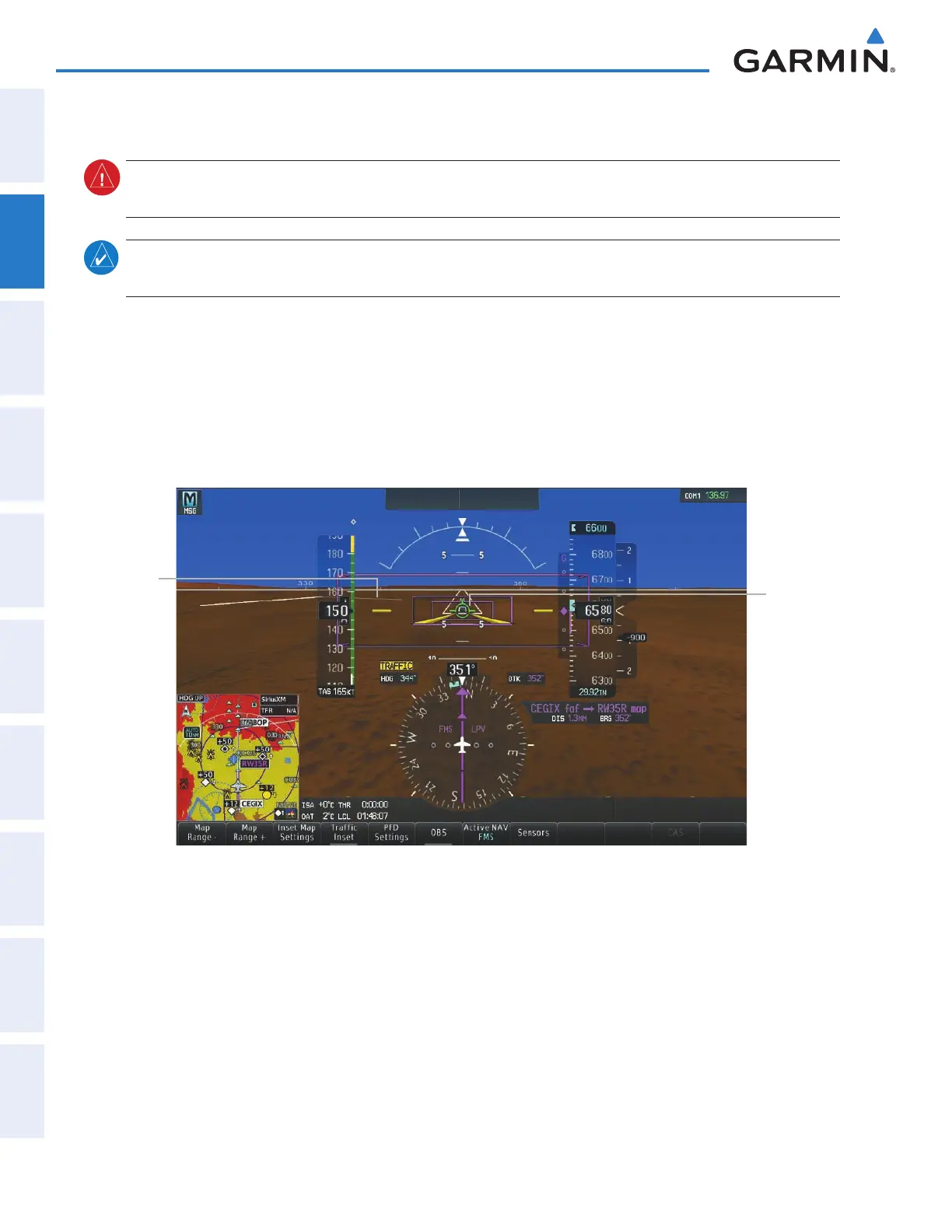
Runway data provides improved awareness of runway location with respect to the surrounding terrain. All
runway thresholds are depicted at their respective elevations as defined in the database. In some situations,
where threshold elevations differ significantly, crossing runways may appear to be layered. As runways are
displayed, those within 45 degrees of the aircraft heading are displayed in white. Other runways will be gray
in color. When an approach for a specific runway is active, that runway will appear brighter and be outlined
with a white box, regardless of the runway orientation as related to aircraft heading. As the aircraft gets closer
to the runway, more detail such as runway numbers and centerlines will be displayed.
Runway
Selected for
Approach
Figure 2-38 Airport Runways
Other
Runway on
Airport
This manual downloaded from http://www.manualowl.com



 To Next Page