190-01263-01 Rev. A
Garmin G2000 Pilot’s Guide for the Cessna T240
153
Audio And CnS
SYSTEM
oVERViEW
FLiGHT
inSTRuMEnTS
EiS Audio & CnS
FLiGHT
MAnAGEMEnT
HAZARd
AVoidAnCE
AFCS
AddiTionAL
FEATuRES
APPEndiCES indEX
DME TUNING
note: The system remembers the last frequency used for DME tuning and the NAV1
,
NAV2,
or
HOLD
state
prior to shutdown.
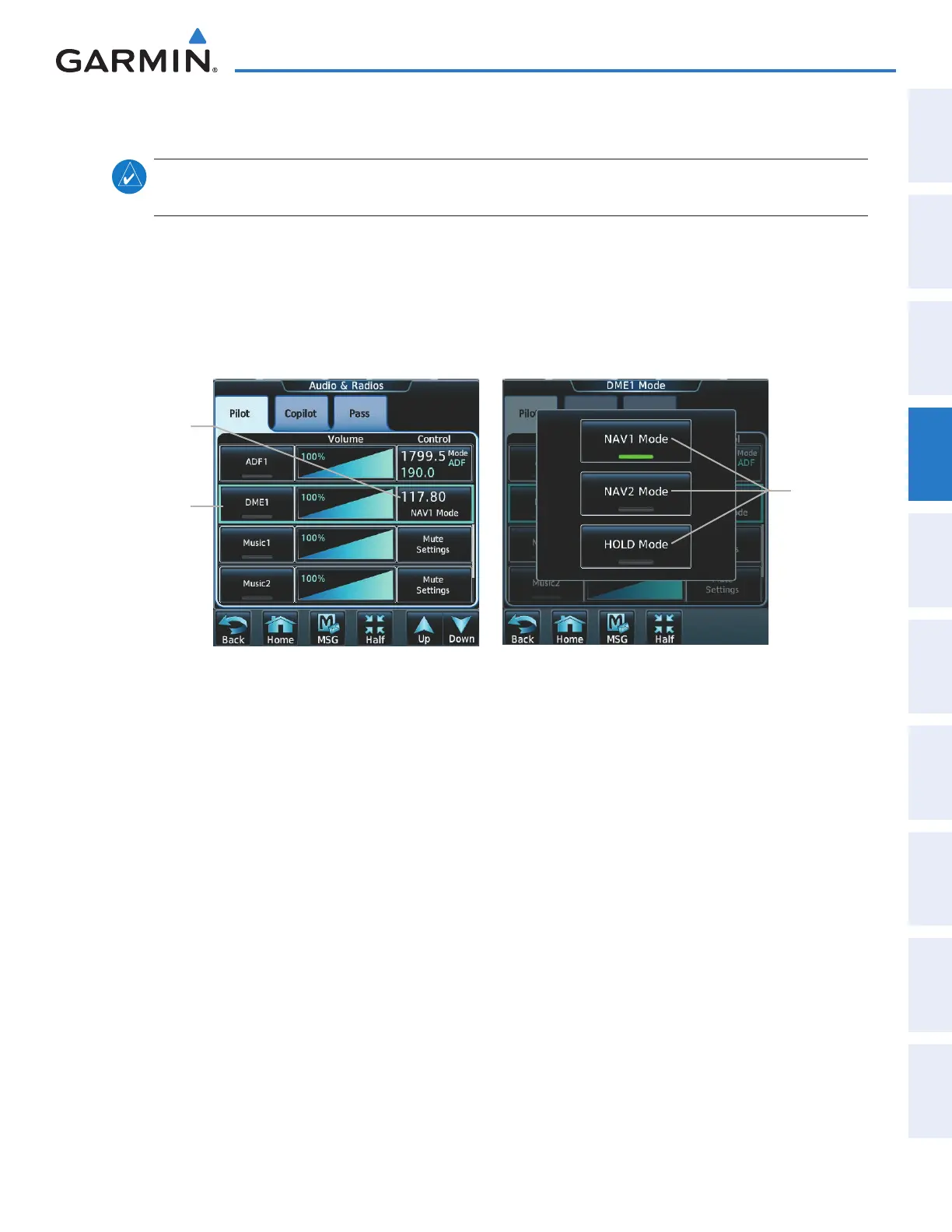
The following DME transceiver pairings can be selected:
• NAV1 – Pairs the DME frequency from the selected NAV1 frequency.
• NAV2 – Pairs the DME frequency from the selected NAV2 frequency.
• HOLD – When in the HOLD position, the DME frequency remains paired with the last selected NAV
frequency.
Figure 4-35 DME Mode Selection
DME
Mode
Select
Buttons
DME1
Audio
Select
Button
DME1
Mode
Control
Button
Selecting DME transceiver pairing:
1) Touch Audio & Radios to display the Audio & Radios Screen.
2) Scroll the list to find the DME.
3) Touch the DME mode control button to display the DME Mode Window.
4) Touch the NAV1 Mode, NAV2 Mode, or HOLD Mode Button to select the DME mode.
This manual downloaded from http://www.manualowl.com



 To Next Page