190-01263-01 Rev. A
Garmin G2000 Pilot’s Guide for the Cessna T240
152
Audio And CnS
SYSTEM
oVERViEW
FLiGHT
inSTRuMEnTS
EiSAudio & CnS
FLiGHT
MAnAGEMEnT
HAZARd
AVoidAnCE
AFCS
AddiTionAL
FEATuRES
APPEndiCESindEX
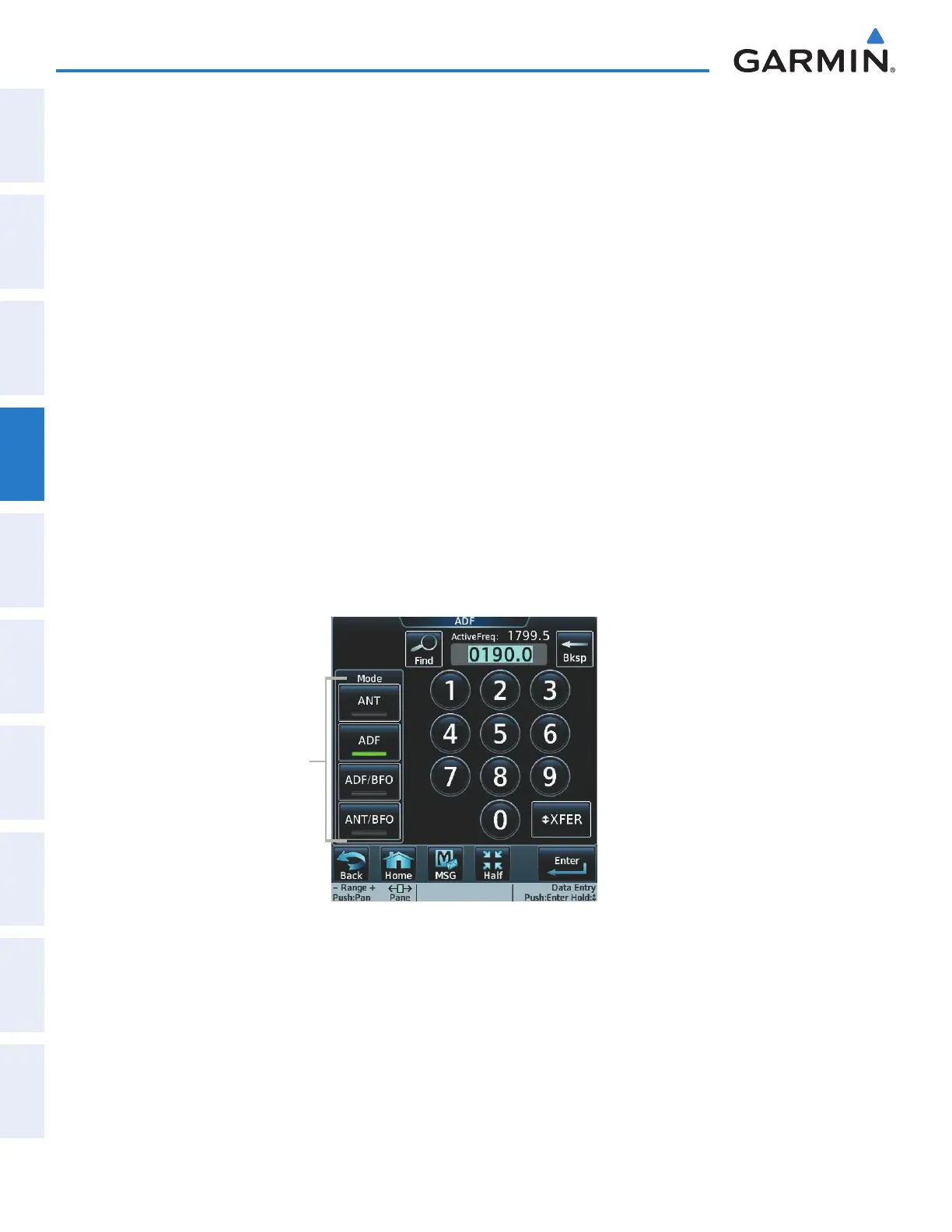
SELECTING ADF RECEIVER MODE
The following modes can be selected: (In all modes NDB audio can be heard by selecting the
ADF1
Button
on the Touchscreen Controller.)
• ANT (Antenna) – The ADF bearing pointer parks on the HSI at 90 degrees. Best mode for listening to NDB
audio.
• ADF (Automatic Direction Finder) – The ADF pointer points to the relative bearing of the NDB station.
• ADF/BFO (ADF/Beat Frequency Oscillator) – The ADF pointer points to the relative bearing of the NDB
station and an audible tone confirms signal reception. This mode allows identification of the interrupted
carrier beacon stations used in various parts of the world.
• ANT/BFO (Antenna/Beat Frequency Oscillator) – The ADF bearing pointer parks on the HSI at 90 degrees
while an audible tone is provided when a signal is received. This mode also allows identification of the
interrupted carrier beacon stations and confirms signal reception.
Selecting an ADF receiver mode:
1) Touch Audio & Radios to display the Audio & Radios Screen.
2) Scroll the list to find the ADF.
3) Touch the ADF control button to display the ADF Mode/Tuning Screen.
4) Touch the ANT, ADF, ADF/BFO, or ANT/BFO Button to select the ADF mode.
Figure 4-34 ADF Mode Selection
ADF Mode Buttons
This manual downloaded from http://www.manualowl.com



 To Next Page