Garmin G2000 Pilot’s Guide for the Cessna T240
190-01263-01 Rev. A186
Flight ManageMent
SYSteM
OVeRVieW
Flight
inStRUMentS
eiS
aUDiO Panel
& CnS
Flight
ManageMent
haZaRD
aVOiDanCe
aFCS
aDDitiOnal
FeatUReS
aPPenDiCeSinDeX
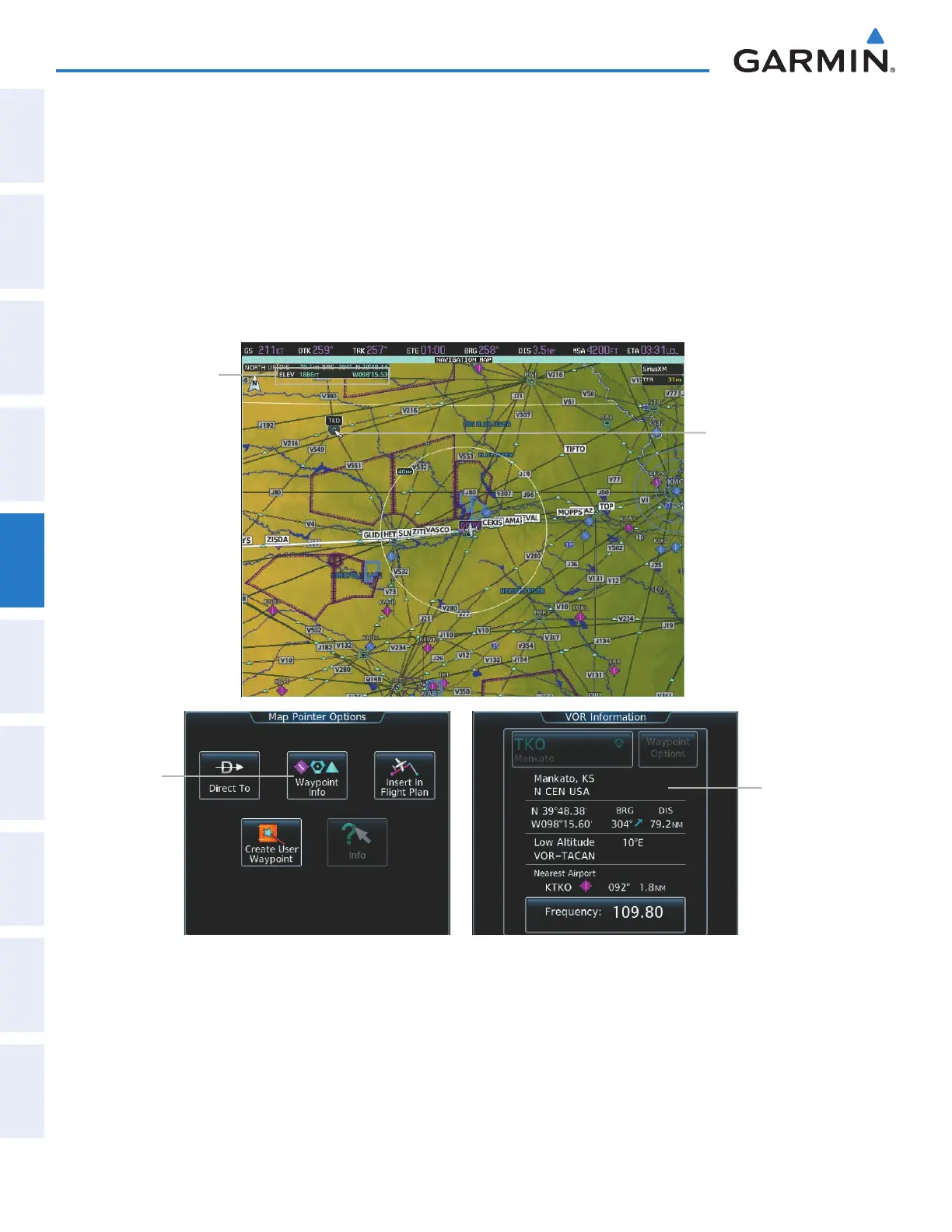
Reviewing information for an airport, NAVAID, or user waypoint:
1) Place the Map Pointer on an airport, NAVAID, or user waypoint.
2) Touch the Waypoint Info Button to display the waypoint information screen.
3) Press the Joystick to exit the waypoint information screen and remove the Map Pointer from the Navigation
Map.
When the Map Pointer is placed on a NAVAID, the name of the NAVAID is highlighted (even if the name was
not originally displayed on the map). When a NAVAID is highlighted on the map display, pertinent information
is available by pressing the Waypoint Info Button on the Touchscreen Controller.
VOR
Information
Waypoint
Info
Button
Figure 5-11 Navigation Map - Map Pointer on VOR
Map Pointer
on VOR
Map Pointer
Information
This manual downloaded from http://www.manualowl.com



 To Next Page