Garmin G2000 Pilot’s Guide for the Cessna T240
190-01263-01 Rev. A194
Flight ManageMent
SYSteM
OVeRVieW
Flight
inStRUMentS
eiS
aUDiO Panel
& CnS
Flight
ManageMent
haZaRD
aVOiDanCe
aFCS
aDDitiOnal
FeatUReS
aPPenDiCeSinDeX
SYMBOL SETUP
All navigation maps can display aviation and land symbols. Aviation and land symbol types (e.g. runway
extensions, railroads) can be removed individually.
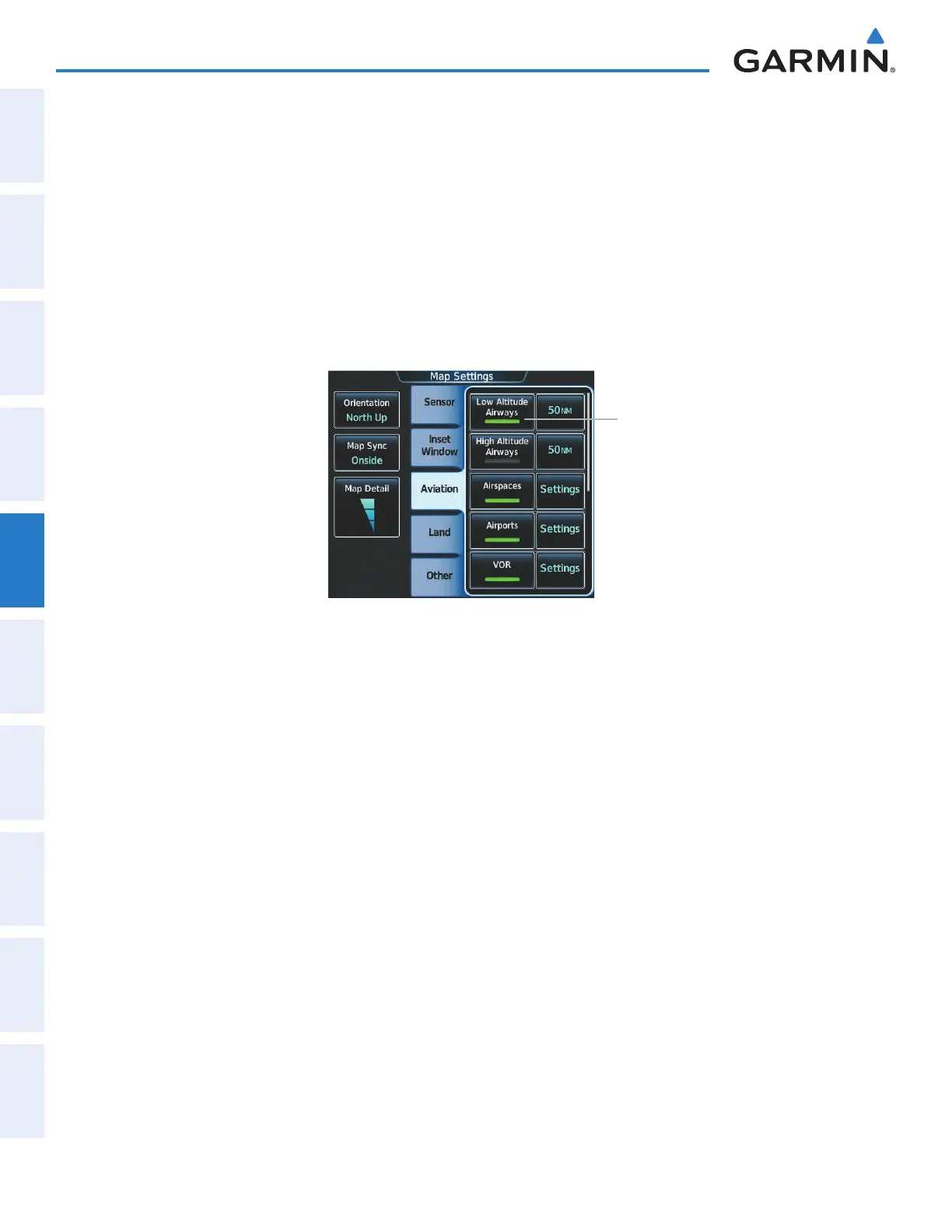
Displaying/removing a navigation or land symbol type:
1) From Home, touch Map > Map Settings.
2) Touch the Aviation Tab or Land Tab, if necessary.
3) Scroll the list to find the desired item.
4) Touch the annunciator button to display/remove the symbol type from navigation maps.
Figure 5-17 Map Settings Screen - Individual Items On/Off
Annunciator Button
The range button sets the maximum range at which items appear on the display.
Selecting an Aviation or Land item range:
1) From Home, touch Map > Map Settings.
2) Touch the Aviation Tab or Land Tab, if necessary.
3) Scroll the list to find the desired item.
4) Touch the range button to display the range choices.
5) Touch a range selection button to select the maximum range.
6) Repeat steps 3-5 as necessary.
This manual downloaded from http://www.manualowl.com



 To Next Page