Garmin G2000 Pilot’s Guide for the Cessna T240
190-01263-01 Rev. A252
Flight ManageMent
SYSteM
OVeRVieW
Flight
inStRUMentS
eiS
aUDiO Panel
& CnS
Flight
ManageMent
haZaRD
aVOiDanCe
aFCS
aDDitiOnal
FeatUReS
aPPenDiCeSinDeX
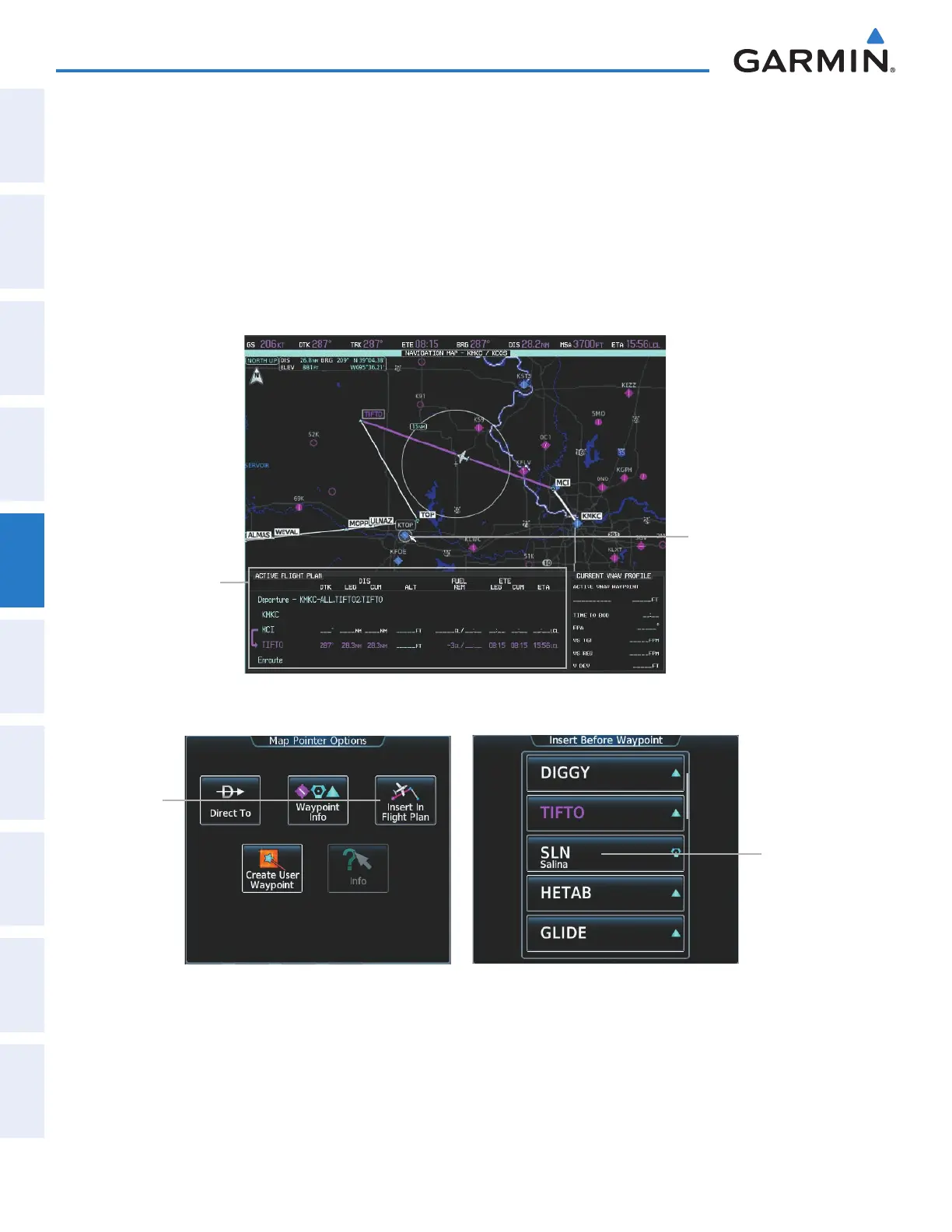
Adding waypoints to the active flight plan using the map pointer:
1) Press the Joystick to activate the panning function on the Active Flight Plan Pane and pan to the map location
of the desired waypoint. When the pointer is activated, the Map Pointer Options Screen is displayed on the
Touchscreen Controller. When the pointer highlights a map location that can be added to the active flight plan,
the Insert In Flight Plan Button is activated.
2) Touch the Insert In Flight Plan Button. The Insert Before Waypoint Screen is displayed.
3) Touch the waypoint selection button to select where to insert the new waypoint. The waypoint is inserted into
the active flight plan before the selected waypoint.
Figure 5-95 Active Flight Plan Pane - Map Pointer Active
Map Pointer
- KTOP Highlighted
Active Flight Plan Info
Insert In
Flight Plan
Button
Figure 5-96 Inserting Waypoint in Active Flight Plan
Waypoint
Selection
Button
This manual downloaded from http://www.manualowl.com



 To Next Page