190-01263-01 Rev. A
Garmin G2000 Pilot’s Guide for the Cessna T240
301
Flight ManageMent
SYSteM
OVeRVieW
Flight
inStRUMentS
eiS
aUDiO Panel
& CnS
Flight
ManageMent
haZaRD
aVOiDanCe
aFCS
aDDitiOnal
FeatUReS
aPPenDiCeS inDeX
Or:
Press the Go-Around Button.
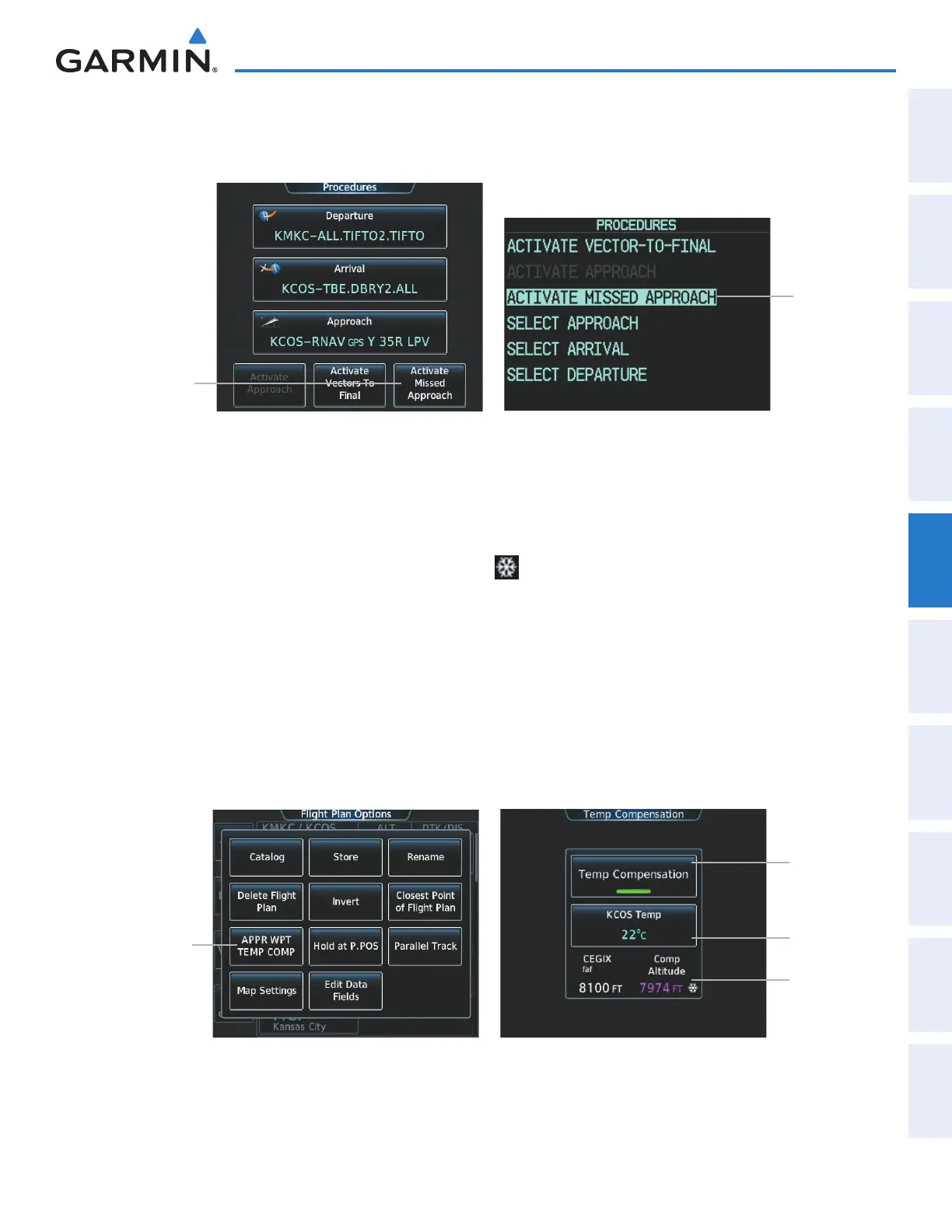
Figure 5-151 Activating a Missed Approach on the Touchscreen Controller and on the PFD
ACTIVATE
MISSED
APPROACH
Selected
Activate
Missed
Approach
Button
Touchscreen Controller - Procedures Screen PFD - Procedures Window
TEMPERATURE COMPENSATED ALTITUDE
A temperature compensated altitude can be computed and used for a loaded approach. A temperature
compensated altitude is displayed with a snowflake (
) icon.
Enabling temperature compensated altitude:
1) From Home, touch Flight Plan > Flight Plan Options.
2) Touch the Temp Compensation Button to display the Temp Compensation Screen.
3) Touch the Temp Compensation Annunciator Button to enable/disable temperature compensation of the
approach waypoints.
4) Touch the <airport> Temp Button to display the numeric keypad. Use the keypad and the Enter Button to
select the temperature at the <airport>. The compensated altitudes are computed and shown in the flight plan.
Temp
Compensation
Button
Figure 5-152 Flight Plan Options Screen - Temperature Compensation
Temp
Compensation
Annunciator
Button
<airport>
Temp Button
FAF Altitude
and
Compensated
Altitude
This manual downloaded from http://www.manualowl.com



 To Next Page