Garmin G2000 Pilot’s Guide for the Cessna T240
190-01263-01 Rev. A18
SyStem Overview
SyStem
Overview
FLiGHt
iNStrUmeNtS
eiS
AUDiO PANeL
& CNS
FLiGHt
mANAGemeNt
HAZArD
AvOiDANCe
AFCS
ADDitiONAL
FeAtUreS
APPeNDiCeSiNDeX
SyStem
Overview
FLiGHt
iNStrUmeNtS
eiS AUDiO & CNS
FLiGHt
mANAGemeNt
HAZArD
AvOiDANCe
AFCS
ADDitiONAL
FeAtUreS
APPeNDiCeSiNDeX
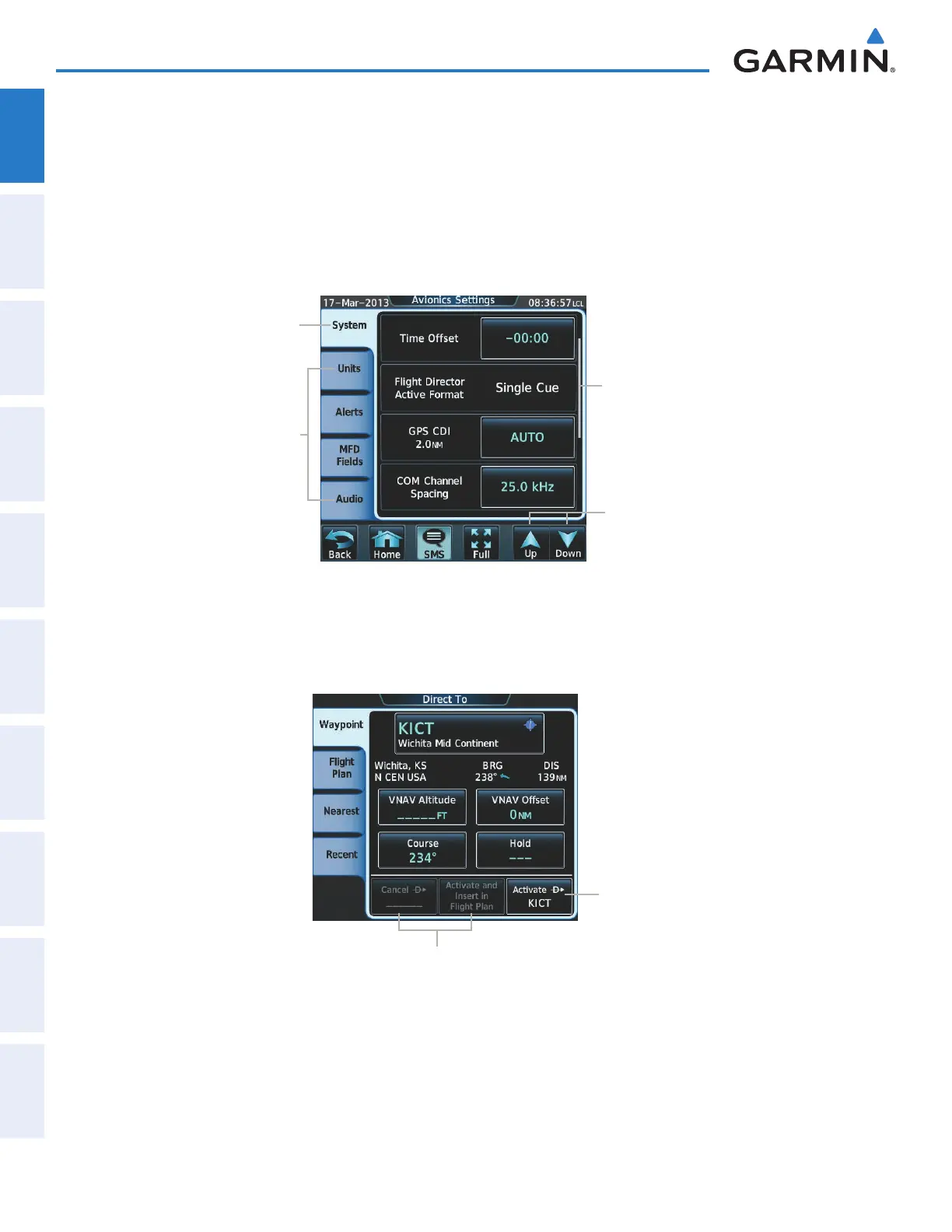
When a Touchscreen Controller screen window contains more information than the window can currently
show, a scroll bar and scroll buttons appear. To scroll inside of a window, touch the controller while moving
the finger up or down accordingly. To scroll more quickly, move the finger up or down rapidly in a flicking
motion. Scrolling can also be performed by touching the Up or Down scroll buttons. If additional scrolling is
required to view all information in the window, each touch of the scroll button display one ‘page’ of information.
Some screens provide tabs as a means to group multiple categories of information or buttons. Touch the
desired tab to display its contents and manage settings or information for the selected tab, which is highlighted.
Selected Tab Highlighted
Other Available Tabs
Scroll Bar
Scroll Arrows
Figure 1-17 Touchscreen Controller with Tabs and Scroll Arrows
Elements on the Touchscreen Controller screens (such as buttons and sliders) appear subdued (dimmed) to
indicate their functions are currently not available.
Touch To Activate
Direct-To
Figure 1-18 Subdued Buttons on Touchscreen Controller
Buttons Subdued Until
Direct-To is Activated
This manual downloaded from http://www.manualowl.com



 To Next Page