190-01263-01 Rev. A
Garmin G2000 Pilot’s Guide for the Cessna T240
319
Flight ManageMent
SYSteM
OVeRVieW
Flight
inStRUMentS
eiS
aUDiO Panel
& CnS
Flight
ManageMent
haZaRD
aVOiDanCe
aFCS
aDDitiOnal
FeatUReS
aPPenDiCeS inDeX
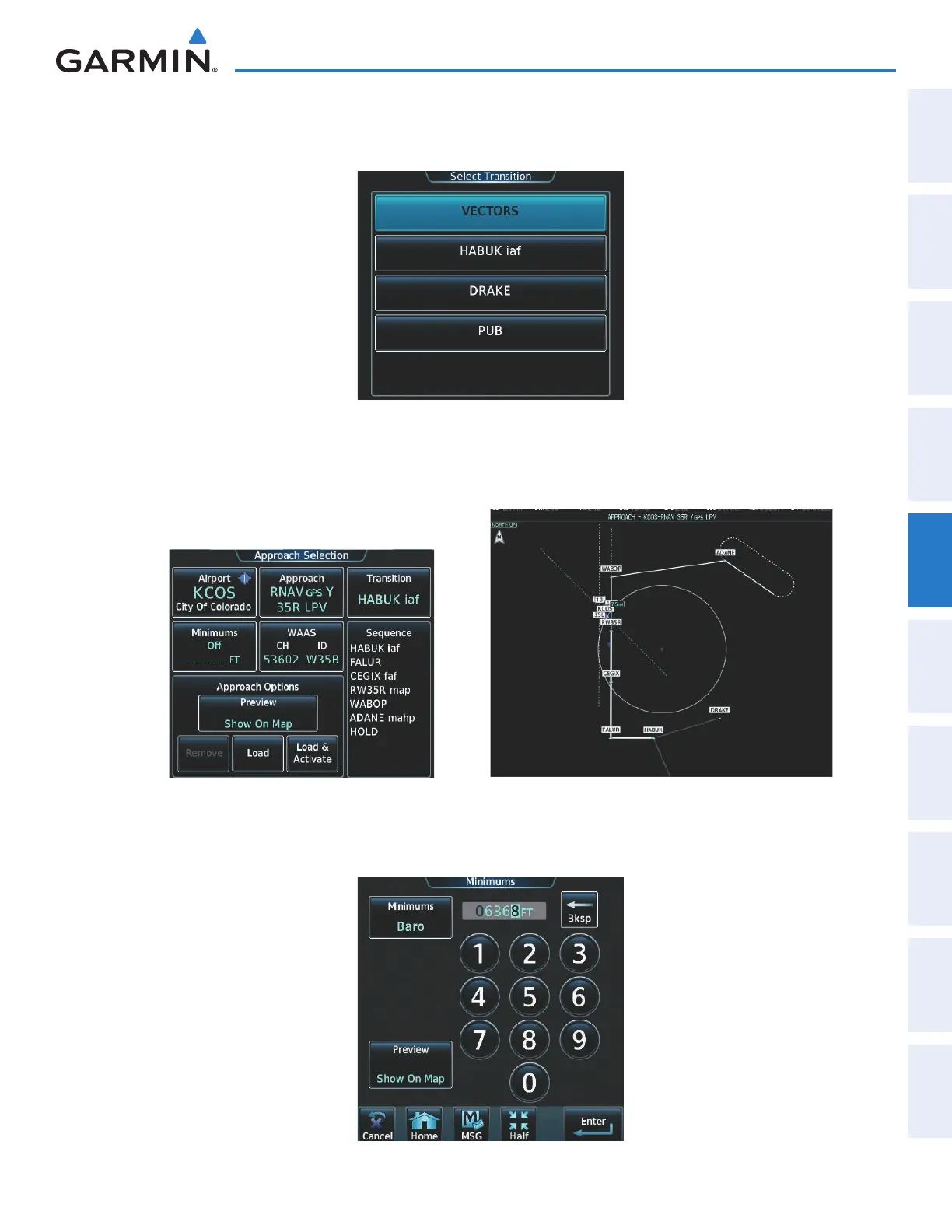
e) Touch the RNAV GPS Y 35R LPV Button. A list of available transitions for the selected approach is displayed
as in Figure 5-184.
Figure 5-184 Select Transition Screen - List of Available Transitions
f) Touch the HABUK iaf Button to select it as the transition and return to the Approach Selection Screen as shown
in Figure 5-185.
Figure 5-185 Approach Selected
g) Touch the Minimums Button to select the minimum descent altitude (Figure 5-186). Touch the Baro Button
and select the altitude using the keypad.
Figure 5-186 Selecting the Minimums
This manual downloaded from http://www.manualowl.com



 To Next Page