Garmin G2000 Pilot’s Guide for the Cessna T240
190-01263-01 Rev. A20
SyStem Overview
SyStem
Overview
FLiGHt
iNStrUmeNtS
eiS
AUDiO PANeL
& CNS
FLiGHt
mANAGemeNt
HAZArD
AvOiDANCe
AFCS
ADDitiONAL
FeAtUreS
APPeNDiCeSiNDeX
SyStem
Overview
FLiGHt
iNStrUmeNtS
eiS AUDiO & CNS
FLiGHt
mANAGemeNt
HAZArD
AvOiDANCe
AFCS
ADDitiONAL
FeAtUreS
APPeNDiCeSiNDeX
SCREEN OVERVIEW
The following is a brief overview of the major screens used to access Touchscreen Controller functions.
Additional specific screens used to perform functions are shown and discussed in detail throughout this Pilot’s
Guide.
NOTE: Screen appearance varies based on the options installed.
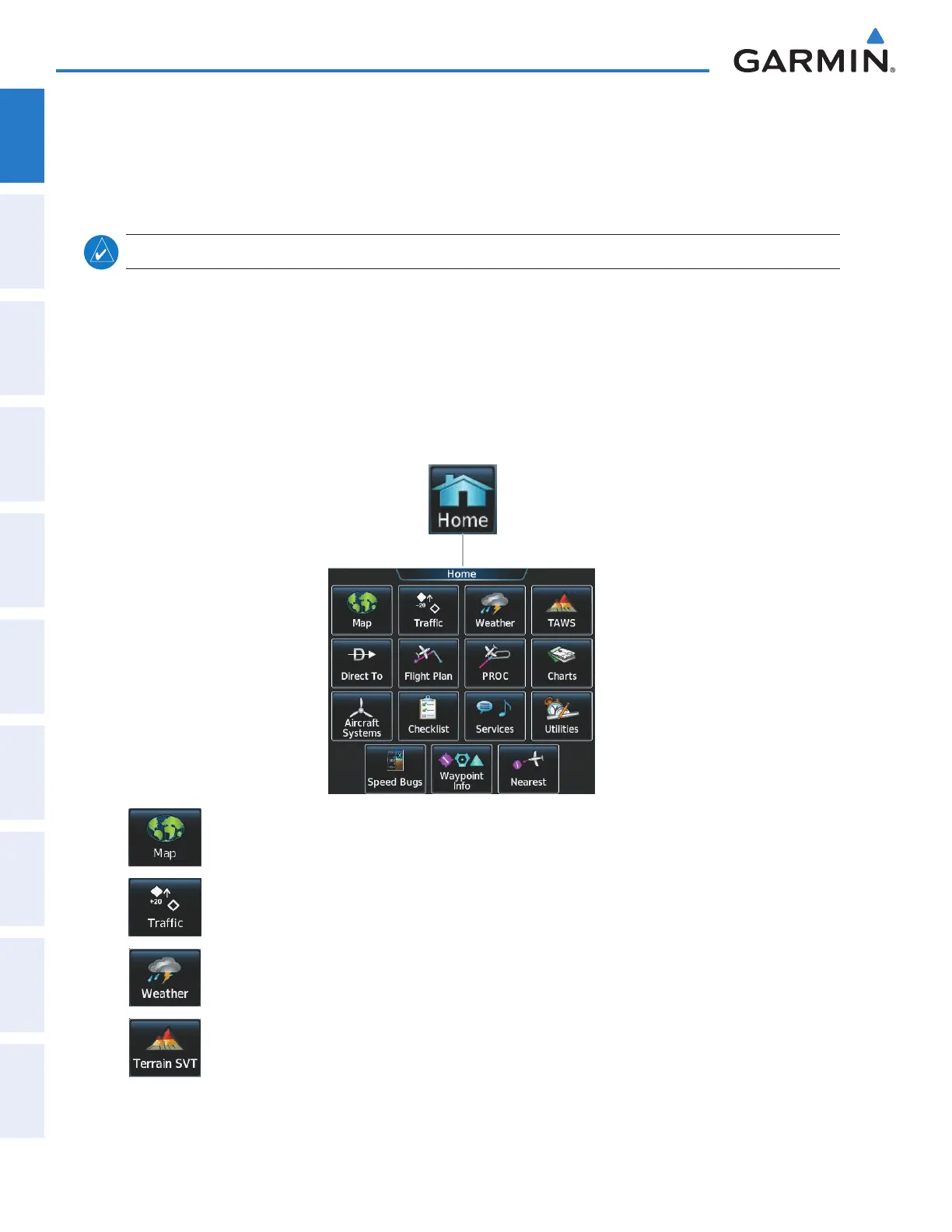
Home Screen
On the Home Screen, the top row of buttons (Map, Traffic, Weather, and Terrain SVT or TAWS) are
each associated with a corresponding display that may be presented on a Display Pane. When one of
these buttons is touched, the selected Display Pane shows the associated display and the button border on
the Touchscreen Controller is highlighted in light blue to indicate the map associated with the button is
selected for display. When returning to the Home Screen, the selected display pane will show the display
associated with the highlighted button.
Shows Navigation Map Pane in the selected Display Pane. Touch button again to access Map
Settings Display on Touchscreen Controller.
Shows Navigation Map Pane in the selected Display Pane. Touch button again to access Map
Settings Display on Touchscreen Controller.
Shows the currently selected weather Display Pane (e.g., SiriusXM Weather, Connext Weather, or
Stormscope) in the selected Display Pane Touch button again to access Weather Selection Screen
on Touchscreen Controller.
Shows Terrain SVT or TAWS Pane (optional). Touch button again to access Terrain SVT or TAWS
Settings screen on Touchscreen Controller.
This manual downloaded from http://www.manualowl.com



 To Next Page