190-01263-01 Rev. A
Garmin G2000 Pilot’s Guide for the Cessna T240
363
Hazard avoidance
SYSTeM
overvieW
FLiGHT
inSTrUMenTS
eiS aUdio & cnS
FLiGHT
ManaGeMenT
Hazard
avoidance
aFcS
addiTionaL
FeaTUreS
aPPendiceS indeX
PIREPS AND AIREPS
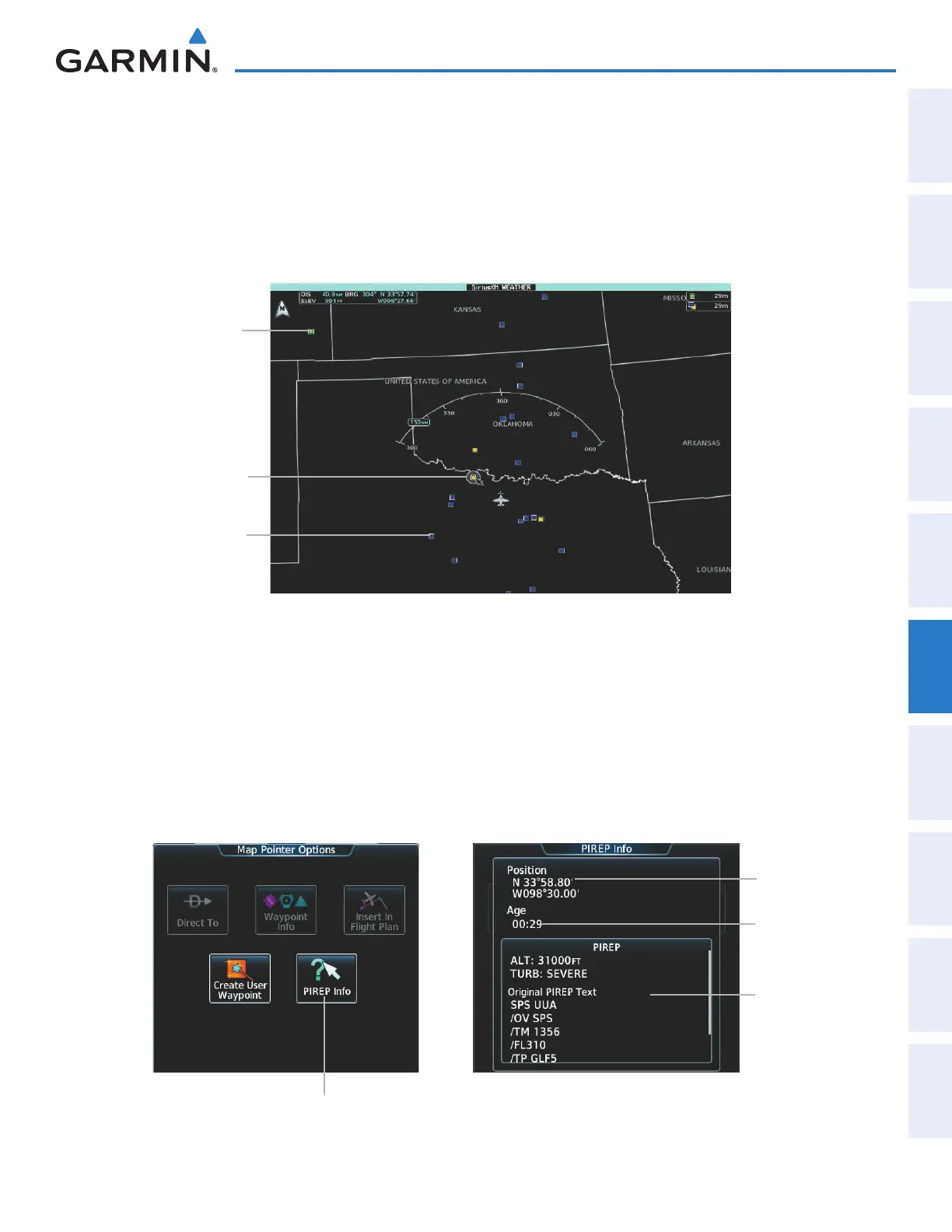
Pilot Weather Reports (PIREPs) (Figure 6-39) provide weather observations collected from pilots. When
significant weather conditions are reported or forecast, Air Traffic Control (ATC) facilities are required to solicit
PIREPs. A PIREP may contain adverse weather conditions, such as low in-flight visibility, icing conditions,
wind shear, and turbulence. PIREPs are issued as either Routine (UA) or Urgent (UUA).
Another type of PIREP is an Air Report (AIREP). AIREPs are used almost exclusively by commercial airlines.
Figure 6-39 AIREPs and PIREPs on the SiriusXM Weather Pane
Urgent PIREP
Selected with
Map Pointer
PIREP
AIREP
Displaying PIREP or AIREP data:
1) From Home, touch Weather > Weather Selection > SiriusXM Weather > SiriusXM Settings.
2) Scroll in the Overlays window as needed and touch the AIREPs or PIREPs Buttons.
3) To view PIREP/AIREP text, push the joystick to activate the map pointer and move the pointer with the joystick
until the selected report is highlighted, then touch the PIREP Info or AIREP Info Button.
4) Scroll as needed through the report text, then touch Back or Home.
Touch to Display
Information for Selected
AIREP/PIREP
PIREP Text
Age of
PIREP
PIREP Info Screen
PIREP
Location
Figure 6-40 Displaying PIREPS/AIREPS on the Touchscreen Controller
This manual downloaded from http://www.manualowl.com



 To Next Page