190-01263-01 Rev. A
Garmin G2000 Pilot’s Guide for the Cessna T240
391
Hazard avoidance
SYSTeM
overvieW
FLiGHT
inSTrUMenTS
eiS aUdio & cnS
FLiGHT
ManaGeMenT
Hazard
avoidance
aFcS
addiTionaL
FeaTUreS
aPPendiceS indeX
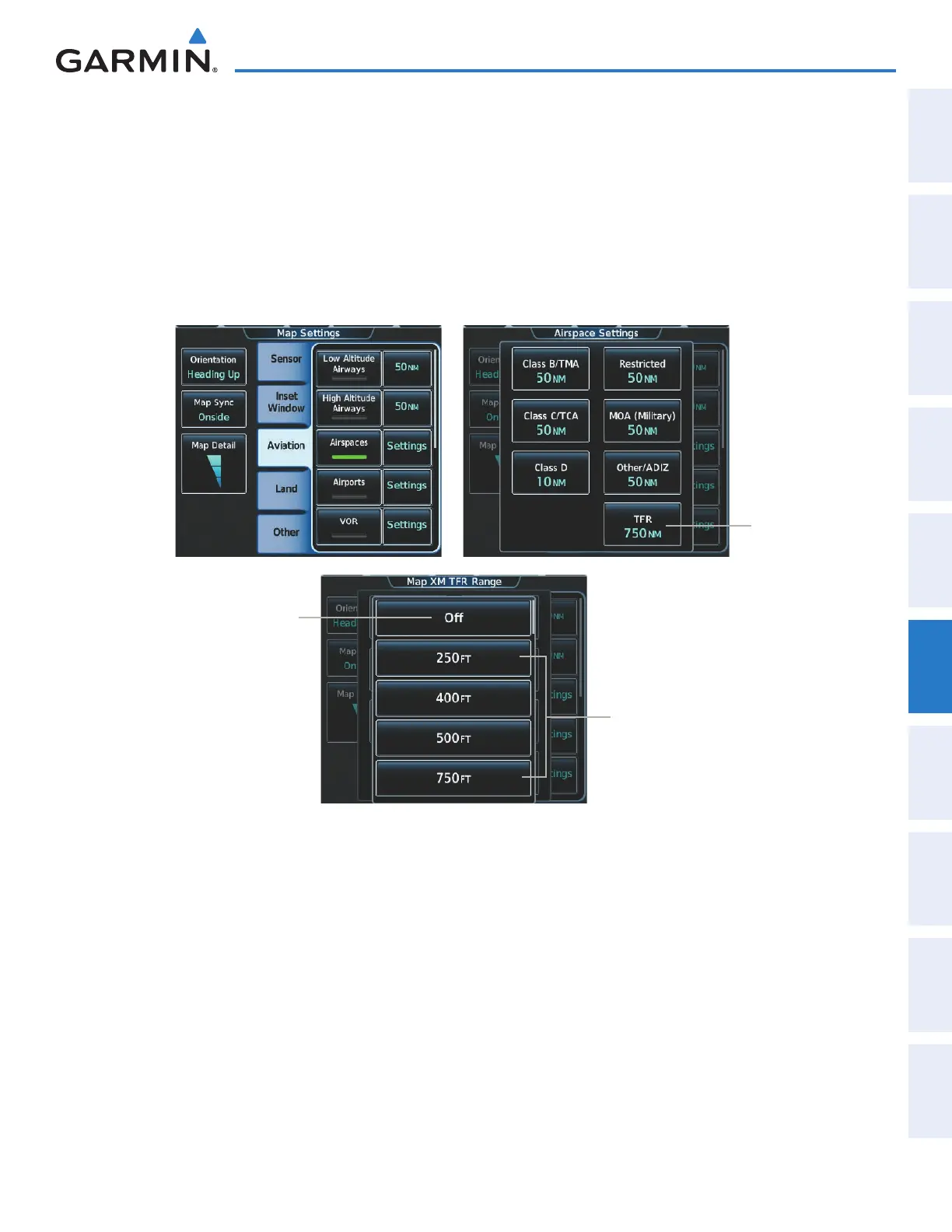
TFR information can also be enabled/disabled as part of the display of Class B/TMA, C/TCA, D, Restricted,
MOA (Military), Other/ADIZ airspaces. This setting affects the display of all airspace in this group.
Enabling/Disabling all airspace settings (including TFRs):
1) From Home, touch Map > Map Settings.
2) If necessary, touch the Aviation tab.
3) Touch the Airspaces button to enable/disable the display of TFRs in addition to Class B/TMA, Class C/TCA,
Class D, Restricted, MOA (Military), and Other/ADIZ airspace.
Select Off to remove
TFR information from
Navigation Maps
Select the
Maximum map
range for system
to show TFRs on
Navigation Maps
Touch to
change
settings
for TFR
display on
Navigation
Maps
Figure 6-74 Customizing TFR display settings for Navigation Maps
This manual downloaded from http://www.manualowl.com



 To Next Page