Garmin G2000 Pilot’s Guide for the Cessna T240
190-01263-01 Rev. A
430
Hazard avoidance
SYSTeM
overvieW
FLiGHT
inSTrUMenTS
eiS
aUdio & cnS
FLiGHT
ManaGeMenT
Hazard
avoidance
aFcS
addiTionaL
FeaTUreS
aPPendiceSindeX
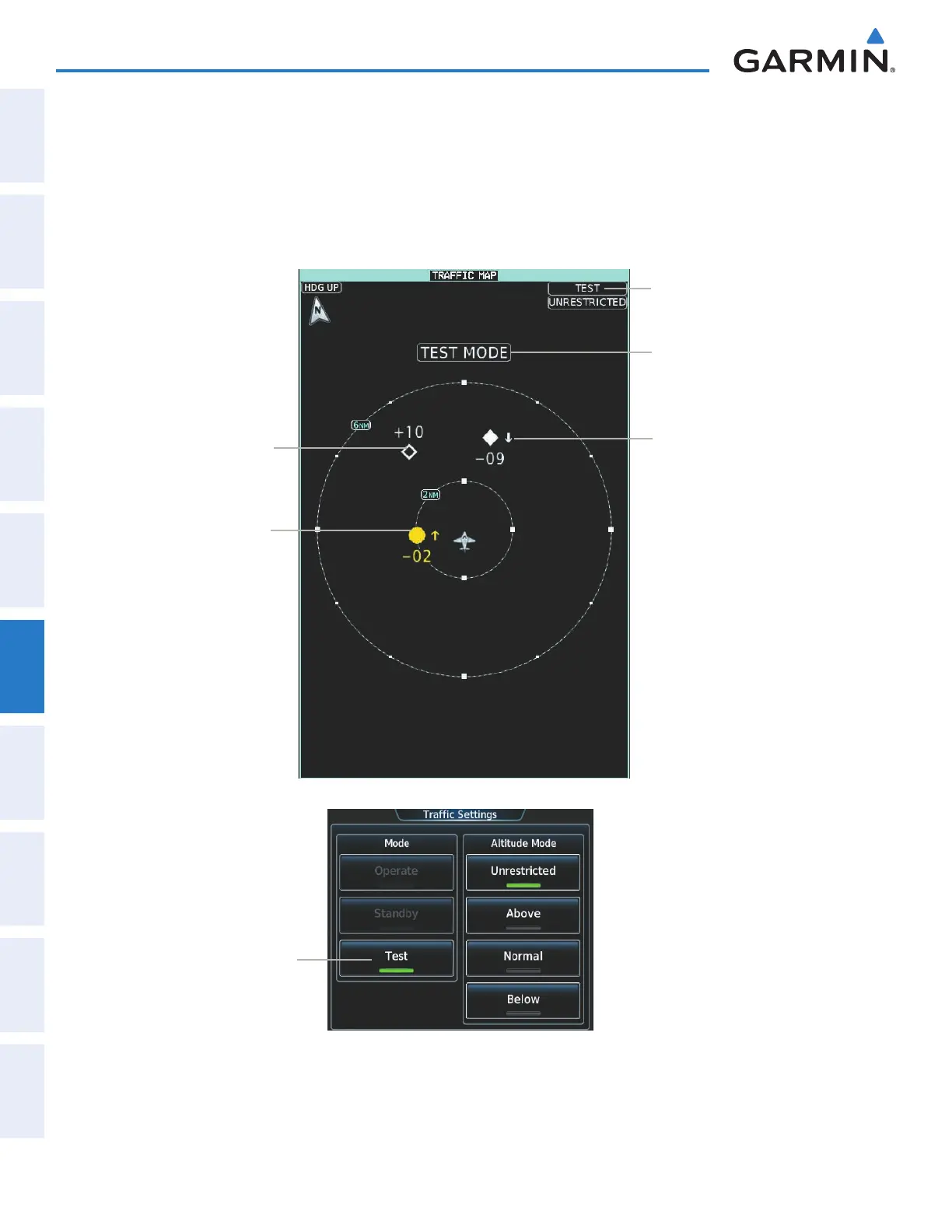
5) Turn the Joystick as necessary to set the Traffic Map Pane range so the outer range ring indicates ‘6 NM’. This
will allow the system to show all traffic symbols in the traffic test pattern.
6) Touch the Test Button. Button annunciator is green while test is in progress. If system test is successful,
the system provides the aural announcement ‘TAS System Test Passed’, and the traffic system returns to the
previously selected mode. If the test fails, the system announced ‘TAS System Test Failed’ and enters Standby
Mode.
Test Mode
Annunciation
Test Banner
Annunciation
Non-Threat Traffic,
1000’ Above, Level
Traffic Advisory, 200’
Below, Climbing
Proximity Advisory,
900’ Below,
Descending
Test Mode
Selected
Traffic Map Pane in Test Mode
Traffic Settings Screen
Figure 6-104 Testing the Traffic System
This manual downloaded from http://www.manualowl.com



 To Next Page